How to Edit a QR Code After Printing: A Practical Guide to Dynamic QR Codes
If you need to change a QR code after it’s already printed, the key is whether it’s static or dynamic. If you are wondering exactly how to edit a QR code after printing, this guide explains how editable QR codes work, how to update a QR code without reprinting it, and what to watch out for so your scans keep working.
Who it's for: This guide is for marketers, restaurants, brands, and small businesses that print QR codes on menus, packaging, flyers, posters, or signs and need a way to update them later.
Quick Answer: Can you edit a QR code after printing?
Yes, you can edit a QR code after printing only if it is a dynamic QR code. Dynamic QR codes allow you to update the destination URL as often as you want without changing the printed image, helping you avoid expensive reprinting costs. Static QR codes, however, cannot be edited once printed.
Visual Explanation: How Editable QR Codes Work
When you scan a dynamic QR code, you are not taken straight to the final website. Instead, you briefly pass through a redirect link. Here is how it works:
↓
Dynamic Redirect (e.g., qrtr.ac/123)
↓
↓
Updated Destination (New Promo)
Because the printed QR image only contains the short dynamic redirect link, the image itself never changes. You simply update where the redirect points to in your dashboard.
What If Your QR Code Is Static?
If you've printed a static QR code and the destination URL changes, you cannot edit it. Static QR codes encode the exact destination URL directly into the square pattern. A different URL requires a completely different pattern.
- What happens if the URL changes: Scanners will see a broken link or a 404 Not Found error page.
- Why reprinting becomes necessary: Since the code itself is directly tied to the old URL, your only option is to generate a new QR code and reprint all materials.
Real-world example: A restaurant prints 500 table tents with a static QR code linking to a specific PDF menu on their website. They redesign their website and the menu URL changes. The old table tents are now useless and must be thrown away and reprinted.
How to Tell If Your QR Code Is Dynamic
Not sure what kind of QR code you have? Use this checklist:
- Dashboard access: Did you create an account to generate the code?
- Edit destination option: Can you log in and see an "Edit" button next to your code?
- Analytics availability: Do you have access to scan counts and location data?
- Redirect settings: Does the QR code point to a short URL
(like
qrtr.ac/...) before loading the final page? - Campaign controls: Can you pause or archive the code?
Summary: If you answered "Yes" to most of these, you have a dynamic QR code. If you generated it using a free tool without signing up, it is likely static.
Step 1: Check whether your QR code is static or dynamic
- A static QR code contains the destination directly in the code itself, so it cannot be changed after printing.
- A dynamic QR code points to a redirect link or management page, which means you can edit the final destination later without changing the printed code.
Step 2: Log in to the QR code platform where the code was created
- Open the dashboard or account where the QR code was generated and look for the specific code you want to update.
- If you did not create it in a QR management platform, there may be no way to edit it after printing.
Step 3: Update the destination URL or content
- Replace the old destination with the new one, such as a new landing page, menu, promo page, PDF, or app link.
- If the platform supports it, also update campaign settings like UTM tags, language routing, or device-based redirects.
Step 4: Save, test, and scan it from a phone
- After saving the update, scan the QR code from a real phone camera to confirm it opens the correct page.
- Test on both iPhone and Android if your audience uses both, especially for app links or location-based pages.
Step 5: Keep track of scans and performance after the change
- Use analytics to see whether people are still scanning the code after the update and whether the new destination is converting better.
- Check scan volume, location, device type, and referral data so you can tell if the update improved results.
Step 6: Use editable QR codes for anything that changes often
- Editable QR codes are especially useful for menus, packaging, event signage, brochures, classroom handouts, and retail displays.
- If you update content frequently, dynamic QR codes save time and prevent costly reprints.
Common Use Cases for Editable QR Codes
Restaurant Menus
The challenge: Menu items, prices, and seasonal specials change frequently.
Why dynamic QR codes help: Restaurants can print a single QR code on table tents and update the linked digital menu PDF or webpage as often as needed.
The benefit: No need to reprint table tents every time a price changes.
Product Packaging
The challenge: Packaging is printed in bulk and lasts for months or years.
Why dynamic QR codes help: Brands can link packaging to user manuals, warranty registrations, or current promotional campaigns.
The benefit: The packaging remains relevant long after it leaves the factory.
Event Signage
The challenge: Event schedules, maps, or speaker lineups may change at the last minute.
Why dynamic QR codes help: Organizers can print large banners and signs early, then update the digital schedule on the day of the event.
The benefit: Attendees always see the most accurate, real-time information.
Marketing Campaigns
The challenge: Running multiple seasonal promotions using the same printed collateral.
Why dynamic QR codes help: A single flyer can point to a Valentine's Day sale in February and a Spring Clearance sale in April.
The benefit: Maximizes the ROI of printed marketing materials.
Real Estate Listings
The challenge: Property status changes from "For Sale" to "Pending" to "Sold".
Why dynamic QR codes help: Agents can use a "yard sign" QR code that initially points to the property listing, and later redirects to their agent profile when the house sells.
The benefit: Yard signs can be reused across different properties.
Digital Business Cards
The challenge: Contact information like phone numbers or job titles change over time.
Why dynamic QR codes help: A QR code printed on a physical business card can link to an editable digital profile (vCard).
The benefit: You never have to throw away a box of business cards just because your phone number changed.
Educational Materials
The challenge: Textbooks and handouts become outdated quickly.
Why dynamic QR codes help: Teachers can link printed handouts to updated study guides, videos, or homework assignments.
The benefit: Keeps printed materials interactive and current.
Retail Promotions
The challenge: Store window displays are difficult and expensive to change.
Why dynamic QR codes help: A window decal QR code can feature a different "Deal of the Week" every week.
The benefit: Drives foot traffic with fresh offers without changing the physical window display.
Why Businesses Prefer Dynamic QR Codes
For almost every professional use case, businesses choose dynamic over static QR codes because of:
- Lower printing costs: Update the destination without reprinting brochures, banners, or packaging.
- Faster updates: Fix a broken link instantly if a mistake was made during setup.
- Better customer experience: Ensure customers never scan a dead link or a 404 page.
- Greater marketing flexibility: Reuse the same QR code for different seasonal campaigns.
- Scan analytics: Measure how many people scan the code, when, and from what devices.
- Long-term scalability: Easily manage hundreds of QR codes across different marketing channels from one dashboard.
For example, a retail store might use a dynamic QR code on their storefront window. In the morning, it links to their online store. After hours, they edit it to link to a special "Night Owl" discount coupon.
Best Practices Before Editing a QR Code
Follow these steps to ensure a smooth transition when changing a QR code's destination:
- Test every update: Always scan the QR code with your smartphone after saving the new destination to confirm it works.
- Avoid expired links: Make sure the new URL is live and public before you switch the destination.
- Verify mobile compatibility: Since most scans come from smartphones, ensure the new destination is highly mobile-responsive.
- Keep redirects organized: Give your QR codes descriptive names in your dashboard so you know exactly which physical printed item you are editing.
- Monitor analytics: Check your dashboard a day or two after the update to verify scans are still coming through.
- Maintain destination quality: If the original QR code promised a "Discount Code", ensure the new destination still delivers on that promise.
- Document major changes: Keep a record of when and why you changed a destination, especially if multiple people manage your marketing.
Example: Editing a Dynamic QR Code
Editing a dynamic QR code is a straightforward process. Here is what it typically looks like in a QR management platform:
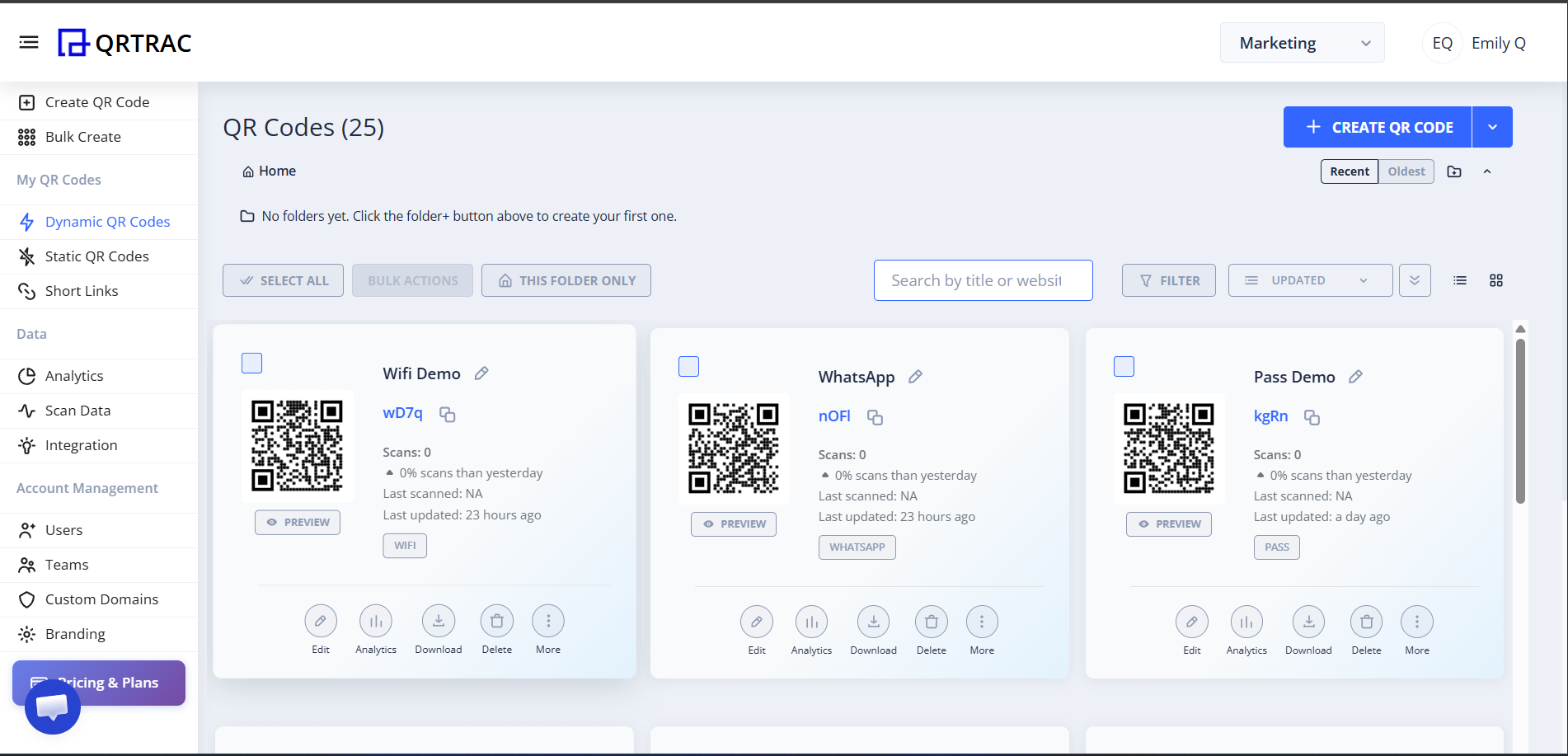
- Open Dashboard: Log in to your QR code generator platform.
- Select QR Code: Find the specific campaign or QR code you want to modify.
- Click Edit: Look for the "Edit" button.
- Update Destination: Paste the new URL or upload the new file.
- Save Changes: Click save to apply the new redirect immediately.
- Test Scan: Scan the printed code with your phone to verify the change.
Common mistakes
- Trying to edit a static QR code after printing it.
- Changing the destination but forgetting to test the new link on a phone.
- Using a short-term link that could expire or be deleted later.
- Not checking analytics after the update, so you can’t tell whether the change worked.
Related Resources
Explore these topics to get more out of your QR code campaigns:
- Dynamic QR Codes: Learn everything about creating, managing, and optimizing dynamic QR codes for long-term campaigns.
- QR Code Analytics: Discover how to track scan locations, devices, and times to measure the ROI of your printed materials.
- QR Code Tracking: Add UTM parameters and campaign tags to trace exactly where your website traffic is coming from.
- PDF QR Codes: A great solution for restaurant menus, instruction manuals, and event schedules that need frequent updating.
- Digital Business Card QR Codes: Share your contact information instantly with a scannable vCard that can be updated anytime.
Frequently Asked Questions
1. Can you edit a QR code after it has been printed?
Yes, you absolutely can edit a QR code after printing, provided it is a dynamic QR code. Dynamic QR codes use a short redirect link that points to your final destination. Because the printed code only contains the redirect link, you can easily change the final destination URL in your dashboard without ever needing to alter the physical printed image.
2. Can I change a QR code destination without reprinting?
Yes, this is the primary benefit of using dynamic QR codes. If you need to update a menu, change a promotional landing page, or fix a typo in your URL, you can do so immediately from your management dashboard. The original printed QR code will instantly redirect users to the new destination, saving you the significant cost and time of reprinting materials.
3. What changes can be updated in an editable QR code?
With an editable QR code, you can update the destination URL, swap out an uploaded PDF file, change an app store redirect link, or update contact information in a digital business card. Additionally, you can modify background campaign settings such as UTM tracking parameters, password protection, or schedule the code to activate at a specific time.
4. Will old printed QR codes still work after I edit them?
Absolutely. As long as the dynamic QR code remains active and managed through the same platform, previously printed QR codes will continue working. Anyone who scans the old printed code will simply be routed through the short link and arrive at your newly updated destination. The end-user experiences a seamless transition.
5. How do I know if my QR code is dynamic?
You can tell if a QR code is dynamic if you created it within a platform that provides a dashboard with an "edit" feature. Additionally, when you scan a dynamic QR code, you might briefly see a short redirect URL (like qrtr.ac) before your final page loads. If you generated the code using a quick, free tool with no login required, it is almost certainly a static code.
6. What happens if I edit the wrong destination?
If you accidentally input the wrong URL or upload the wrong file, don't panic. Because it is a dynamic QR code, you can log back into your dashboard and edit the destination again immediately. Once you save the correct destination, all subsequent scans will instantly point to the right place. Just remember to always test your code after making an update.
7. Are editable QR codes secure?
Yes, reputable dynamic QR code generators use secure HTTPS connections for their redirects, ensuring user privacy and safety. As long as you protect your dashboard login credentials, no one else can edit the destination of your QR codes. The underlying technology is robust and trusted by enterprise companies globally.
8. Do dynamic QR codes support analytics?
Yes. Because users pass through a redirect link when scanning a dynamic QR code, the platform can collect anonymous data. You can view metrics such as total scans, unique scanners, the geographic location of the scan (by city/country), the operating system used (iOS vs Android), and the exact time and date the scan occurred.
9. Can I change a PDF, menu, or landing page linked to a QR code?
Yes, replacing a linked file is very common. If you have a PDF QR code for a restaurant menu, you can simply upload your new, revised PDF into the dashboard to overwrite the old one. Alternatively, if you host your menu on a specific landing page, you can just update the URL the QR code points to.
10. Why do businesses use dynamic QR codes instead of static QR codes?
Businesses strongly prefer dynamic QR codes because they offer flexibility and security. Mistakes happen, and marketing campaigns evolve. Being able to edit the destination after printing prevents costly reprinting of materials. Furthermore, the robust scan analytics provided by dynamic codes allow businesses to measure engagement and calculate the ROI of their offline marketing efforts.
Create Your Editable QR Code Today
Never worry about a broken link or an outdated promotion again. The key takeaway is simple: dynamic QR codes can be edited even after printing. Enjoy fully editable destinations, comprehensive scan analytics, and long-term flexibility without expensive reprinting costs. Plus, with QRTRAC, you benefit from clear, one-time purchase pricing with absolutely no recurring subscription fees.
Generate Dynamic QR Code