Event Passes with QR Codes That Can't Be Faked

Ditch the paper tickets. Generate custom digital QR passes instead. Your gate staff can scan and validate tickets in seconds using any phone camera. No apps, no expensive hardware, and no slow-moving lines.

  • One-scan ticket burn
  • VIP & backstage tiers
  • Live scan tracking
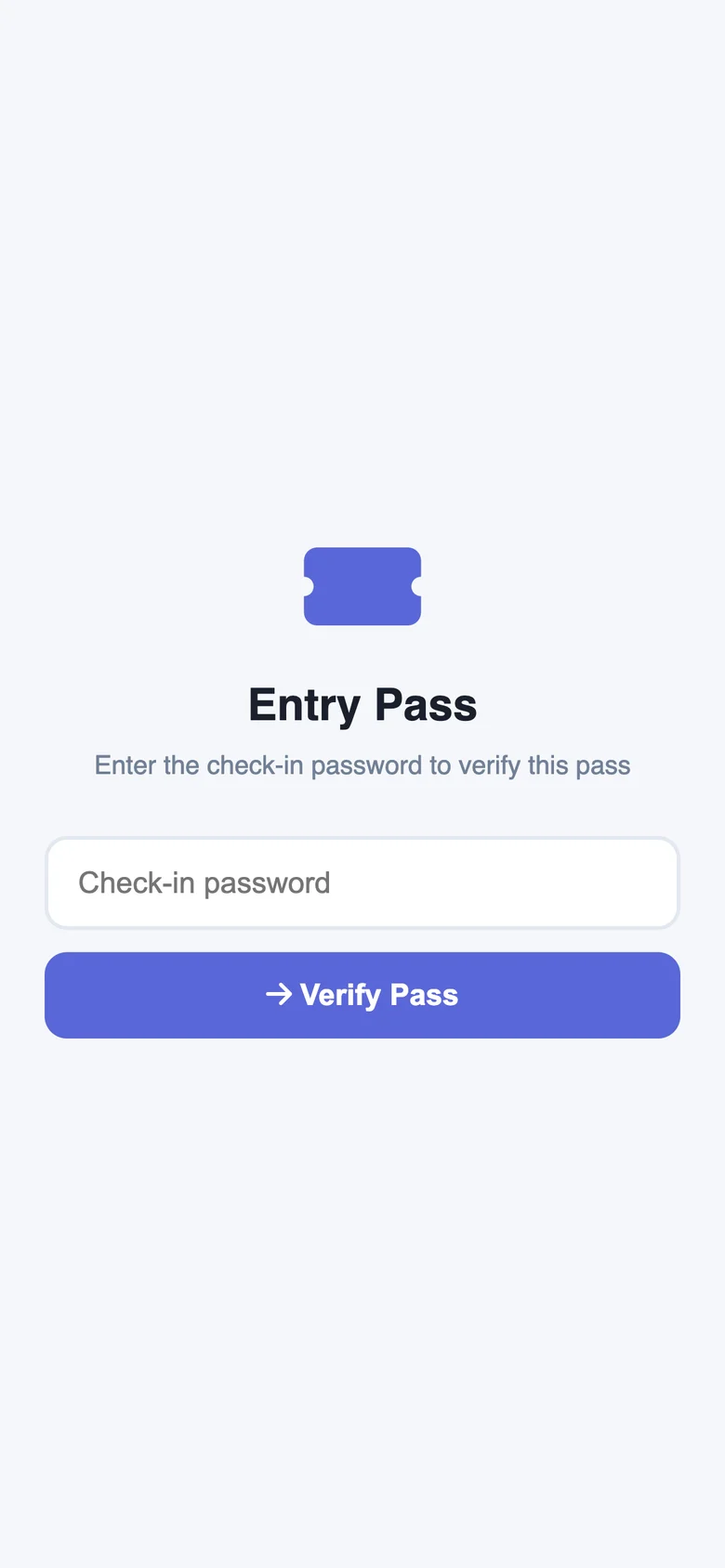
Phone showing an example QRTRAC entry pass asking staff for the check-in password
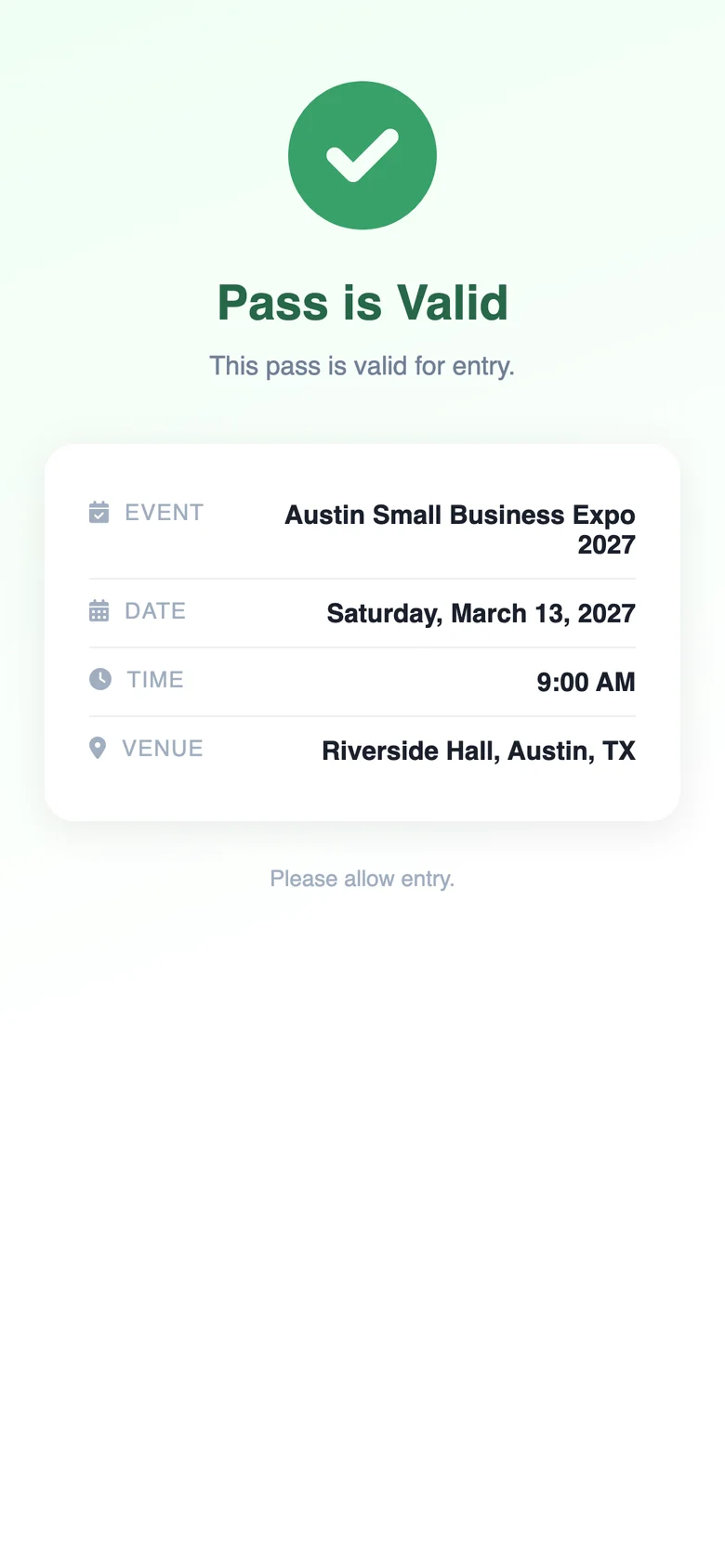
The same pass after the password is entered: Pass is Valid, for the Austin Small Business Expo 2027 on Saturday, March 13, 2027 at Riverside Hall, Austin, TX
What gate staff see when they scan a pass for a fictional expo: a password prompt, then Pass is Valid.
Pass Types

One Platform, Every Pass Type

From general admission to backstage VIP — create tiered passes with different access levels and scan limits.

General Admission

Standard single-entry passes for your main gate. Generate thousands in bulk from a CSV sheet. Every attendee gets their own unique QR code.

Single entryBulk generationEmail delivery

VIP Access

Premium passes for VIP lounges, backstage access, or early entry. Spot them instantly with custom dark-themed designs.

Priority entryBranded designExclusive zones

Multi-Day Passes

Keep the same ticket for multi-day festivals. Lock valid entry to Day 1, Day 2, or the entire weekend without sending extra emails.

Date-lockedDay selectorFestival-ready

Staff & Crew Passes

Unlimited-scan badges for production crew and volunteers. Staff can move in and out of the venue without burning the pass.

Multi-scanRole-labeledRe-entry allowed

Press & Media Passes

Credentials for journalists and film crews. Send a quick pass link so reporters can show their phone at the press gate.

Media zonesLink deliveryPhoto ID optional

Sponsor & Exhibitor

Manage load-in day and vendor access. Restrict passes to specific exhibition halls and track multi-person booth staff.

Zone controlTeam passesSetup day access
Gate Validation

What Happens at the Gate

The gate loop takes under two seconds. Your attendee shows their phone, your staff scans the code, and the pass burns instantly.

01

Attendee opens pass on phone

The attendee opens their pass from an email, SMS, or Apple Wallet. It loads on any smartphone browser. No downloads required.

02

Staff scans from their own phone

Gate crew points any phone camera at the QR. QRTRAC loads the check-in screen instantly in their browser.

03

Staff enters event password

Staff inputs a quick PIN to authorize. This stops general attendees from scanning and validating their own tickets.

04

Result: GREEN or RED — instant

Green means go. The pass burns in 100ms. Red means stop—the system flags duplicates immediately.

Valid

Pass Valid

Entry approved

Marking USED
in 100ms…

Blocked

Pass Used

Entry denied

Screenshot
or duplicate

Early

Not Yet

Doors not open

Pass preserved,
not burned

Features

Everything Your Event Needs

From pass creation to post-event reporting — the full workflow in one dashboard.

Bulk Pass Generation

Upload an attendee CSV sheet. We generate a unique, single-use QR code for every row. Export thousands of passes in less than a minute.

Branded Pass Design

Slap your logo, brand colors, and custom fields on the pass. They look crisp on phone screens or printed out.

Email & Link Delivery

Email passes directly from our dashboard or embed the URLs in your existing confirmation emails. Attendees tap to open.

One-Time Scan Lock

Each pass burns the millisecond your staff validates it. Screenshots and forwarded emails fail automatically.

Real-Time Attendance

Track headcount as gates open. Watch real-time scans per hour, monitor VIP area capacity, and see exactly who is inside.

Export Scan Reports

Grab complete scan logs as a CSV. See exactly who checked in, the precise entry timestamp, and which gate they used.

Paper Tickets vs. QRTRAC Passes

Why organizers are ditching paper wristbands and tickets.

Feature
Paper Ticket
QRTRAC Pass
Fraud prevention
❌ Easy to copy or fake
✅ Single-use server lock
Delivery cost
❌ Printing and postage fees
✅ Free email or link delivery
Lost tickets
❌ Slow help desk queues
✅ Resend the link in seconds
Real-time count
❌ Counting paper stubs
✅ Live web dashboard
Staff setup
❌ Expensive laser scanners
✅ Any smartphone camera
Duplicate screening
❌ Staff checking IDs manually
✅ Automatic 100ms database lock
Eco impact
❌ Discarded stubs and ink
✅ Zero physical waste
Post-event data
❌ Guesswork and lost stubs
✅ Clean CSV scan log export

Built for Every Type of Gate

Our QR passes scale from tiny local meetups to multi-stage festivals.

🎵 Concerts & Festivals
🎪 Conferences
🏆 Sports Events
🎓 University Events
💒 Weddings & Galas
🏛️ Trade Shows

Related Solutions

Ditch the Paper Tickets

Build and test your digital event passes in less than 10 minutes. Try it free for 7 days with no credit card.

No credit card · Custom domain included in trial

Event Passes — Common Questions

What is a QR event pass?
A QR event pass is a digital ticket with a unique code tied to an attendee. When gate staff scan it, our system checks it instantly against our database to approve or deny entry. Once scanned, the code burns so no one can reuse or share it.
Can attendees share their pass with someone else?
No. The second your staff scans a pass, our servers mark it as used. If someone tries to scan a copy or screenshot later, the system flags it as used and blocks entry immediately.
Do attendees need to download an app?
No apps required. Attendees open a link in their email or text messages to show their QR code. Your gate staff scan it using their phone's built-in camera and a simple web browser page. You do not need to buy expensive laser scanners.
How do I generate passes for hundreds of attendees?
Just upload your spreadsheet as a CSV. We instantly create a unique, single-use QR pass for every row. You can download them all or email them directly from our dashboard. Bulk-generating 1,000 tickets takes under a minute.
Can I create different pass tiers (VIP, General, Staff)?
Yes. You can set up custom pass types for one event. Give VIPs re-entry privileges, let staff passes scan unlimited times, and set standard general admission tickets to burn after a single scan.
What happens if an attendee loses their pass link?
You can look up their name in your dashboard and resend the link instantly. As long as their original pass has not been scanned at the gate, the new link will work perfectly.

Frequently Asked Questions

What is a QR event pass?
A QR event pass is a digital ticket with a unique code tied to an attendee. When gate staff scan it, our system checks it instantly against our database to approve or deny entry. Once scanned, the code burns so no one can reuse or share it.
Can attendees share their pass with someone else?
No. The second your staff scans a pass, our servers mark it as used. If someone tries to scan a copy or screenshot later, the system flags it as used and blocks entry immediately.
Do attendees need to download an app?
No apps required. Attendees open a link in their email or text messages to show their QR code. Your gate staff scan it using their phone's built-in camera and a simple web browser page. You do not need to buy expensive laser scanners.
How do I generate passes for hundreds of attendees?
Just upload your spreadsheet as a CSV. We instantly create a unique, single-use QR pass for every row. You can download them all or email them directly from our dashboard. Bulk-generating 1,000 tickets takes under a minute.
Can I create different pass tiers (VIP, General, Staff)?
Yes. You can set up custom pass types for one event. Give VIPs re-entry privileges, let staff passes scan unlimited times, and set standard general admission tickets to burn after a single scan.
What happens if an attendee loses their pass link?
You can look up their name in your dashboard and resend the link instantly. As long as their original pass has not been scanned at the gate, the new link will work perfectly.