One Code.
Every Store.
 By Eshwar Deshmukh
· Updated
By Eshwar Deshmukh
· Updated Stop printing two different QR codes for iOS and Android. Generate one smart code that detects the user's phone OS and routes them to the correct app store instantly.
Trusted by Leading Organizations
Join thousands of businesses using QRTRAC for their QR code needs





How OS Detection Works
Combine your Apple, Google, and Amazon store links into one smart routing engine.
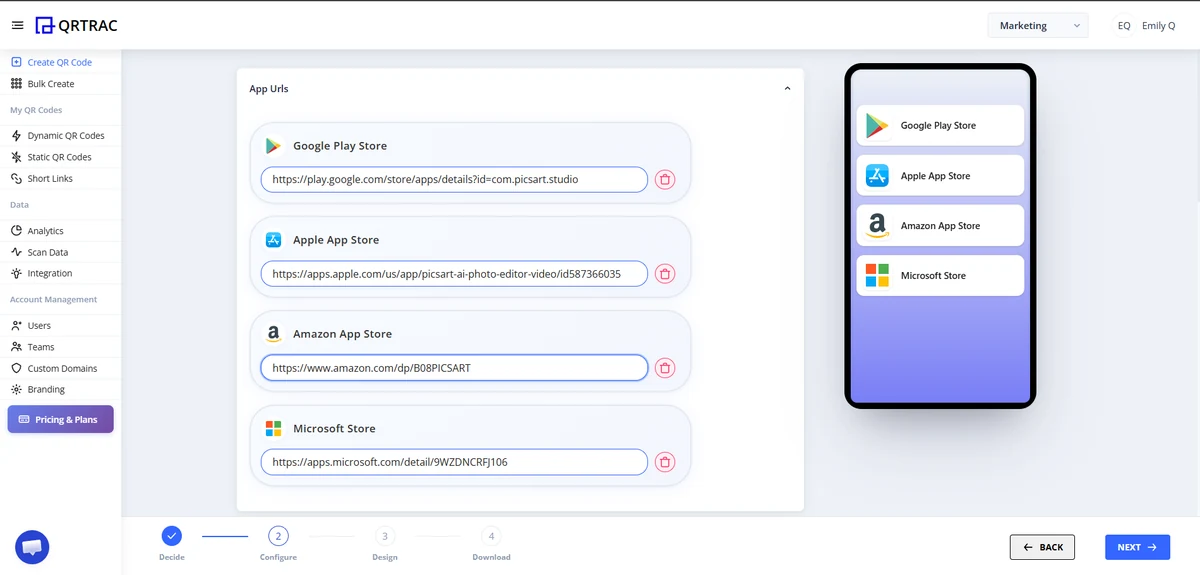
1. Add Store Links
Paste your individual URLs for the Apple App Store, Google Play, and Windows/Amazon.
2. Fallback Page
Design a branded landing page to catch any desktop scanners or unsupported devices.
3. Smart Routing
When scanned, our engine reads the phone's User-Agent and routes them instantly.
4. Print & Track
Print one universal code on your marketing materials and track your install campaigns.
Built for User Acquisition
Asking users to scan an Android code vs an iOS code is confusing and wastes valuable ad space. One code maximizes conversions.
Instant App Store Launch
We use deep linking protocols so that scanning the code opens the native App Store app, not a browser window.
Frictionless Fallbacks
If someone scans on a desktop PC, they're routed to your branded landing page where they can send a download link to their phone.
Live Link Swapping
If you change your app name or move to a new store listing, simply update the URL in your dashboard. No reprinting required.
Real-World Applications
How high-growth startups drive offline-to-online app installs.
Retail Packaging
Include a single code on your unboxing materials to drive users to your loyalty app.
TV & Billboard Ads
Maximize your expensive ad spend by showing one scannable code that works for everyone.
Micro-Mobility
Scooter and bike rentals put one code on the handlebars so riders can install the app instantly.
Restaurant Tables
Drive diners to your mobile ordering app while they wait for their food.
Live Events
Print on conference badges so attendees can download the event schedule app.
Direct Mail
Add to physical postcards and flyers to track exactly how many app installs your mailer generated.
Common Avoidable Mistakes
- Pasting your marketing website URL instead of the actual App Store listing URL.
- Forgetting to test the QR code on both an iPhone and an Android phone before mass printing.
- Turning off "Smart Download", forcing users to manually tap which store they want to go to.
Real-Time Scan & Click Analytics for QR Codes and Links
Elevate your QR code campaigns with QRTRAC’s real-time analytics. Track unique scans, user behavior, and location data with anonymized IP and geo-location insights. Export first-party scan data for a complete view of your campaign's success and make data-driven decisions to optimize performance
First Party Scan Data
Export scan data to learn about your QR code campaign performance
Real Time Analytics
Get instant insights into unique users, scan frequency, and location data to optimize your campaigns.
Frequently Asked Questions
Common questions about app store QR codes and smart OS detection
What is an app store QR code?
An app store QR code is a single scannable code that detects whether the person scanning it is on an iPhone or an Android phone, then automatically routes them to the correct app listing — the Apple App Store or Google Play — without them typing anything.
How does a QR code know whether to send someone to the App Store or Google Play?
When the code is scanned, our routing engine reads the phone's User-Agent string to identify the operating system, then instantly redirects to the App Store link for iOS or the Google Play link for Android — all in milliseconds.
Can one QR code really work for both iOS and Android?
Yes. You add both your App Store URL and your Google Play URL once when creating the code. From then on, the same printed QR code correctly routes every scanner to their own platform's store.
What happens if someone scans the code on a desktop computer?
Desktop and unsupported-device scans are sent to a branded fallback landing page instead of an app store, where you can show a QR code to scan with a phone or a direct link to send to their device.
Do I need to reprint my QR code if I update my app or change stores?
No. Because this is a dynamic QR code, you can update the destination App Store or Google Play links from your dashboard at any time — the printed code itself never changes.