Scan Once.
Can't Be Reused.
Generate disposable QR codes that lock after the first scan — for coupons, gift redemptions, event passes, VIP access, and one-time document links. No app required. No exceptions.
Alex Rodriguez
Courtside VIP
Gate A (VIP Only)
Row 2, Seat 14
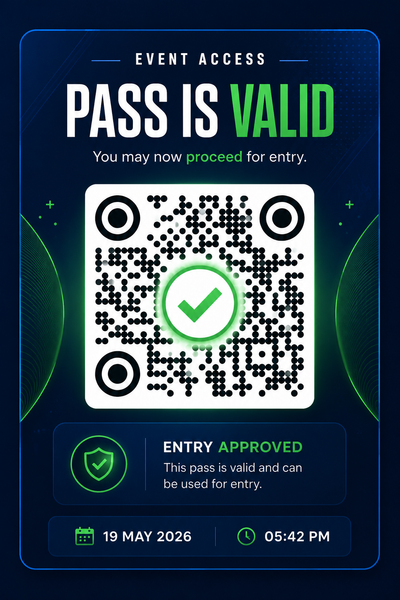
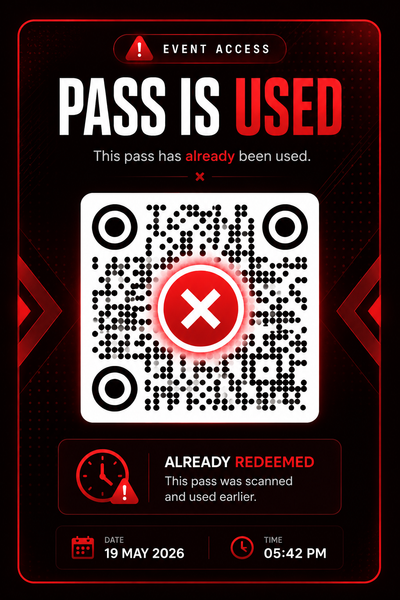
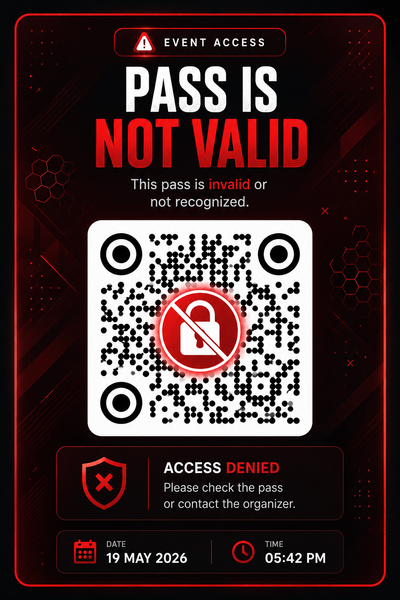
Looking for a One-Time Scan or a One-Time Purchase?
The term "one-time QR code" can mean two very different things depending on your project. Here is how to choose the right solution:
1. One-Time Scan (Single-Use Validation)
Best for tickets, vouchers, coupons, and secure access gates. The QR code is scanned once and immediately invalidated in the database to prevent screenshots, fraud, or multiple entries.
2. One-Time Purchase (ongoing validity)
Best for physical products, packaging, books, signage, and set-and-forget marketing. You pay a one-time flat rate to buy the dynamic code once and keep it active forever with no recurring monthly subscriptions.
Workflow
How SecurePass QR Works
A simple, bulletproof 6-step integration flow from creation to physical access verification.
Organizer uploads attendee list
Sync your attendee files or integrate via APIs to load authorized guest details.
System generates thousands of unique QR passes
Each ticket is encoded with a unique dynamic signature stored in the verification ledger.
QR codes are embedded into existing ticket designs
Download passes in bulk or export raw imagery directly to overlay onto custom design templates.
Authorized staff scans QR
Using standard smartphones or handheld scanners. No complex hardware required at the entrance.
Password verification appears
A secure validation gate prevents unauthorized attendees or casual scanners from redeeming the tickets.
Pass status changes instantly
Transitions from VALID to USED in under 100 milliseconds. Repeated entries trigger duplicate scan blocks.
Product Attributes
Engineered For Zero Ticket Leakage
Uncompromising security metrics combined with absolute ease-of-use at major gates.
One-Time Validation
Each pass can only be redeemed once. The status changes immediately in our database on the first check.
Password Protected Access
Only authorized staff can validate entries. Dynamic verification codes ensure no ticket fraud occurs.
Browser Based
No app installation required for staff or attendees. Runs inside any modern browser on Android/iOS.
Bulk Generation
Generate thousands of passes in minutes. Secure QR outputs can be instantly downloaded as a ZIP payload.
Existing Design Integration
Embed QR codes into your current ticket templates. Compatible with standard graphic export engines.
Real-Time Validation
Instant status updates ensure that event gates maintain high-speed throughput without bottlenecks.
Anti-Fraud Engine
Blocks ticket sharing and duplicate usage. Detects screenshot metadata to filter bad actors.
Enterprise Scale
Built for events with thousands of attendees. High concurrency clusters prevent latency at the gates.
Single-Use QR Technology
What Is a One-Time Scan QR Code?
A one-time scan QR code — also called a disposable QR code, 1-time QR, or single-use QR — is a dynamic QR code that self-destructs after its first successful scan. Unlike standard QR codes that can be scanned infinitely, a one-time QR is burned server-side the instant it is validated, making every subsequent scan return an expired or denied result.
1-Time QR Scan — How It Works
Each code carries a unique cryptographic token. The first scanner's device sends the token to the QRTRAC server, which authenticates it and marks it used in under 100ms. Every device that scans after receives a Pass Is Used or Invalid response.
Disposable QR Use Cases
- • Concert & stadium entry passes
- • VIP backstage & hospitality access
- • Conference & expo badge validation
- • Secure document delivery (one-view links)
- • Contest prizes — first scanner wins
- • Time-limited promotional codes
No App Required — Ever
Both attendees and gate staff use the native phone camera. One-time QR passes open directly in the browser — no app install, no account creation, no friction at the door. Works on iOS and Android out of the box.
Defensive System
Built To Defeat Ticket Sharing
Traditional tickets can be screenshotted and shared infinite times. Here is how SecurePass QR blocks malicious duplicates at the gates.
Person A Scans → Entry Granted
First original scan of the QR code. Server authenticates signature, grants entry, and burns the token.
Person B Tries Same Pass → Access Denied
Person B attempts to scan the same QR code at Gate B. Database flags token as already redeemed.
Person C Uses Screenshot → Invalid
Attempting to use a screenshot forwarded via messaging app. Checked state marks pass void instantly.
Person D Tries Duplicate Ticket → Rejected
Using a photocopied or duplicated barcode. Cryptographic checks reject signature check.
Live Simulator
Experience The Validation Interface
Play the role of an event gate steward. Simulate different scanning scenarios using the interactive phone mockup below.
Choose a Validation Scenario:
secure2026 in the phone screen to validate passes.
Password Required
Enter Authorized Staff Password
Target Venues
Perfect For High-Traffic Access Control
SecurePass QR protects major gateways, ticket booths, and exclusive lounges across these key markets.
Sports Events
Concerts
Festivals
VIP Access
Corporate Events
Universities
Conferences
Racing Events
Gaming Events
Entertainment Shows
Comparison
Traditional QR vs SecurePass QR
Why standard static QR codes fail event security metrics, and how SecurePass fixes the vulnerability.
| Feature | Traditional QR | SecurePass QR |
|---|---|---|
| One-Time Entry | ❌ | ✅ |
| Password Protected | ❌ | ✅ |
| Anti Screenshot Fraud | ❌ | ✅ |
| Real-Time Validation | ❌ | ✅ |
| Browser Based | ❌ | ✅ |
| Bulk Pass Creation | ❌ | ✅ |
Pass Lifecycle
Three Statuses. One QR. Zero Ambiguity.
QRTRAC manages the full lifecycle of every pass server-side — from pre-event blocking through live staff validation to permanent expiry. No manual tracking. No gray areas at the gate.
Not In Schedule
The QR is live but the event window hasn't opened. Scan it before gates open and the attendee sees "Not in Schedule" — the pass does not validate and is not burned. It becomes scannable automatically once the schedule window begins.
Valid → Auto-Marked Used
During the event window, staff scans the QR on their device and enters the staff password. The system validates → shows PASS IS VALID → automatically marks it USED in under 100ms. No manual step. No second thought required.
Already Used — Permanently Blocked
The same QR scanned a second time — screenshot, forwarded pass, photocopy, any device — returns PASS IS USED and blocks entry instantly. The server-side burn is global and irreversible. First scan wins, every other attempt loses.
Three Advanced Settings. Complete Pass Control.
All three statuses are configured inside QRTRAC's Advanced Settings panel — no code, no third-party tools, no integration required. One QR type with three protection layers running simultaneously.
Schedule Campaign
Drives "Not in Schedule" — blocks scans before gates open without burning the pass
Password Protection
Ensures only staff can trigger validation — attendees cannot self-scan to bypass the gate
Scan Limit = 1
Server-side burn on first staff validation — permanent "Already Used" for every reuse attempt
How Many One-Time QR Codes Do You Get?
One-time scan codes use the same plan quota as regular QR codes — but on annual plans you unlock 4× more codes than the standard limit.
Annual Plan = 4× Your QR Code Quota
Every annual plan includes 4× the number of one-time QR codes vs the base limit. Unique passes, coupons, gift redemptions at scale — no per-code fees.
| Plan | Annual Plan Price billed once per year | Regular QR Codes | One-Time QR Codes (4× annual quota) | |
|---|---|---|---|---|
Kickoff Individuals & testing | $49/yr | Up to 5 | 20 | Start Trial |
Startup Small businesses | $100/yr | Up to 25 | 100 | Start Trial |
| Business Plus Most PopularGrowing businesses | $400/yr | Up to 250 | 1,000 | Start Trial |
Legendary High-volume operations | $899/yr | Up to 500 | 2,000 | Start Trial |
Agency Agencies & multi-client | $4,999/yr | Custom | Custom | Start Trial |
7-day free trial on all plans. One-time codes share the same plan quota — 4× reflects the annual bonus. Additional codes at $3/yr each. See full pricing →
We'll Bulk-Create & Embed Unique Codes Into Your Designs
Need thousands of unique QR codes embedded into your existing designs — tickets, packaging, vouchers, wristbands — at print-ready quality? Any QR type. Our team handles the entire production run end-to-end. Same design. Same finish. Every code unique.
We generate a unique QR code for every unit in your run — any type
Each code is placed into your design template at the correct position, size, and resolution
Output delivered print-ready — PDF, PNG, SVG, or direct-to-printer format
Quality-checked — every code tested scannable before delivery
Works with your existing ticket design, packaging artwork, or brand template — no redesign needed
Service Pricing
Minimum Order
250 codes generated & embedded into your design — ready to print. On top of your active annual plan.
$250
for 250 codes
Need more? Talk to our team →
Price covers code generation, design embedding, and quality verification. Delivery format discussed during onboarding call.
FAQ
Frequently Asked Questions
Everything you need to know about SecurePass QR validation
What is SecurePass QR? +
SecurePass QR is an enterprise-grade ticket validation system that generates dynamic, one-time-use QR codes with password-protected staff validation to prevent ticket fraud and screenshot abuse at events.
How does one-time validation work? +
Each SecurePass QR code can only be redeemed once. After the first scan and validation, the pass status changes immediately in our database and subsequent scans are automatically rejected, preventing duplicate entry.
Can SecurePass QR detect screenshot fraud? +
Yes. Our anti-screenshot technology analyzes metadata and detects when a QR code is being used from a screenshot or screenshot attempt, automatically flagging and rejecting fraudulent access.
Do attendees need to download an app? +
No. SecurePass QR is completely browser-based and works on any modern smartphone without requiring any app installation for attendees or staff members.
Is staff validation password-protected? +
Yes. Only authorized staff members with the correct password can validate passes at the gate, ensuring secure access control and preventing unauthorized entry attempts.
How fast is validation at the gates? +
SecurePass QR provides real-time validation with instant status updates, ensuring high-speed throughput at gates without bottlenecks even during peak entry times.
Can I generate passes in bulk? +
Yes. You can generate thousands of secure QR passes in minutes. All outputs can be instantly downloaded as a ZIP payload for easy distribution.
What industries can use SecurePass QR? +
SecurePass QR is perfect for sports events, concerts, festivals, VIP access control, corporate events, universities, conferences, racing events, gaming events, and entertainment shows.
How is SecurePass QR different from static QR codes? +
Static QR codes can be screenshotted infinitely and shared among multiple people. SecurePass QR generates dynamic, single-use codes with cryptographic validation and anti-fraud detection.
Can I embed SecurePass QR codes into existing tickets? +
Yes. Our SecurePass QR codes are compatible with your current ticket templates and standard graphic export engines for seamless integration.
What happens if someone tries to use a pass twice? +
The system immediately flags it as a duplicate check-in and denies access. Staff see a clear alert indicating the pass has already been redeemed.
Is SecurePass QR secure for large events? +
Absolutely. SecurePass QR is built for enterprise scale with high-concurrency clustering designed to handle events with thousands of concurrent attendees at the gates.
How does the anti-fraud engine work? +
Our anti-fraud engine blocks ticket sharing, detects duplicate usage, and analyzes screenshot metadata to filter bad actors and prevent unauthorized entry.
Can staff validate passes offline? +
SecurePass QR is designed for online validation with real-time updates. For offline capability, contact our team for enterprise solutions.
How much does SecurePass QR cost? +
Pricing varies based on event size and pass volume. Start with our 7-day free trial to test the system, then choose a plan that fits your needs.
Can I customize the validation flow? +
Yes. SecurePass QR offers customization options for password requirements, validation messages, and gate-specific configurations to match your event needs.
What data is captured during validation? +
SecurePass QR captures validation timestamp, gate location, staff member, and pass status. You get complete audit logs for security and compliance.
How do I get technical support? +
Our support team is available 24/7 during your event. Contact support through the dashboard or call our emergency hotline for immediate assistance.
Can I use SecurePass QR with my existing ticketing system? +
Yes. SecurePass QR integrates with most major ticketing platforms via API. Contact our team for integration details specific to your system.
What if a legitimate pass is rejected? +
Staff can manually verify passes using the admin dashboard. Override options are available for edge cases with proper authentication and logging.
How quickly can I set up SecurePass QR? +
You can be up and running in minutes. Generate passes, train staff on the password, and start validating. Our onboarding team helps with the setup process.
Is SecurePass QR GDPR compliant? +
Yes. SecurePass QR complies with GDPR and other data protection regulations. We provide data processing agreements and detailed privacy documentation.
Can I set pass expiration dates? +
Yes. You can set expiration dates, time windows, and access restrictions for each pass or batch of passes to control when they can be used.
How do I handle refunds or cancellations? +
You can manually deactivate passes in the dashboard. Cancelled passes cannot be redeemed even if they're scanned, providing full control over your inventory.
What makes SecurePass QR better than competitors? +
SecurePass QR combines one-time validation, password protection, anti-screenshot technology, browser-based access, enterprise scale, and real-time fraud detection in one integrated solution.
What are the security advantages of single-scan QR codes? +
Single-scan QR codes eliminate the three biggest vulnerabilities of standard QR codes: (1) screenshot sharing — a photo of the code is worthless after the first legitimate scan; (2) re-entry fraud — the code is permanently burned server-side and cannot be reactivated; (3) code duplication — each code carries a unique cryptographic token that can only be validated once, making copies indistinguishable from the original but equally invalid after first use. Combined with QRTRAC's password gate and schedule lock, there is no practical bypass.
Which companies provide one-time scan QR code ticketing services? +
QRTRAC is purpose-built for one-time scan ticketing. Unlike general-purpose QR generators, QRTRAC enforces scan limits server-side, supports password-protected staff validation, bulk-generates unique per-attendee codes, and provides real-time scan dashboards with audit logs. General ticketing platforms handle sales but rarely offer server-side single-use QR enforcement at this granularity — meaning a shared screenshot can still get someone through the gate.
What applications support one-time QR code generation for event tickets? +
QRTRAC supports one-time QR generation natively — no third-party app or integration required. Set Scan Limit = 1 in Advanced Settings, optionally add a Password Gate for staff validation, and bulk-generate a unique code for every attendee via CSV upload. Attendees open codes in any standard phone camera app — no download required on their end. Everything runs through QRTRAC's dashboard with real-time validation status per code.
From the Help Library
How to Create a One-Time Scan QR Code
Step-by-step: Scan Limit = 1, post-limit redirects, bulk generation for per-person codes.
Scan Limit — Advanced Setting
How to set a maximum scan count and configure what happens when the limit is reached.
Password Protection — Advanced Setting
Restrict QR access to staff with a password so only authorised personnel can validate scans.
Schedule Campaign — Advanced Setting
Set a start/end time window so passes show "Not in Schedule" outside event hours — without burning the scan counter.
Advanced Settings — Full Reference
Complete guide to all Advanced Settings: Scan Limit, Password, Schedule, GPS, Age Gating, UTM and more.
Bulk QR Code Generation
Generate a unique one-time QR code for every person on your list using CSV or Excel upload.