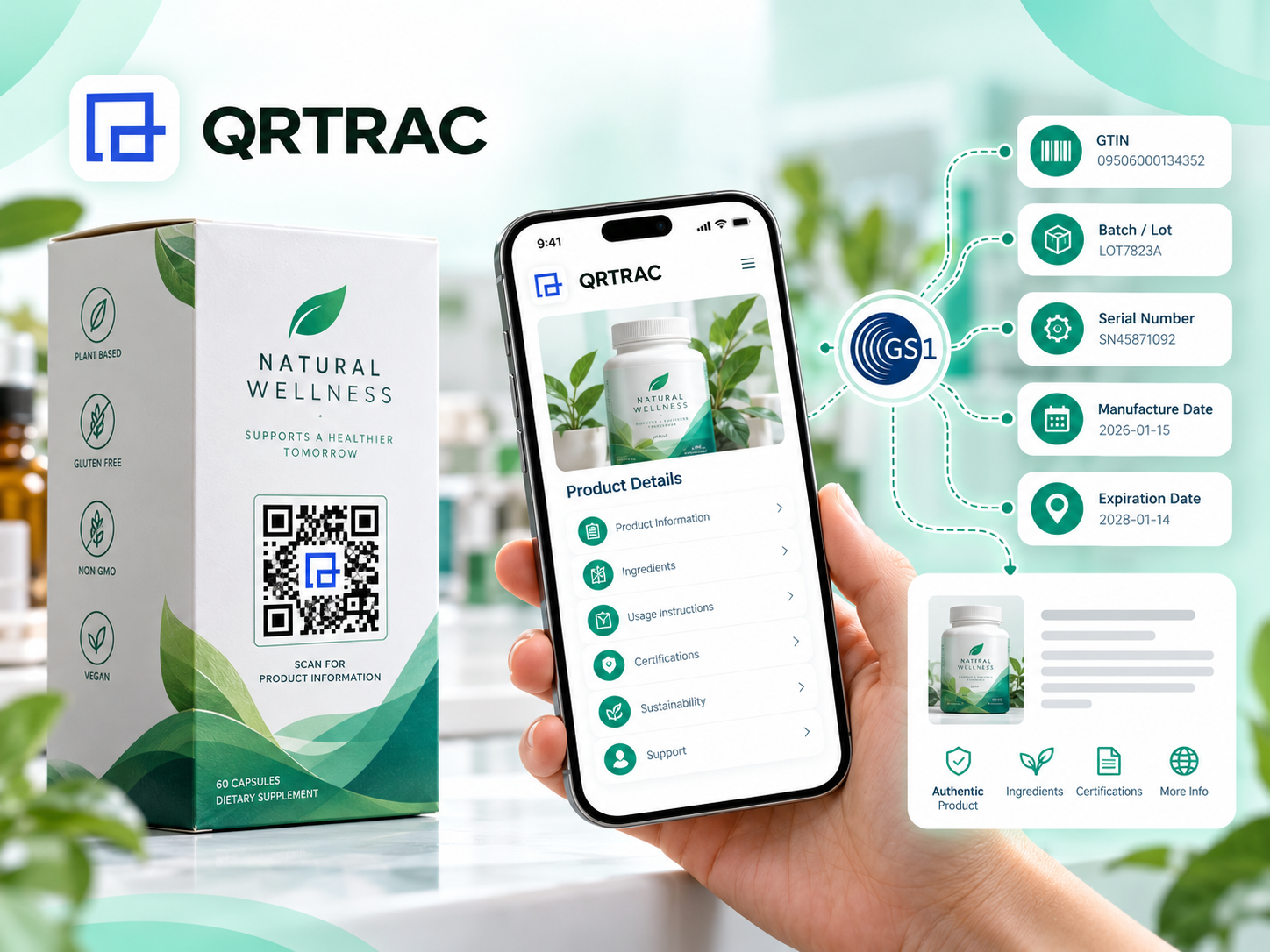
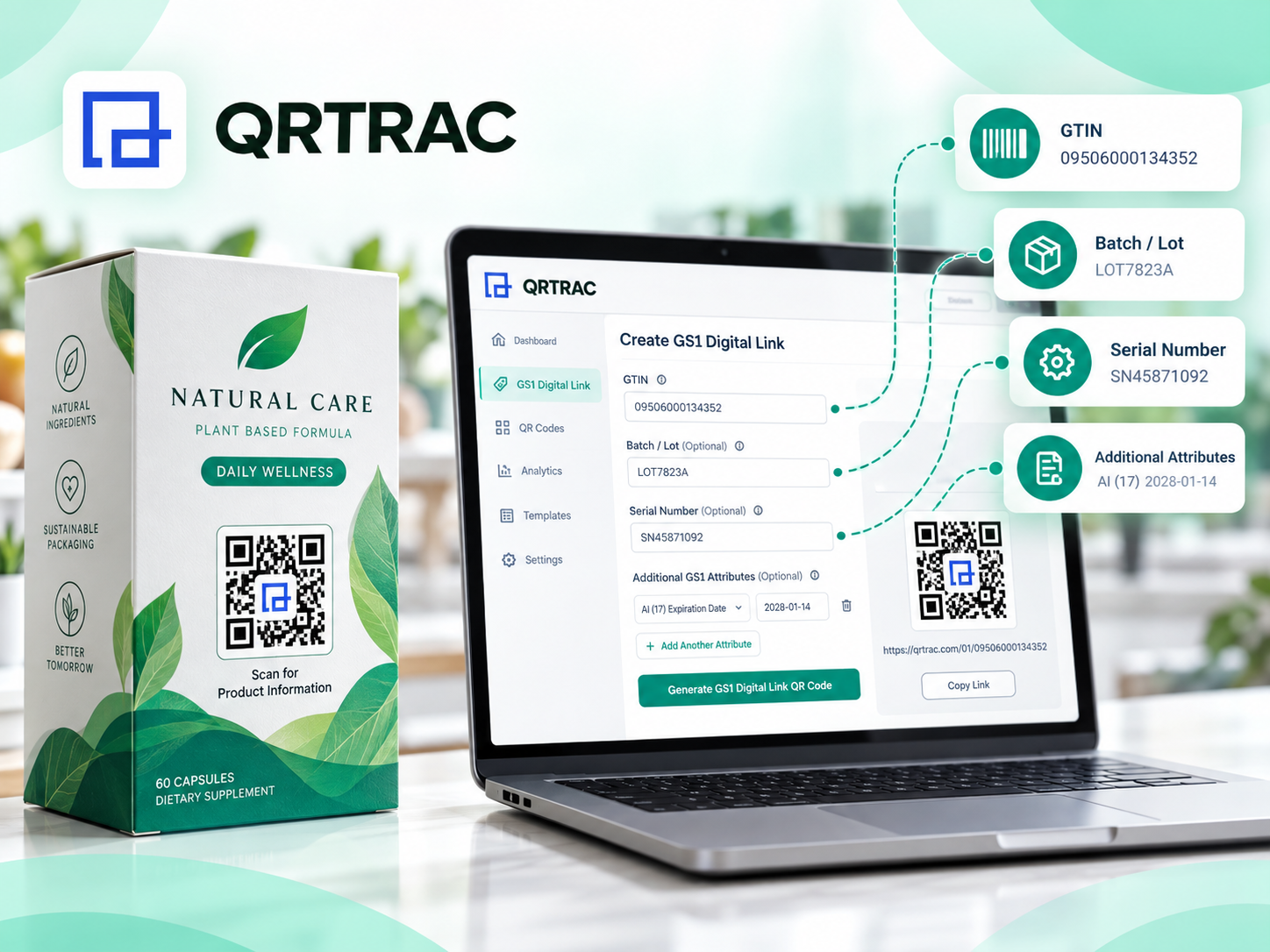
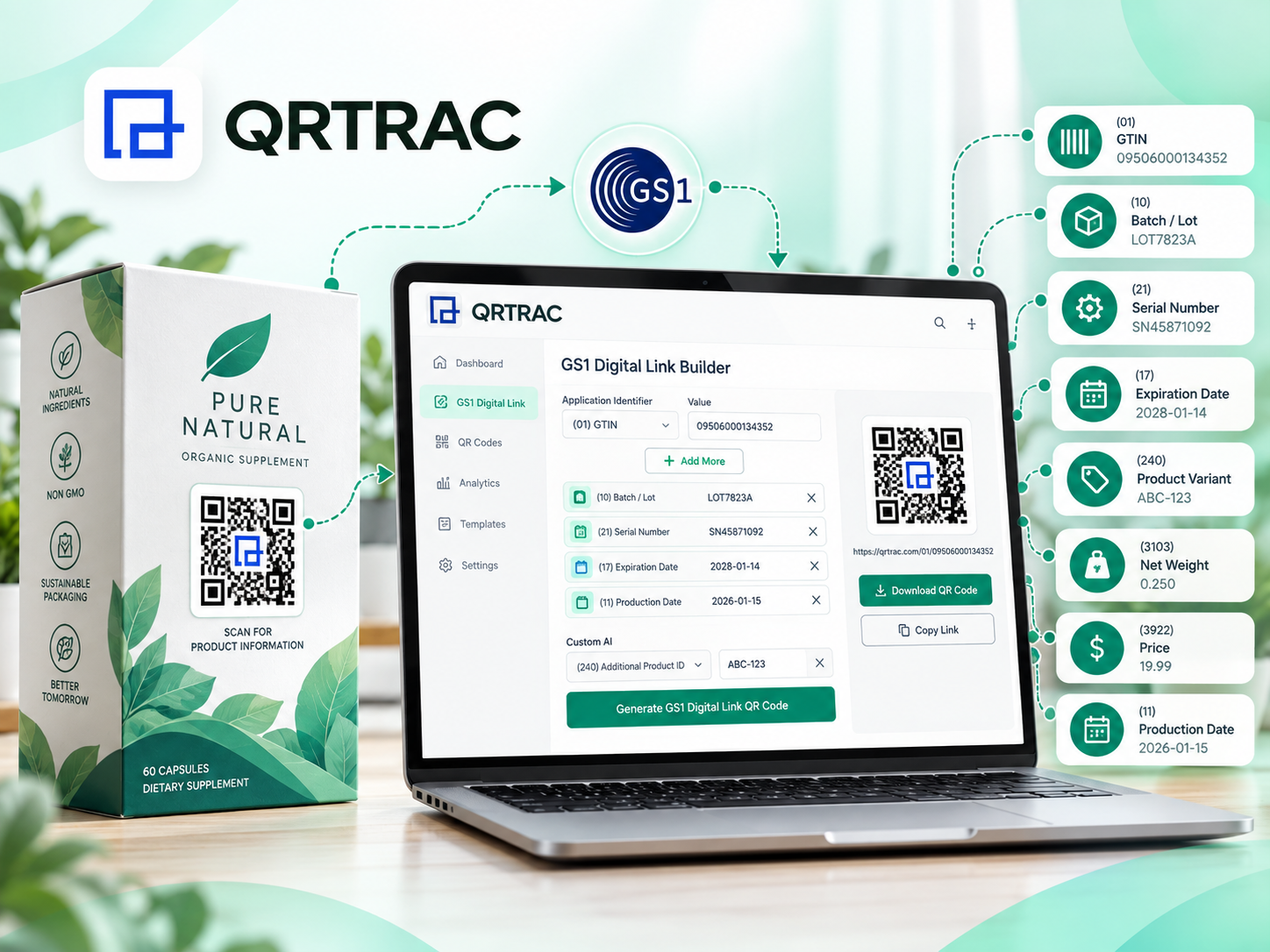
Create GS1 Digital Links with structured product identification such as GTINs, Batch/Lot, Serial numbers and GS1 Application Identifiers, then connect each product identity to an editable digital destination.
A GS1 Digital Link connects structured product identification with a web-based digital destination. It upgrades the traditional barcode into a digital web address format, acting as a bridge between the physical product and its digital twin.
GTIN
The Global Trade Item Number that uniquely identifies the specific physical product worldwide.
Digital Link
Translates the GTIN into a globally standardized web-address format that browsers can understand.
Destination
The final web location or interactive experience the consumer is seamlessly directed to when scanning.
The Digital Flow
Physical Product
GTIN + Qualifiers
Digital Link
Destination
How to Create a GS1 Digital Link
Enter Product Identity
Add the required GTIN for your product.
01
Add Optional Qualifiers
Add Batch/Lot, Serial and other attributes when required by your workflow.
02
Add Application Identifiers
Select supported Data Attributes or add Custom Application Identifiers.
03
Select Domain & Destination
Choose the QRTRAC domain and enter the final destination URL.
04
Create, Download & Manage
Create the Digital Link, configure and download the code, and manage it from your dashboard.
If you need identifiers outside the predefined list, QRTRAC allows you to enter a custom AI identifier and its corresponding value seamlessly.
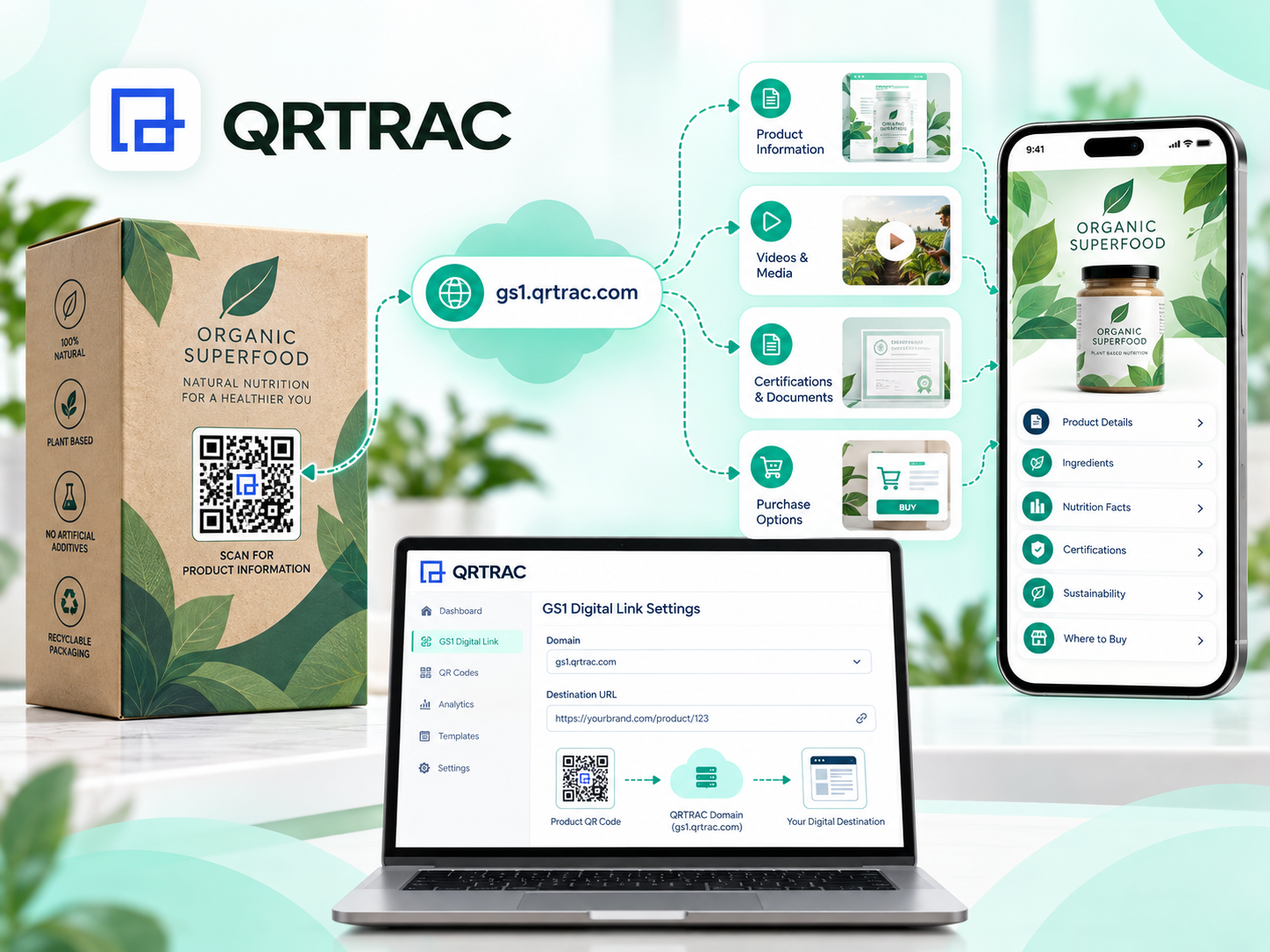
Control Your GS1 Digital Link Destination
The power of dynamic routing: your physical QR code remains constant while digital destinations can evolve.
Domain
The domain used for the GS1 Digital Link (e.g., gs1.qrtrac.com).
Destination
The URL where users ultimately land to view the product's digital experience.
Note: GTIN and its qualifiers are fixed once saved, while attributes, destination, and design remain fully editable later without reprinting the physical QR code.
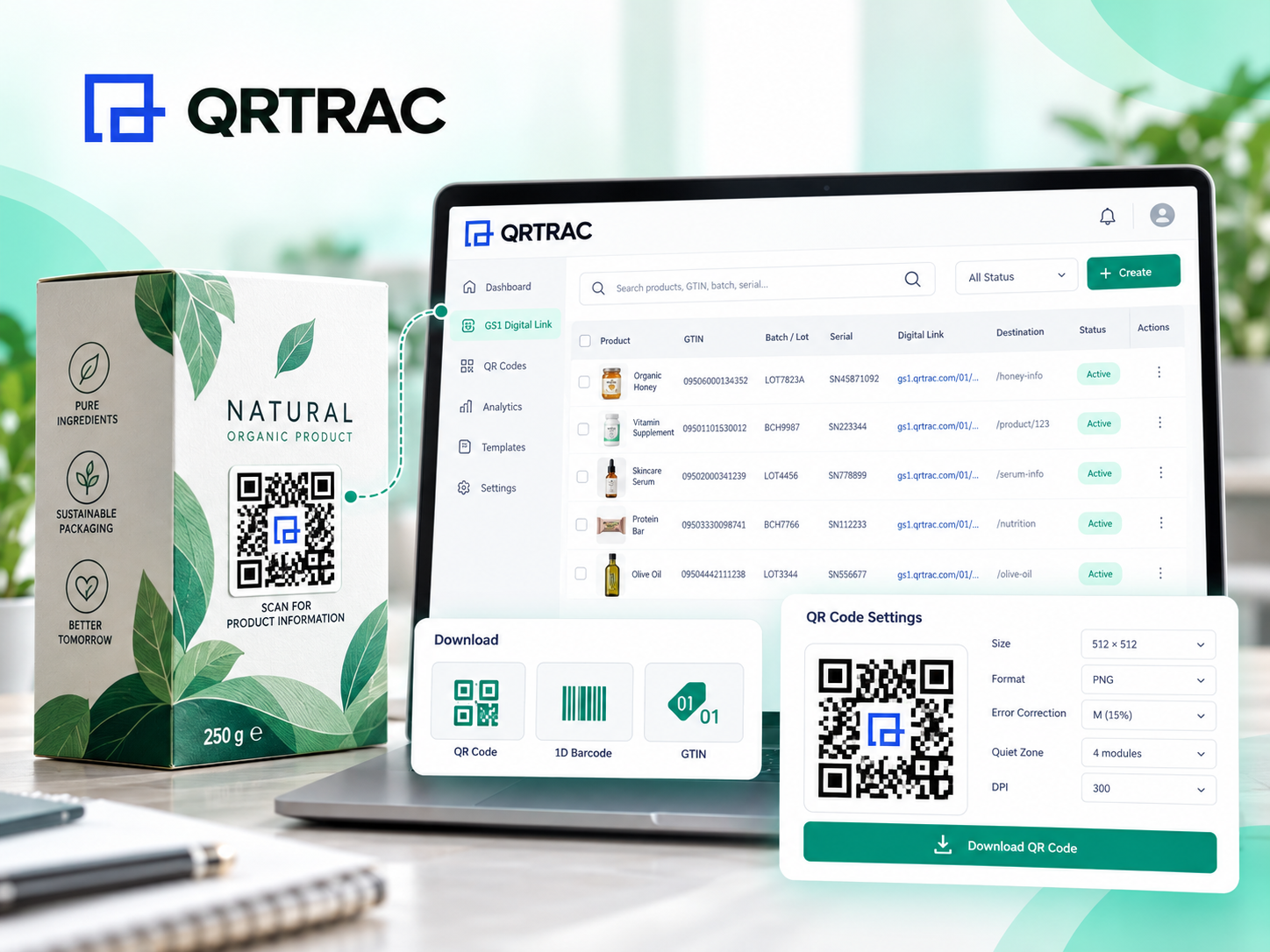
Manage Your GS1 Digital Links From One Dashboard
Keep your product links organized. View and manage all your created Digital Links including Code, GTIN, Batch / Lot, Serial, Digital Link, and Destination.
Find exactly what you need quickly with built-in search functionality for GTIN, Batch, Serial, or Name.
Download the Product Codes You Need
QRTRAC lets you download your codes directly from the interface:
✓ QR Code
✓ 1D Barcode
✓ GTIN Number
Create Print-Ready GS1 QR Codes
Configure your QR code output precisely for digital or print use.
Choose from sizes ranging from 300 × 300 to 4096 × 4096 (or custom), formats like PNG, JPEG, SVG, and WEBP, and control advanced settings like Error Correction Level, Margin / Quiet Zone, and DPI.
Ready to upgrade your product packaging?
Start building compliant GS1 Digital Links today and future-proof your inventory for Sunrise 2027.
Incorporate Batch/Lot information securely when your product workflow requires precise tracking.
Serialized Products
Use serial-level product identification where item-level granularity is necessary.
Lifecycle Info
Connect physical products to digital information that can be maintained and updated over time.
Supply Chain Workflows
Support internal and external retail workflows that rely on structured product identification.
GS1 Digital Link vs Standard QR Code
Standard QR Code
• Encodes a destination or other generic information
• Can be used for general digital experiences
• Flexible for many everyday QR use cases
GS1 Digital Link
• Built around GS1 product identification
• Uses GTIN and optional qualifiers
• Supports GS1 Application Identifiers
• Connects structured product identity to a web destination
• Designed for product-centric digital experiences
A GS1 Digital Link is particularly relevant when the QR code needs to carry structured product identification, whereas standard QR codes are meant for general URL routing.
GS1 Digital Link vs Destination URL
GS1 Digital Link
The structured product identity (GTIN, Batch, Serial) that is globally standardized and physically printed on the product.
Destination URL
The final web location or landing page the user reaches upon scanning. This can be updated dynamically anytime.
GS1's Sunrise 2027 initiative asks retailers to have point-of-sale scanners that can read 2D barcodes by the end of 2027. GS1 Digital Link is the standard that lets one QR code handle checkout and send shoppers to manuals and ingredient lists.
Warehouse ready: GTINs, batch numbers and serial numbers are encoded in the code on the package itself.
Ready for product passports: the same code can carry Digital Product Passport data as EU rules phase in.
By shifting to GS1 Digital Links, organizations can consolidate the consumer digital experience and product identification into a single scan, reducing packaging clutter and enhancing the available data density.
What's Inside a GS1 Digital Link
Each part of the link is a GS1 Application Identifier (AI) followed by its value. Checkout scanners read the GTIN; phones open the same link as a web page on your domain.
A GS1 Digital Link connects structured product identification with a web-based digital destination, represented as a scannable 2D barcode.
What is a GTIN?
A Global Trade Item Number (GTIN) uniquely identifies trade items and products globally. It is the core requirement for a GS1 Digital Link.
What is the difference between a GS1 Digital Link and a Destination URL?
The GS1 Digital Link is the structured product identity web-format embedded in the code. The Destination URL is the final webpage the user ultimately sees.
How long do GS1 Digital Links last?
As long as you maintain your domain and the redirect rules, the links will function indefinitely. The printed QR code never expires.
Do GS1 Digital Links comply with global retail standards?
Yes. The GS1 Digital Link standard is ratified by the global GS1 organization, ensuring full compliance with the retail networks of the future.
How do GS1 Digital Links help with sustainability?
By linking to digital manuals, recycling instructions, and ingredient lists, brands can eliminate printed inserts and reduce physical packaging size.
What are the benefits of a GS1 Digital Link for brands?
One code does both jobs. The store scans it to sell the product, and your customer scans the same code to register a warranty, read the ingredient list or check for safety recalls.
What is the standard format of a GS1 Digital Link URI?
The structure follows: https://[domain]/01/[GTIN]/[AI]/[Value]. The '01' indicates the GTIN, followed by optional Application Identifiers.
What information is required to create a GS1 Digital Link?
You must provide the GTIN, a Domain, and a Destination URL. Other qualifiers like Batch/Lot or Serial are optional.
Is Batch/Lot or Serial required?
No, both Batch/Lot and Serial information are completely optional depending on your specific product workflows.
What are GS1 Application Identifiers?
They are standardized prefixes that define the meaning and format of the data attributes that follow them, such as Expiration Date or Net Weight.
Which Application Identifiers can I add?
You can add supported attributes like Expiration Date, Product Variant, Variable Count, Net Weight, Price, Production Date, Packaging Date, Best Before Date, Sell By Date, and Harvest Date.
Can I add Custom Application Identifiers?
Yes, you can manually enter a custom AI identifier and value within the QRTRAC builder.
Can I change the destination or GTIN after saving?
The destination URL can be changed after saving. However, the GTIN and its qualifiers (like Batch/Serial) are fixed once the Digital Link is saved.
How do I get a GTIN?
You must license a GTIN (Global Trade Item Number) directly from your regional GS1 member organization (e.g., GS1 US, GS1 UK).
Is a GS1 Company Prefix required?
Yes. A GS1 Company Prefix is required to generate legitimate GTINs for your products. This prefix is assigned to you by GS1 when you become a member.
What is the role of a brand's custom domain in a GS1 Digital Link?
Using a custom domain (like link.yourbrand.com) instead of a generic short link ensures brand trust, improves consumer confidence, and complies with enterprise digital identity standards.
Can a single GS1 Digital Link route to multiple experiences?
Yes. With an advanced resolver setup, the link can route consumers to a marketing page, while routing supply chain scanners to an EPCIS database based on the app or context of the scan.
Can I download a 1D barcode and QR code?
Yes, QRTRAC provides options to download the QR Code, the 1D Barcode, and the GTIN Number from the dashboard.
Which QR code formats are supported?
You can download print-ready codes in PNG, JPEG, SVG, and WEBP formats.
Can I configure QR code size, margin, error correction and DPI?
Yes, QRTRAC supports advanced download configurations including size, margin (quiet zone), error correction level, and DPI.
How do I print a GS1 Digital Link on my packaging?
You can download the generated QR code in high-resolution vector formats (SVG) from QRTRAC and provide it to your packaging designer or printing partner.
Are there specific size requirements for printing the QR code?
GS1 recommends a minimum physical size of 15x15mm for consumer scanning, and maintaining a clear 'quiet zone' around the barcode for reliable scanning.
What is Sunrise 2027?
Sunrise 2027 is a global initiative led by GS1 to transition retail point-of-sale (POS) systems from reading traditional 1D barcodes to 2D barcodes by 2027.
What happens to the 1D UPC/EAN barcode after I switch?
Eventually (post-2027), the 1D barcode will be phased out. However, currently, brands are printing both codes on packaging to ensure backward compatibility with older POS scanners.
What happens if a POS scanner cannot read the QR code?
During the transition phase (prior to 2027), it is highly recommended to print both the traditional 1D barcode and the GS1 Digital Link QR code side-by-side on your packaging.
How does a GS1 Digital Link improve supply chain visibility?
By encoding Batch/Lot and Serial numbers directly into the barcode, supply chain partners can scan the code to instantly log inventory movement, track expiration dates, and verify authenticity.
Can I use a GS1 Digital Link for product authentication?
Yes. By encoding a unique Serial Number into the Digital Link, you can verify the authenticity of individual items when they are scanned.
How are product recalls handled using GS1 Digital Links?
If a specific Batch/Lot number is recalled, consumers scanning the code can be instantly warned via the web interface, while retailers can program their POS to block the sale of that specific batch.
Do GS1 Digital Links work at the Point of Sale (POS)?
Yes. Because they contain the product's GTIN, modern optical POS scanners can read a GS1 Digital Link QR code and process the checkout just like a traditional UPC or EAN barcode.
Can consumers scan GS1 Digital Links with their smartphones?
Absolutely. A consumer scanning the exact same barcode with their native smartphone camera will be seamlessly directed to a web page containing product information, marketing content, or instructions.
Does the GS1 Digital Link require an internet connection at checkout?
No. The POS scanner extracts the GTIN directly from the text embedded in the QR code. It does not need to connect to the internet to 'resolve' the web link during checkout.
What is the difference between a GS1 Digital Link QR code and a standard QR code?
A standard QR code simply holds a website URL. A GS1 Digital Link QR code contains a structured URI that embeds the product's GTIN and supply chain data, adhering to strict global retail standards while still resolving to a webpage.
Can I use a GS1 DataMatrix instead of a QR code?
Yes, the GS1 Digital Link syntax works with any 2D barcode format. However, QR codes are currently preferred for consumer engagement because they are natively supported by all smartphone cameras.
Do I need my own resolver to use GS1 Digital Links?
No. QRTRAC acts as your resolver out-of-the-box, directing consumer scans to your desired destination URL while maintaining the integrity of the GS1 URI.
Can I track scan analytics on my GS1 Digital Links?
Yes. Because the links are routed through the web, you can track scan locations, devices, times, and overall engagement metrics just like a dynamic QR code.
Can I export my GS1 Digital Link data?
Yes, QRTRAC allows you to export your campaign data, Digital Links, and scan analytics for external reporting.
Can I manage and search multiple GS1 Digital Links?
Yes, the dashboard allows you to manage all links and search by GTIN, Batch, Serial, or Name.
Does QRTRAC support GS1 Digital Link URI syntax?
Yes, QRTRAC automatically formats your data into the correct GS1 Digital Link URI structure (e.g., https://domain.com/01/gtin/10/batch/21/serial).
Create Your First GS1 Digital Link
Build structured product links with GTINs, qualifiers, Application Identifiers and editable digital destinations using QRTRAC.