
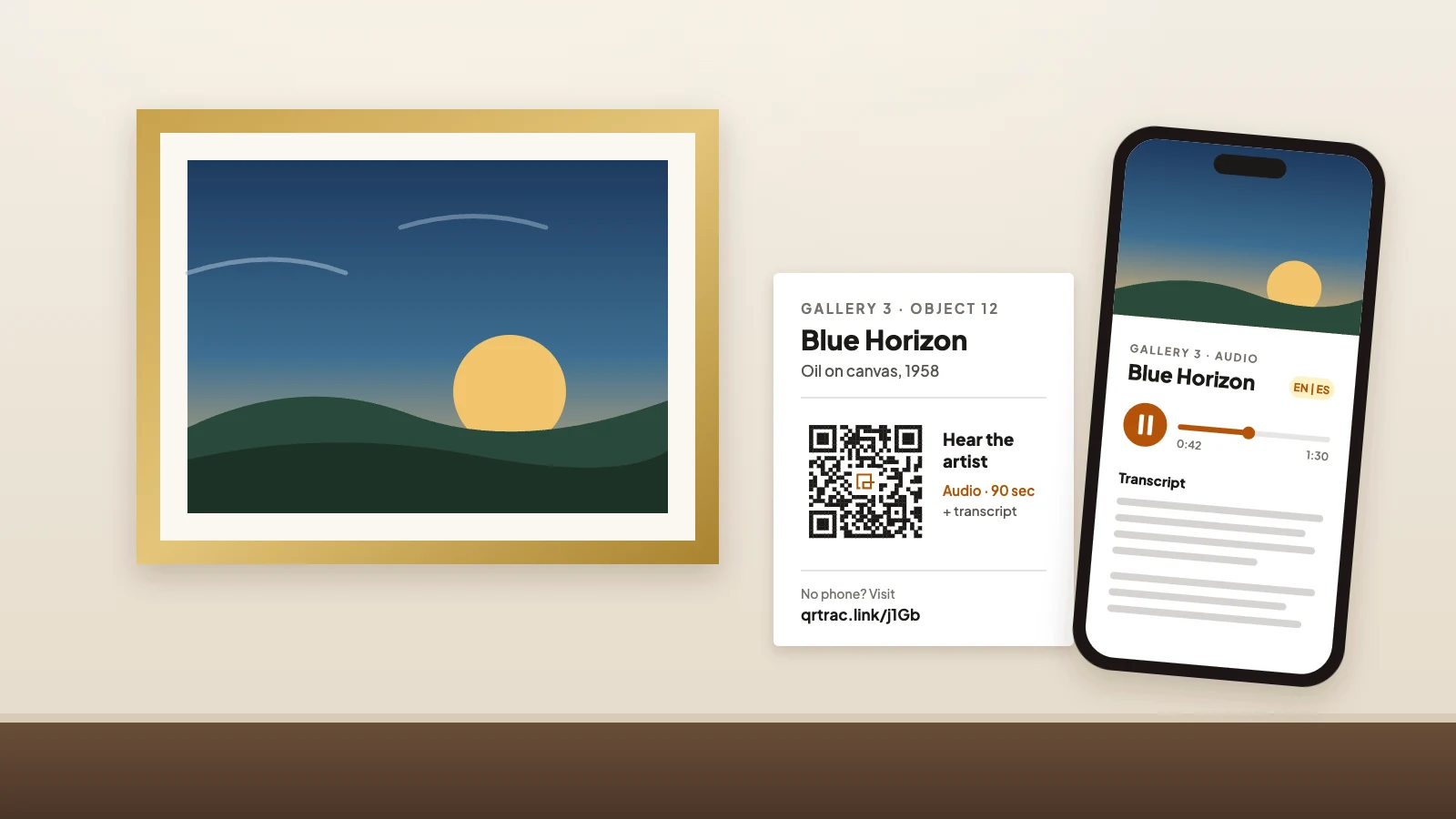
The new labels are mounted. Six months later the website is redesigned, the audio files move and every code in the east gallery opens a "page not found" error. Nobody notices until a visitor mentions it at the front desk.
QR codes in museums rarely fail because of the code. They fail because nobody decided what each code was for, who looks after the link, or what happens to a visitor who can't scan. The pattern on the label is the easy part.
This guide covers the decisions that keep museum codes working: what to link, how to keep every visitor included, how to size and test labels, how to own the link, and how to tell whether any of it is being used.
Key takeaways
- Give each code one visitor task and print what they'll get and how long it takes.
- Keep essential information on the label. The code adds a layer; it never replaces the label.
- Test every placement at its real height, under real lighting, on several phones and a weak signal.
- Print a short link on your own domain beside each code so the link outlives any vendor or redesign.
- Scan counts are a starting point. Pair them with attendance, page behavior and visitor questions.
Give each code one visitor task
A code that opens "more information" usually opens a long page nobody finishes. A code that promises "hear the potter explain this glaze, 90 seconds" gets scanned by the people who want exactly that. Write the task first, then decide whether a code is the right way to deliver it.
The test is simple: could you print the promise in five words next to the code? If not, the destination is probably a dumping ground for text that didn't fit on the label. Cut it down or leave the code off.
| Visitor task | What they get | Who maintains it |
|---|---|---|
| Hear the maker's story | A 90-second audio clip with a transcript | Curatorial |
| Read this label in Spanish | The same label text, translated | Interpretation |
| Watch the object in use | A captioned video under 2 minutes | Digital or media |
| Do an activity with kids | A one-page family challenge | Education |
| Support this gallery | Your donation or membership page | Development |
The third column matters as much as the first two. If no team will update the content, the code will outlive its accuracy.
Choose content a label can't hold
The strongest museum uses add something print can't do: sound, motion, another language or an action. A few that work well:
- Audio narration: a short clip from a curator, the maker or a community voice, always with a transcript on the same page. Many museums host this on a simple mini-site or their own website and link it with a website URL QR code.
- Translations: one code that opens the label in the visitor's language. A multi-language QR code can route by the phone's language setting, so you don't need a row of flags and codes on a small label.
- Captioned and sign-language video: a demonstration, an archival clip or an ASL interpretation. YouTube QR codes work if your videos already live there.
- Then-and-now images: historic photos of an object or building, linked with an image gallery QR code.
- Gallery maps and family guides: a PDF QR code at the entrance, sized for a phone screen rather than a printed brochure.
- Feedback, donations and membership: near exits, not on every case. A feedback QR code with two questions gets more answers than a ten-question survey. For giving, see our guide to donation QR codes.
Keep the destination light. A page that streams a 40 MB video before anything appears will lose most people standing in a gallery with one bar of signal.
Keep every visitor included
Not everyone carries a smartphone, has a data plan, wants to use one in a gallery or can hold a phone steady at a label. A code should always be an extra layer, never the only way to get essential information. Object title, date, maker and any safety or wayfinding notes belong on the printed label.
Used well, codes widen access. The American Association for State and Local History suggests codes on labels so visitors with low vision can open the text and hear it read by their phone's screen reader. Captioned and sign-language videos do the same for Deaf and hard-of-hearing visitors.
That only works if the destination is accessible too. Use real text (not a photo of the label), captions on every video, a transcript for every audio clip, readable contrast and buttons large enough to tap. Our QR code accessibility guide covers the page side in detail.
Finally, keep a non-phone route: large-print label booklets, a loaner device at the desk or staff who can help. Print a short typed link beside each code, too. A visitor who can't scan can still type it, and a staff member can read it out.
Size, mount and test every placement
A code that scans on your desk can fail in the gallery. Exhibit lighting is designed to flatter objects, not phone cameras: spotlights create hot spots, and codes behind case glass pick up reflections. Test where the code will actually live.
- Size to the distance: about 1 in of code for every 10 in of scanning distance. Visitors step up to rail labels and scan from 12 to 18 in (30 to 45 cm), so 1.25 to 1.75 in (3 to 4.5 cm) is usually enough. Our QR code size guide covers wall panels and banners.
- Mount within reach: the 2010 ADA Standards set an unobstructed forward reach range of 15 to 48 in (38 to 122 cm) above the floor. A code mounted high on a wall panel may be out of reach for a visitor using a wheelchair. The Smithsonian Guidelines for Accessible Exhibition Design are the standard reference for label placement.
- Fight glare: use matte label stock, angle labels away from track lights and avoid placing codes directly behind glass. The lighting conditions guide explains why.
- Leave the quiet zone: keep a clear border around the code. Decorative frames and engraved borders that touch the pattern are a common cause of failed scans.
- Check the signal: basements, vaults and thick stone walls often have weak cell coverage. Post guest Wi-Fi details nearby, and see why some networks block QR links before you rely on yours.
Test with at least three phones, including an older one, at the mounted height. If you engrave codes on brass or etch them on acrylic, request a sample first; low contrast on metal is hard for cameras. QRTRAC exports codes as SVG, which keeps edges sharp at any engraving or print size.
Own the link, not just the code
This is the decision most museum QR guides skip, and it matters more for museums than for most businesses. A retail flyer is gone in a month. An exhibit label, an engraved plaque or a donor wall can stay up for years, longer than most vendor contracts and staff tenures.
There are two kinds of codes. A static code stores the full web address in the pattern, so it never expires but can never change. A dynamic code stores a short link that redirects to your content, so you can update the destination after printing, which is useful when exhibits rotate or a website is rebuilt. Our explainer on static vs. dynamic QR codes covers the tradeoffs.
The catch with dynamic codes is that the redirect runs on the provider's servers. Every provider has some version of this risk, and it's worth knowing the details before you print. With QRTRAC, for example, if a subscription ends, dynamic codes are paused and show a notice instead of redirecting until the account is active again; static codes made in the app keep working. Ask any vendor the same question.
Three habits reduce that risk:
- Use a domain you control: a short link like go.yourmuseum.org/clay is your address, not the vendor's. If you ever switch providers, you can point that domain somewhere new and keep the printed codes working. Here's how custom domain QR codes are set up.
- Print the short link as text: it doubles as an accessible fallback and lets anyone check the link without a phone.
- Choose static for permanent installations: a code engraved into a building or memorial that will never change can point straight to a stable page on your own site.
Measure use, not just scans
A scan count tells you how many times a link was opened. It can't tell you whether anyone listened to the clip, understood the translation or enjoyed the visit. Treat scans as the first number, not the answer.
- One code per placement: if the same audio clip appears in two galleries, give each label its own code. Then you can see which location gets used.
- Scans per visitor: divide a gallery's weekly scans by its attendance. That ratio is fairer than raw totals when one gallery is busier than another.
- What happens after the scan: audio play time and video completion come from your media player or website analytics, not from the QR platform. Connect the two.
- Observation and questions: watch a gallery for an hour and ask a few visitors one or two questions on the way out. You'll learn why people do or don't scan.
In QRTRAC, each code reports scans over time, device type and approximate location, and you can send the data to Google Analytics to see it next to your website traffic. The QR code analytics guide explains what each metric does and doesn't show.
Keep a code register and a review schedule
Museums catalog every object, yet codes often go up with no record of where they are or where they point. A simple spreadsheet fixes that. It's the single most useful thing you can make before printing a full run.
| Column | What to record | Why it helps |
|---|---|---|
| Code ID and location | Gallery, case or label number, height | You can find and replace a damaged label fast |
| Destination | The current URL and the typed short link | Anyone can check the link without a phone |
| Content owner | A named person or team | Broken links get fixed by someone, not everyone |
| Install and review dates | When it went up, when to check it next | Old exhibits don't keep dead codes on the wall |
| Account and domain | Which provider, plan and domain the link uses | A lapsed subscription or domain doesn't break every label at once |
Set a review rhythm. Check every link when an exhibit opens and again when it closes, and walk the galleries each quarter to look for damaged or tampered labels. A sticker placed over a real code is a known scam pattern; the FTC warns about it, especially near anything involving payments. Our broken QR code link guide and QR security best practices cover what to do when you find one.
Also put renewals in the register: the QR subscription, the custom domain and any hosting for audio or video. Most museum code failures trace back to one of those lapsing quietly.
Pilot one gallery before you roll out
Start with one gallery and five to ten codes, each with a different task. Run it for a few weeks, compare scans per visitor across the codes and talk to front-of-house staff about what visitors ask. Then expand the formats that worked and drop the ones that didn't.
Use this checklist before you print each round.
| What to check | Why it matters | What to look for |
|---|---|---|
| The label says what you get | Visitors decide in seconds whether to scan | "Hear the artist, 2 min" beside the code, not just "Scan me" |
| Essential facts are on the label | Not every visitor has a phone, data or a free hand | Title, date, maker and safety notes printed, with the code as an extra |
| Scans at the real spot | Glare and distance only show up in the gallery | Tested on 3 or more phones at the mounted height, under the gallery lights |
| Loads on a weak signal | Basements and stone buildings often have poor coverage | A light page that opens in a few seconds, or guest Wi-Fi posted nearby |
| The link is yours | Codes outlive vendors, staff and website redesigns | A short link on your own domain, printed as text beside the code |
| Someone owns it | Unowned codes break quietly | A named owner and a review date in your code register |
One more consideration: replacing printed material with digital content isn't automatically greener. Streaming media, devices and hosting have their own footprint. Use codes where they add something, not to remove the label.