
Branded QR Codes
Done Right.

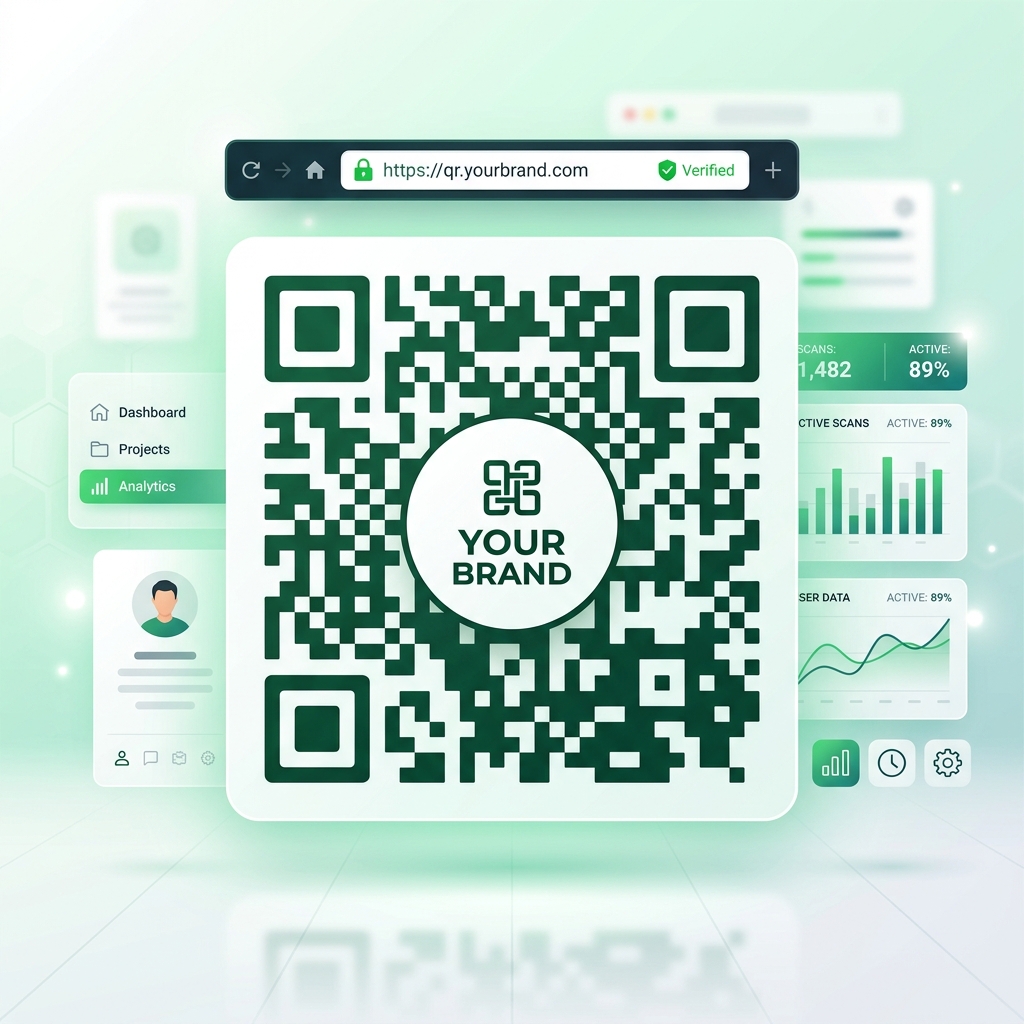
Create professional QR codes with your logo, brand colors, and custom domain. Enhance brand recognition and boost scan trust by 40%.

Create Branded QR

Free 7-Day Trial • Cancel Anytime

Custom Branded QR Code with Logo and Secure Domain

Trusted by Leading Organizations

Join thousands of businesses using QRTRAC for their QR code needs

QR Codes that
Match Your Brand.

Stop using generic black-and-white barcodes. QRTRAC provides powerful design tools to make your QR codes an extension of your visual identity.

Custom Logo Integration

Add your company logo directly to the center of your QR codes for instant brand recognition and higher scan trust.

Brand Color Customization

Inject your exact HEX codes. Create beautiful gradients, adjust eye colors, and style patterns to match your corporate guidelines.

The Design Engine

  • Error Correction

    Auto-adjusts density to ensure logos don't break scannability.

  • Eye Frames & Patterns

    Choose from dozens of shapes for the corners and data dots.

  • HD Vector Exports

    Download crisp SVG, PDF, and EPS files for print marketing.

  • Brand Templates

    Save your styles so your entire team stays consistent.

Expert QR Design Secrets

Discover how to design QR codes that actually get scanned and maximize your conversions.

1

1. Add a Clear CTA

A naked QR code is a mystery. Adding a short call-to-action like 'Scan to get 20% OFF' removes hesitation instantly. Place it below or inside the frame.

Boosts Scans
2

2. Build Trust with Logos

Generic black-and-white QR codes look like technical barcodes. Adding your brand logo in the center builds trust and dramatically increases scan rates.

Builds Trust
3

3. Contrast is King

Scanning speed depends entirely on contrast. Always use a dark foreground on a light background. Avoid inverted colors (white on dark).

Ensures Scannability

Complete White Label Setup

Rebrand the QRTRAC platform to launch as your own internal or external QR marketing software.

Custom Domain & SSL Security

Host the entire dashboard and all your dynamic QR codes on your own domain (e.g., qr.youragency.com). We automatically provision and manage free SSL certificates for every custom domain to guarantee secure, encrypted connections for your users.

  • Custom Root & Subdomains
  • Automatic Free SSL Certificates (HTTPS)
  • Seamless Domain Management
  • Hide the QRTRAC Brand Completely

Sub-Account Management

Spin up isolated workspaces for your clients. Each client works within their own namespace and only sees your native tooling.

  • Up to 100 Sub-Accounts
  • Workspace Isolation
  • Custom Terms of Service
  • Advertising Agency Ready

The Complete Guide to Branded QR Codes

Why You Need a QR Code Generator With a Logo

A generic, black-and-white QR code can appear suspicious to modern consumers. By using a specialized QR code generator with logo integration, you transform a plain barcode into a trusted brand asset. Inserting your company's logo into the center of the QR code immediately signals authenticity, resulting in higher scan rates and better user engagement.

Custom Domains, SSL, and Secure Management

Beyond visual branding, professional marketers use white label QR codes with full domain management. This means the underlying short link (e.g., qr.yourcompany.com) perfectly matches your brand instead of displaying a generic generator URL. Our platform includes an advanced domain management system that automatically provisions and renews SSL certificates (HTTPS) for your custom domains. This guarantees that when a user scans your code, their browser shows a secure padlock icon, eliminating security warnings and building immediate trust. Every touchpoint from the physical scan to the secure digital destination is 100% controlled by your brand.

Designing Professional QR Codes

When customizing your brand colors, remember that contrast is essential. The foreground data patterns should always be significantly darker than the background. QRTRAC automatically configures the appropriate error correction level when you upload a logo, ensuring that the visual overlay never breaks the code's scannability. Whether you export in PNG or high-resolution SVG, your branded QR code will remain crisp and scannable on billboards, packaging, and digital displays.

Branded QR Codes FAQ

Common questions about designing and managing custom QR codes.

Q Can I add my own logo to the QR code?

Yes! QRTRAC allows you to easily upload your company logo and place it perfectly in the center of your QR code. We automatically adjust the error correction level so the code remains 100% scannable.

Q Will my custom colors affect scannability?

As long as you maintain high contrast (dark foreground dots on a light background), your custom colors will not affect scannability. Our generator will warn you if the contrast is too low.

Q Can I host the QR codes on my own domain?

Yes. With our White Label Agency features, you can map a custom subdomain (e.g., qr.yourcompany.com) so that your users never see the QRTRAC URL when they scan or manage links.

Q What formats can I download my branded QR code in?

You can download your high-resolution QR codes in PNG, SVG, PDF, and WebP formats, ensuring they look perfect on both digital screens and large printed materials.

Q Can I create a template for my team to use?

Absolutely. Once you design the perfect branded QR code, you can save it as a template. Your entire team can then generate new codes that automatically inherit your exact brand colors, logo, and styling.

Q Do branded QR codes expire?

If you create a Dynamic QR code, it will never expire as long as your account is active, and you can change the destination URL at any time. Static QR codes never expire and work forever, but you cannot change where they point.

Ready to create branded QR codes?

Join thousands of businesses using QRTRAC for professional custom QR codes.