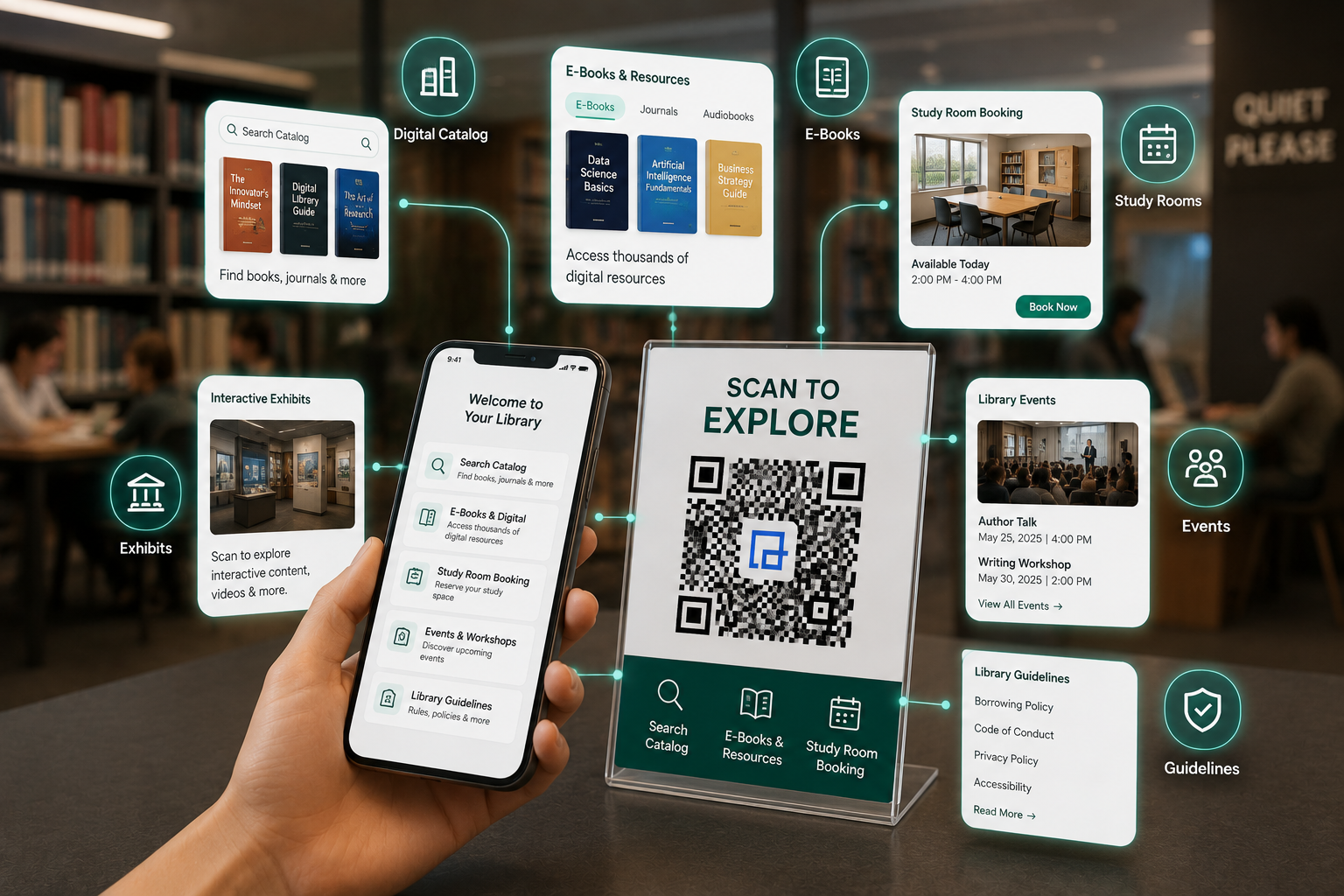
What is a Library QR Code?
A library QR code is a scannable digital barcode placed on bookshelves, study rooms, or front desks. When scanned with a smartphone camera, it instantly directs patrons to digital catalogs, e-books, reservation forms, or audio tours, eliminating the need to wait in line or use physical catalog terminals.
Transforming Libraries: The Core Benefits
You manage thousands of physical books while serving visitors who expect digital speed. Your physical space must balance quiet environments with instant access. QR codes bridge this gap. They act as quiet, direct links that keep your library quiet while offering helpful digital tools.
When you build a clear QR code strategy, you improve how visitors use your library. Instead of wandering through aisles looking for a lost book or waiting in line at the desk, visitors find what they need on their own phones. Here is how libraries benefit from QR codes:
These updates do more than save time. They change how your community sees your library. By linking physical shelves directly to digital resources, you position your library as a modern community hub, not just a warehouse for paper books.
How to Implement QR Codes in Your Library
Successful QR codes require clear planning. Stick codes on random walls, and visitors will ignore them. Use this practical 10-step guide to build a system that visitors actually use.
Identify library friction points and core services
Audit your physical space. Where do people get lost? Where do lines form? If visitors constantly ask how to book study rooms, put a booking QR code directly on the study room door.
Choose the right QR code type
Decide if you need a standard link, a PDF download, or a sign-up form. For example, use a contact card (vCard) code for librarians so visitors can save their phone number with one tap.
Build mobile-optimized landing pages
A QR code is only as good as the page it opens. If a visitor scans a code to view the catalog, and the site is slow or hard to read on a phone, they will close it. Ensure your target links load in under 3 seconds on standard cellular connections.
Design codes that build trust
Plain black-and-white codes can look like security risks. Add your library's logo, use your brand colors with high contrast, and add a clear frame. A label that says "Scan to Reserve Room" gets far more scans than a bare code.
Test on multiple mobile devices
Never assume a code works just because it scans on your new phone. Test on older Androids, cheap phones, and tablets. Test them on the physical shelf under harsh library lights or in dark corners to ensure easy scanning.
Pick smart physical spots
Place codes at eye level in busy areas. Ensure they are printed large enough (at least 2x2 inches for wall posters). Do not place codes on swinging doors or in dark corners where cameras struggle to focus.
Train your library staff
Your front-line staff need to know how the system works. Ensure librarians and volunteers know where codes point and how to help visitors who struggle to scan them. Run a quick 15-minute training session before launching.
Tell your visitors about the codes
Do not launch silently. Place a small sign near the entrance. A simple graphic showing "Open Camera, Point at Code, View Map" helps older visitors or those unfamiliar with the tech.
Check your data and adjust
Watch your scan dashboard. See which sections get the most scans and which codes get ignored. If a code on a bulletin board has zero scans, move it to a better spot or rewrite the label.
Use Dynamic QR Codes for easy updates
Use dynamic codes so you do not have to reprint signs. You can keep the same physical code on the shelf but change the web link behind it when schedules or catalog links change.
Library QR Code Use Cases
Libraries wear many hats. You run community programs, support research, and manage media. Here is how libraries deploy QR codes to solve specific daily problems.
Book Information & Reviews
Dynamic Website QRTarget: Fiction & New Releases Stacks
The Challenge: Visitors want summaries or reviews before borrowing a thick book, but physical book jackets have limited space, and looking up reviews on catalog computers takes too much time.
The Solution: Put QR codes on shelf labels under popular books. Scanning links to Goodreads or your catalog page.
The Benefit: Visitors make quick choices in the aisle. This makes browsing more fun and reduces questions at the desk.
Digital Catalog Access
Multi-Link QRTarget: Endcaps & High Traffic Corridors
The Challenge: During busy after-school hours, your catalog computers have long lines, making visitors wait just to find a shelf location.
The Solution: Post QR codes on shelf endcaps. These open your mobile catalog, library app, and a floor map.
The Benefit: Every phone becomes a personal catalog terminal. Visitors search, hold, and locate books on their own devices.
Study Room Booking
Form / URL QR CodeTarget: Private Rooms & Collaborative Spaces
The Challenge: Paper signup sheets or manual desk bookings take up staff time and cause double-bookings.
The Solution: Put a QR code on each study room door linking to your booking system.
The Benefit: Instant, self-service bookings. Visitors scan, book, and sit down. The schedule updates in real-time.
Library Events & Programs
Dynamic URL QRTarget: Bulletin Boards & Community Spaces
The Challenge: Libraries run great classes and events, but printed flyers get forgotten, leading to low turnouts.
The Solution: Put QR codes on event posters linking to RSVP forms or calendar invites.
The Benefit: You capture interest immediately. Visitors sign up on the spot, giving you accurate headcounts.
E-books and Audiobooks
App Store QR CodeTarget: Physical Shelves & Check-out Desks
The Challenge: Many visitors only browse physical shelves and do not know you have thousands of free e-books on apps like Libby.
The Solution: Place printed placeholders on shelves for popular digital books with a QR code linking to the app.
The Benefit: This combines physical browsing with digital borrowing. It drives up usage for your paid digital catalogs.
Choosing the Right QR Code Type
You need different codes for different jobs. Selecting the right format for your specific goal keeps things simple for your visitors.
Website URL QR
The Standard Workhorse
How it works: Directs traffic immediately to targeted library web pages. By far the most common format.
Best Use: Link to digital catalogs, event registration landing pages, or specific author profiles. Deploy these on posters, shelf talkers, and general promotional materials.
PDF QR Code
The Paper Saver
How it works: Hosts a PDF file securely in the cloud and initiates an immediate document download upon scanning.
Best Use: Library bylaws, computer use policies, floor maps, or monthly multi-page newsletters. Place prominently at the entrance or the main circulation desk to save thousands in printing costs.
Multi-Link QR
The Digital Directory
How it works: Opens a customized, mobile-friendly landing page containing multiple buttons to various destinations (like Linktree).
Best Use: Consolidating library social media, OPAC links, app downloads, and contact info. Perfect for printing on library welcome brochures or membership cards.
Form QR Code
The Data Collector
How it works: Opens a highly optimized digital form integrated directly with your database or email.
Best Use: Visitor feedback, digital membership applications, or book request forms. Post these near exits, customer service points, or on the circulation desk to collect data efficiently without manual entry.
Location QR
The Navigator
How it works: Stores geographic coordinates and instantly opens the patron's native mapping app (Google Maps/Apple Maps) with directions pre-loaded.
Best Use: Guiding patrons to specific sister branches, overflow parking lots, or off-site library events. Ideal for print advertising and external community marketing.
Email QR
The Support Line
How it works: Automatically drafts an email on the user's phone, pre-filling the destination email address, subject line, and even boilerplate body text.
Best Use: Research assistance and reference desk inquiries. Place on isolated study carrels so patrons can email a librarian for help without losing their seat.
Library Patron Privacy & Data Security
Patron privacy is a strict mandate. You protect reader history and personal details. We designed QRTRAC to honor that trust. Our codes do not collect personally identifiable information (PII) during a scan. We track anonymous, grouped data to help you measure success. This includes:
- Timestamp: The exact time and date the scan occurred.
- Approximate Location: Derived at the city or regional level based on the ISP's IP address routing (not precise GPS tracking).
- Device OS and Browser: E.g., iOS Safari or Android Chrome, to help IT teams optimize landing pages.
- Total vs. Unique Scans: Basic tracking to see if the same device scanned the code multiple times.
The system does not track names, card numbers, or individual search history. By using a secure platform, you can share scan counts with your board without compromising patron trust.
Accessibility (ADA/WCAG) Best Practices for QR Codes
Libraries serve everyone. Your digital tools must be accessible to all. Use these standards to keep your QR codes compliant:
1. Physical Tactile Markers
Place raised borders or Braille labels next to codes so visually impaired visitors can find them. Keep heights consistent (like 48 inches from the floor) across the building so visitors know where to scan.
2. High-Contrast Printing
Print dark codes on light backgrounds. Avoid gray on white or dark blue on black. Black on white remains the most reliable and readable option for people with low vision.
3. Accessible Landing Pages
Ensure the linked pages meet WCAG standards. The pages must work with screen readers, have clear alt-text for images, and support basic keyboard navigation.
4. Clean Alternatives
Always offer another option. Print a short, easy web address below the code for people without smartphones so they can access the same information on catalog terminals.
Budget & ROI Justification for Library Boards
To get budget approval, show your board how QR codes pay for themselves across three main areas:
-
Area 1: Paper and Printing Savings
Calculate what you spend on flyer, map, and rule sheet printing. Because dynamic codes let you update content online without reprinting signs, you can buy durable acrylic displays and cut recurring print bills.
-
Area 2: Saved Staff Time
Track how often staff answer basic questions about directions or room bookings. Self-service QR codes handle these questions, freeing librarians for deeper research support and community programs.
-
Area 3: Boosting Digital Book Use
Libraries pay high fees for digital databases and e-books, but they often sit unused. Placing codes in physical aisles drives traffic to these paid assets, lowering your cost-per-circulation.
Best Places to Use QR Codes in Libraries
Smart placement drives scans. Put codes where they match what the visitor is doing at that exact moment:
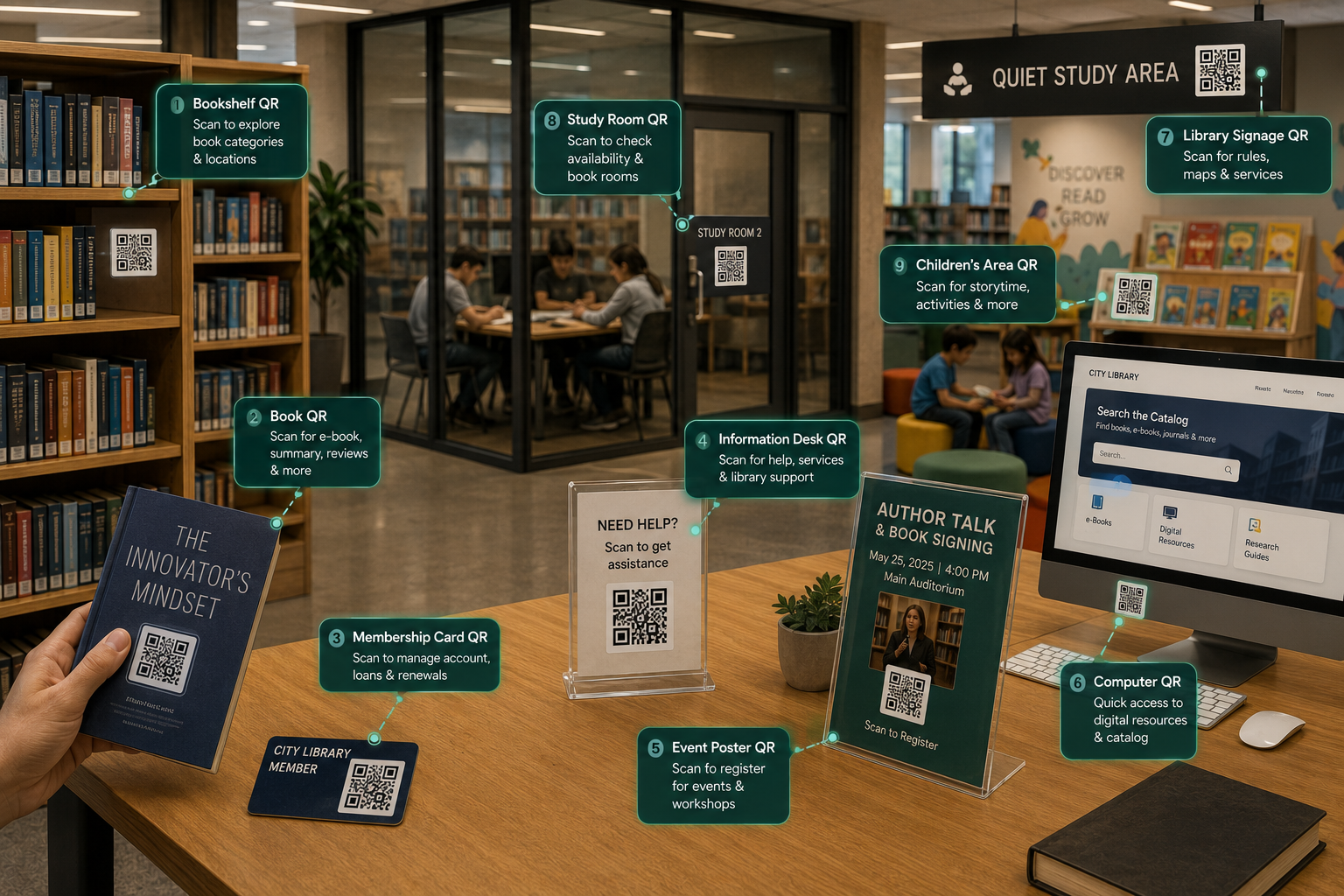
- ▶ Bookshelves & physical books: Link to catalogs or similar recommendations right from the shelf.
- ▶ Entrances & notice boards: Show digital card signups, building guidelines, and hours.
- ▶ Study rooms: Place on glass doors for quick calendar bookings.
- ▶ Help desks: Use email codes to let shy visitors text questions without standing in line.
- ▶ Children's areas: Link to interactive storytelling calendars or reading games.
- ▶ Digital displays: Provide quick links to download your library’s mobile apps.
How QR Codes Improve the Library Visitor Journey
QR codes help visitors help themselves. They act as quiet digital guides at every step:
1. Entering the library
A patron scans a code in the lobby. This loads a layout map, the WiFi login details, and today’s event schedule directly to their screen.
2. Finding books
Browsing the sci-fi aisle, they scan a shelf tag. It shows similar authors and e-book versions that are available to download right now.
3. Viewing book info
They pick up a new book and scan the barcode. This displays professional reviews and reading lists without needing a desktop search station.
4. Borrowing books
At self-checkout, they open their digital library card from their phone's wallet by scanning a quick-link code on the desk.
5. Accessing digital resources
Before leaving, they scan a poster to download Libby, linking their card for instant audiobook checkouts on their commute home.
6. Providing feedback
They scan a feedback code on the exit door to leave a quick rating, helping staff track visitor satisfaction automatically.
Dynamic vs Static QR Codes
Understanding the difference between Dynamic and Static QR Codes will save your team from reprinting signs when links break.
Dynamic Codes
- Editing: Change the destination link anytime inside your online account without changing the printed code.
- Analytics: Tracks scan totals, device types, scan times, and general locations.
- Library Updates: Ideal for changing schedules, seasonal displays, and recurring programs.
- Maintenance: Fix broken web links instantly from your computer.
- Scalability: Easily manage hundreds of codes from one dashboard.
Static Codes
- Editing: Permanent. The link is locked in the print pattern and cannot be edited.
- Analytics: No scanning data or analytics available.
- Library Updates: Only useful for simple, permanent links like your homepage.
- Maintenance: If a link changes or breaks, you must reprint and replace the sign.
- Scalability: Hard to manage across multiple rooms and shelves.
Common Mistakes to Avoid
Avoid these simple layout errors to keep your system working smoothly for visitors and staff:
Critical Deployment Errors
- Using static codes: This forces you to reprint signs every time a web page changes. Always use Dynamic codes for physical signs.
- Bad code placement: Putting codes too high, too low, or behind shiny glass makes scanning slow and difficult.
- No instructions: Visitors ignore bare codes. Always add a frame with text like "Scan for Audio Tour."
- Broken target pages: If you do not test your links regularly, visitors will get frustrating 404 errors.
- Low-resolution printing: Small, blurry, or fuzzy codes will fail to scan. Always export and print in vector formats (SVG).
Best Practices for Library QR Codes
Follow this checklist to guarantee a great visitor experience and high scan rates across your entire catalog:
Measuring Performance
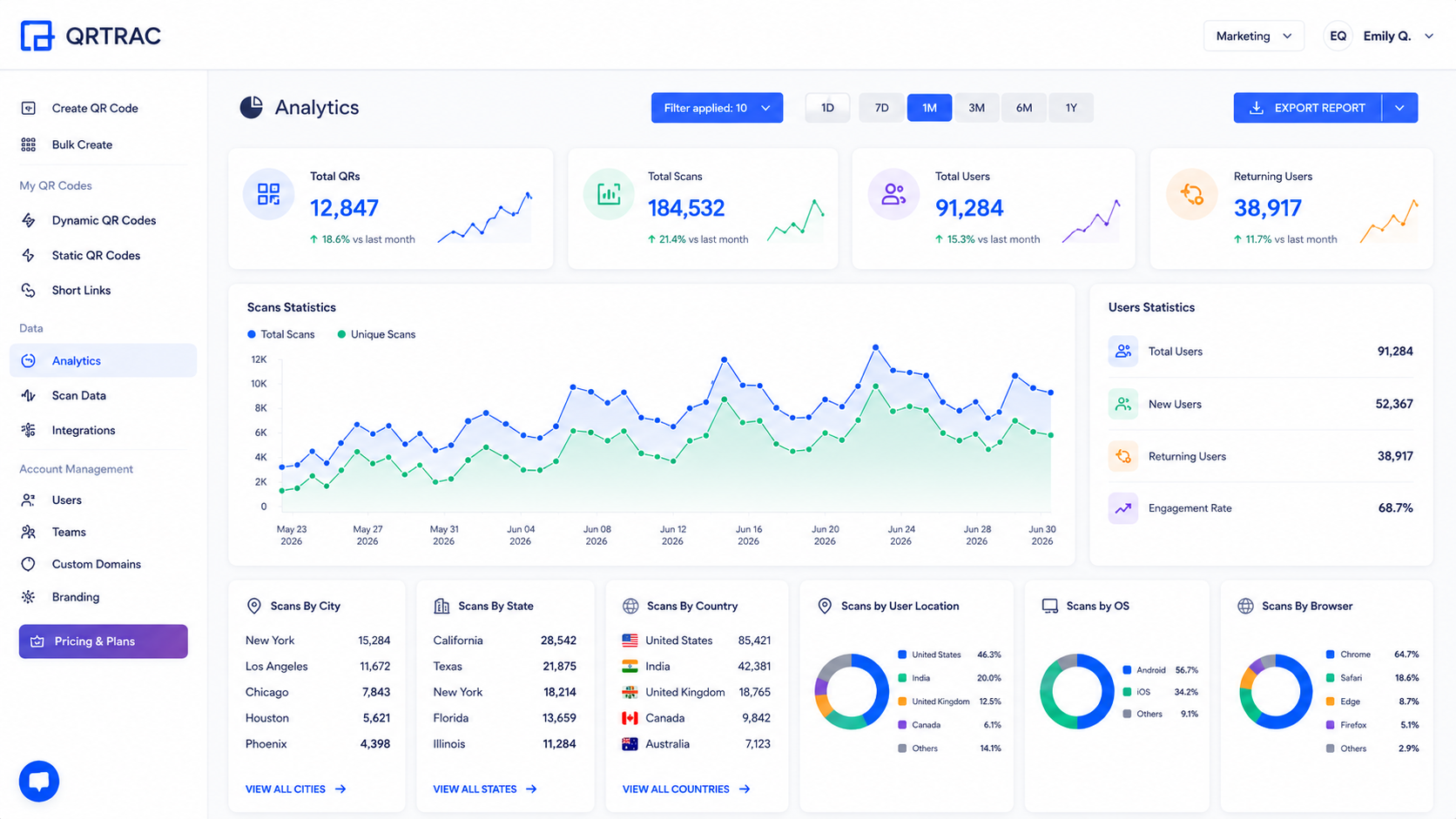
Data helps you make better decisions. With our analytics, you can track exact usage without tracking people. Monitor total scans and unique visitors to see which programs are popular. Check device types to make sure your pages load fast on the phones your visitors actually carry.
Deployment Checklist
Before launching a new digital initiative to the public, have your IT and circulation teams run through this final quality-assurance checklist:
- QR Codes tested natively: Verified across multiple iOS and Android devices under library lighting.
- Mobile compatibility verified: All landing pages render perfectly and quickly on smartphones.
- Book links confirmed active: Destination URLs point accurately to the correct library catalog resources.
- Library branding applied: Logos, contrast, and brand colors match the library's style guide.
- Staff trained: Librarians know exactly how to assist confused patrons with scanning.
Frequently Asked Questions
Can libraries update QR Codes after printing?
Yes, if you use Dynamic QR Codes. The physical square pattern remains exactly the same on the wall, but the destination URL can be updated instantly in the QRTRAC backend dashboard. This saves libraries thousands of dollars in acrylic sign reprinting costs over the years.
Which QR Code type is best for physical books?
A Dynamic URL QR Code is considered the industry best practice. It can link patrons directly to professional reviews, author video interviews, or the digital OPAC catalog to see if other branch copies or audiobook variants are currently available for immediate checkout.
Can QR Codes fully replace printed library guides?
Absolutely. By placing a prominent QR Code at the entrance linking to a mobile-responsive digital map and interactive guide, libraries can drastically reduce paper waste, lower print budgets, and ensure patrons are always viewing the most up-to-date floor plans.
Do patrons need a special app to scan library QR codes?
No. Nearly all modern smartphones (both iOS and Android) released in the last seven years have QR code scanning capabilities built natively into their default camera apps. Patrons simply open their camera, point it at the code, and tap the notification link that appears on their screen.
How do we handle broken links on older permanent signage?
If you used Dynamic QR codes, a broken link (404 error) is a minor administrative fix. Simply log into your QRTRAC dashboard, find the specific campaign, and paste in the new working URL. The physical sign on the wall remains perfectly functional and does not need to be touched.
How can QR Codes improve book discovery in the stacks?
By linking physical shelves to digital recommendation engines. A patron browsing the mystery section can scan a shelf-talker code to instantly view top-rated mystery e-books available for download, bridging the gap between physical browsing and digital circulation.
Can QR Codes simplify library membership onboarding?
Yes. Linking a Form QR Code to a secure digital sign-up sheet allows patrons to register for a library card directly from their smartphones in the lobby. This removes physical paperwork, unreadable handwriting, and tedious manual data entry for your circulation staff.
How do libraries track QR Code usage without violating privacy?
Through enterprise generators, libraries can access dashboards showing aggregated telemetry (how many times a code was scanned, time of day, and general device type). This data is completely anonymized and does not collect personally identifiable information (PII), ensuring strict compliance with ALA privacy guidelines.
Are QR codes compliant with ADA and WCAG accessibility standards?
QR codes themselves are accessible if deployed correctly. The best practice is to pair physical QR codes with tactile markers or Braille signage so visually impaired patrons can locate them. Also, the destination website must strictly adhere to WCAG 2.1 AA standards for screen reader compatibility.
Can QR Codes help promote library events?
Yes, placing codes prominently on event flyers allows patrons to immediately RSVP or add the event to their digital calendar (via .ics files). Striking while their interest is high significantly boosts attendance rates and provides better headcount estimates for staff.