"White label" covers three different products. Here's how to tell which one a vendor is selling, what each costs, and how to test it before anything goes to the printer.
Picture 4,000 table tents already printed. Every code opens a link on a short domain nobody at your company recognizes, and the first guest who checks the URL before tapping asks whether it's safe. A white label QR code provider fixes that, but only if you buy the right kind of white label.
The trouble is that vendors use the term for three different things. Some mean your domain in the scan URL and nothing else. Others also rebrand the dashboard your team logs into. A few add separate client workspaces so you can resell the service. The question isn't whether a tool offers white label. It's which level, and what it costs.
Key takeaways
White label comes in three levels: your domain in the scan URL, a branded dashboard, and isolated client workspaces. Ask every vendor which one they mean.
Get answers in writing on SSL, domain slots, email sender, workspace isolation and data export before you compare prices.
Printed codes depend on the domain staying yours. Register it under your company, not a freelancer or an agency.
Price jumps sharply between levels, so decide which level you need first.
The Three Levels of White Label
Sort any vendor's features into these three levels. Each one builds on the one before it.
Each level includes everything inside it.
Level
What becomes yours
What stays the vendor's
Typical buyer
1. Custom domain
The URL a scanner sees, such as qr.yourbrand.com/menu
Dashboard, login page and system emails
One brand printing menus, packaging or signs
2. Branded dashboard
Dashboard address, logo, favicon, company name and email sender
The underlying platform
Companies giving teams, franchisees or partners a login
3. Client workspaces
A separate, isolated workspace for each client
The underlying platform
Agencies, print shops and software companies reselling QR codes
Level one is the cheapest and covers most single brands. Levels two and three matter once someone outside your own team logs in: clients, franchisees or partner brands. Plenty of tools call themselves white label and stop at level one, so the person logging in still sees the vendor's name, logo and emails even though the scan URL is yours.
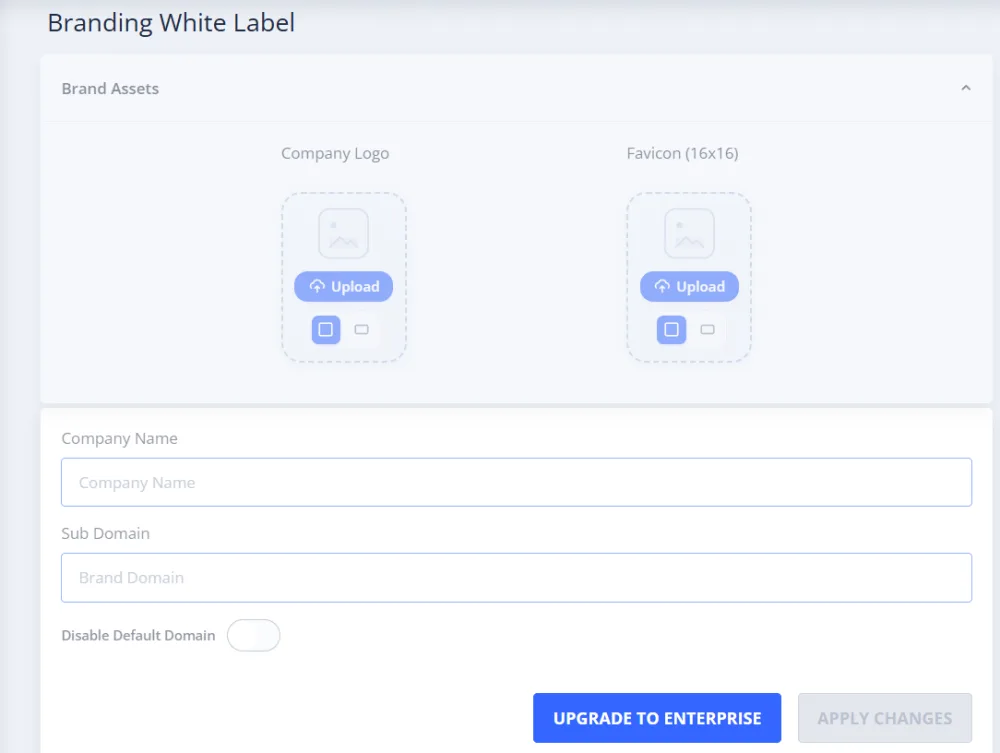
Level 2 in practice: QRTRAC's Branding White Label panel, where you set the logo, favicon, company name and dashboard subdomain.
Why the Scan URL Matters Most
When someone points a phone at a code, the camera shows the link before the page opens. That preview is the moment of trust. A domain the scanner has never heard of looks like any other link shortener, while qr.yourbrand.com looks like you.
People are being taught to read that preview. In a December 2023 consumer alert, the FTC told consumers: "If you see a QR code in an unexpected place, inspect the URL before you open it." It also advised looking "for misspellings or a switched letter." A recognizable domain passes that check. An anonymous one gives a careful scanner a reason to walk away.
So whichever level you buy, level one is the part every scanner sees. For more on the trust and safety side, see why custom domain QR codes build trust.
10 Questions to Ask Any Provider
Feature pages tend to skip the details that cause trouble later. Ask these, and get the answers in writing.
Ask
Why it matters
1. Which level of white label does this plan include?
The single biggest source of mismatched expectations.
2. Does my domain apply to dynamic codes?
Static codes carry the destination inside the image, so there's no domain to brand. Only dynamic, redirect-based codes use yours.
3. Do you issue and renew the SSL certificate?
An expired certificate puts a browser warning in front of every scan. It should be automatic and free.
4. Can I use a subdomain like qr.yourbrand.com?
Keeps your main website's DNS untouched.
5. How many domains are included, and what do extras cost?
Multi-brand and multi-region teams hit this limit first.
6. Can I remove the vendor's "Powered by" label?
A vendor badge on your landing pages undoes the branded URL.
7. Can system emails come from my own sender?
Invitations and password resets from a vendor address tell clients who you buy from.
8. Are client workspaces fully isolated?
One client must never see another's codes or data. Required before you resell.
9. Can I export my paths and destinations?
Without an export, switching vendors means reprinting.
10. Can existing codes move onto my domain?
In some tools, codes made before you attached a domain stay on the vendor's.
Who Owns the Domain, and What Happens When You Leave
This is the part vendor pages rarely mention. Each QR code encodes your full URL, path included, such as qr.yourbrand.com/spring-menu. The platform only answers requests sent to that address. Everything else is yours to protect.
Register the domain in your company's account, not under the freelancer or agency who set it up, and put the renewal date on a shared calendar.
If the registration lapses, or you remove the domain from the platform, every printed code on it stops resolving.
To switch vendors without reprinting, the new platform has to answer the same paths on the same subdomain. That only works if you can export your path list from the old one.
Owning the domain is also what keeps you portable. Because you control its DNS, you can point it at a new provider later. Codes on a vendor's own short domain can't move with you.
For Agencies: Put Every Client on Their Own Domain
If you manage QR codes for several customers, don't print all of them on your agency's domain. Give each client codes on their own domain, such as qr.clientbrand.com. Their customers then see a name they already trust, which is the whole point of level one, and you aren't the weak link if a scanner checks the URL.
It also protects both sides of the relationship. The domain stays registered to the client, so their printed codes keep working whatever happens to the account, and you never hold a client's packaging hostage by accident. Clients notice that, and it makes renewing with you an easy decision.
Then let clients serve themselves. With level three, each client gets an isolated workspace on your branded dashboard. They log in, edit destinations, create new codes and check their own scan analytics, without filing a ticket and without seeing any other client's data. You stop spending hours on "can you change the menu link" requests and spend them on work clients pay you more for.
Per-client domains: each client's scans run on qr.theirbrand.com, with SSL handled for you.
Self-serve workspaces: clients manage their own codes, campaigns and analytics, and can only see their own.
Your brand on the dashboard: clients log in at your address, see your logo and get emails from your sender.
On QRTRAC, this setup is the Agency plan. See how client workspaces and per-client domains work on the white label QR code generator page.
What Each Level Costs
Vendors price white label very differently, so compare by level, not by plan name. QRTRAC's white label help article puts the line plainly: a custom domain only masks the scanning URL, while full white label lets you resell or redistribute the service. Here's how that maps to QRTRAC's plans, in USD:
Plan
Price
Level 1: Custom domain
Levels 2 and 3
Kickoff
$5/mo or $49/yr
Add-on, $10/mo or $100/yr
No
Startup
$15/mo or $100/yr
Add-on, $10/mo or $100/yr
No
Business Plus
$49/mo or $400/yr
1 included
No
Legendary
$99/mo or $899/yr
1 included
No
Agency
$500/mo or $4,999/yr
Custom
Yes, up to 25 seats
Enterprise
From $10,000/yr
Custom
Yes, up to 50 seats
On the smaller plans, check the math. Startup plus one domain comes to $25 a month, while Business Plus includes a domain for $49 a month along with more codes and seats. Choose on what else the plan has to do, not on the domain alone. Every plan from Startup up can also remove the "Powered by QRTRAC" label from landing pages and short links.
The jump from level one to levels two and three is large everywhere, because you're buying a platform you can put clients on. If you're an agency or print shop, see how QRTRAC's white label QR code generator handles client workspaces, or the reseller program.
Test the Setup Before You Print
Connecting a domain takes one DNS record and usually goes live within 15 minutes to 48 hours. The custom domain setup guide walks through it registrar by registrar. Once it's live, an hour of testing costs less than one reprint. Run these checks on a single code before you order 4,000 of anything.
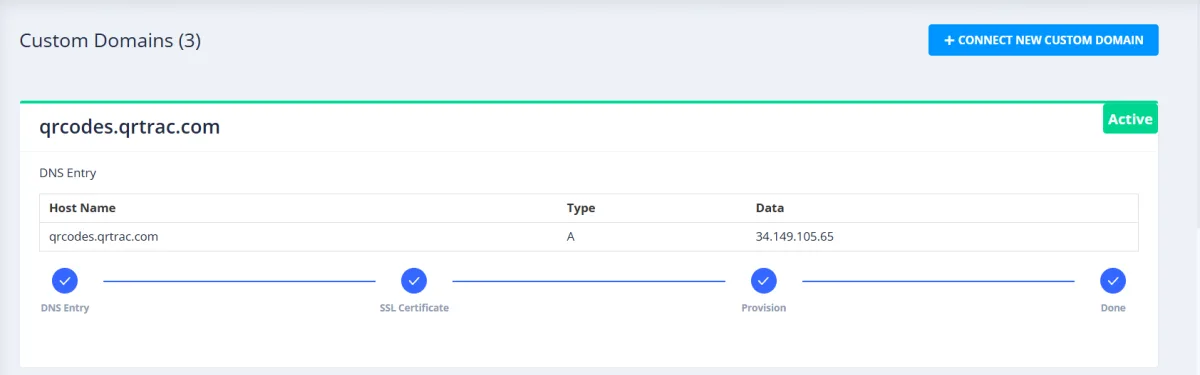
Don't print until all four steps are checked and the status reads Active.
Check
How to run it
What a pass looks like
Domain status
Attach the subdomain and wait
Status reads Active
HTTPS
Open the subdomain in a browser
Padlock shows, no warning
Encoded URL
Create a dynamic code and read the URL behind it
Your subdomain appears, not the vendor's
Real scans
Scan with an iPhone and an Android phone, on cellular and on Wi-Fi
Both land on the destination
Edit
Change the destination and scan the same printed image again
New page loads, no new image needed
Analytics
Check the dashboard after those scans
Scans are logged
Branding (levels 2 and 3)
Invite a teammate or test client
Invitation shows your logo and sender
Whichever provider you choose, decide the level first and the plan second. Level one protects trust at the moment of the scan. Levels two and three matter once other people log in under your name.
Frequently Asked Questions
What is a white label QR code provider?
A QR code platform that lets your brand replace the vendor's. At the simplest level, the scan URL uses your own domain. At higher levels, the dashboard, login page and system emails carry your name too, and each client gets a separate workspace so you can resell the service.
Is a custom domain the same as white label?
No. A custom domain only changes the URL a scanner sees. A complete white label setup also rebrands the dashboard your team or clients log into, and lets you resell or redistribute the service.
What should I ask a white label QR code provider before buying?
Ask which level of white label is included, whether SSL is issued and renewed for you, how many domains your plan covers, whether system emails can come from your own sender, whether client workspaces are fully isolated, and whether you can export your paths and destinations if you leave.
How much does white label QR code software cost?
It depends on the level. On QRTRAC, a custom domain is included on Business Plus ($49/mo) and Legendary ($99/mo), or $10/mo as an add-on on smaller plans. Both the Agency plan ($500/mo or $4,999/yr) and Enterprise plan (from $10,000/yr) support full white-label functionality, and both plans include a branded dashboard and separate client workspaces.
What happens to printed codes if I lose the domain?
They stop resolving. Each code contains a URL on your domain, so keep the registration current and in your company's own account, not a freelancer's or agency's.
Can I resell QR codes under my own brand?
Yes, with level three white label. You need a branded dashboard, your own email sender, and client workspaces that keep each client's codes separate. Put each client's codes on their own domain, and let them manage their codes and analytics self-serve in their workspace. On QRTRAC that's the Agency or Enterprise plan.
Put Your Own Name on Every Scan
Start with a custom domain on any plan, or go full white label on Agency. Try it free for 7 days, no credit card required.
 By Eshwar Deshmukh
· Published