Festival Events Made Simple with QR Codes
Run your entire food festival, beer crawl, or wine walk with a single QR code. Attendees scan once to get their coupon pass. They redeem at different vendor stalls using local PINs, while you track every scan live.
















Brands that trust QRTRAC
















See It In Action
Real participant experience from scanning to redemption
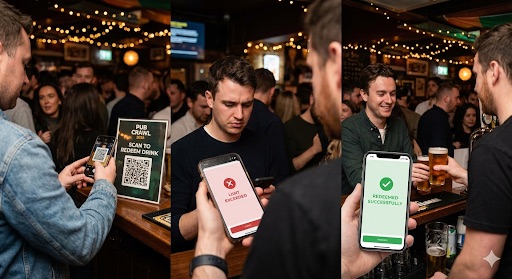
How it looks: Scan QR pass → View scan count → Claim drink or food discount
Try It Yourself
Grab your phone and try it. See exactly what your attendees and vendor staff experience during an event.
Participant Experience
What your attendees see. Open the links below to test the mobile coupon page. No downloads needed.
Click any coupon link below to see the participant experience. When opened, you'll see exactly what participants see when they scan a festival QR code. You can download the coupon image and show it to vendor staff for redemption.

This is what participants scan
Scan this QR code with your phone camera to access the coupon
What you'll see: The coupon page opens instantly with your discount. You can download the coupon image and show it to vendor staff for redemption at any participating vendor.
Vendor Staff Redemption
How vendor staff accept coupons. They scan the customer's pass, enter a 4-digit PIN, and mark it used. Try it below.
Experience the vendor staff redemption flow yourself. Follow the simple steps below to see how easy it is for vendor staff to validate and redeem coupons. The entire process takes just seconds and requires no special training or apps.
Step-by-Step Redemption Instructions
- 1 Open a demo coupon link above.
- 2 Scan the validation code on the coupon screen.
- 3 Enter the vendor PIN (e.g., '1234') to approve.
- 4 Tap redeem. The system immediately logs the sale and updates your dashboard.
No App Required
Use any device with a web browser—phone, tablet, or computer. No downloads or installations needed.
Instant Redemption
Scan and redeem in seconds—no training needed. The process is intuitive and works the same way every time.
Automatic Vendor Tracking
Every redemption is automatically tracked and attributed to your vendor location for instant analytics.
What you'll experience: The redemption takes seconds. Scan the pass, enter the vendor PIN, and the ticket updates live. The system credits the correct food stall in the background.
Complete Admin Control & Management
Upload vendor lists, set scan limits, assign staff PINs, and watch redemptions roll in. Keep full control of your event rules from one screen.
Walkthrough: Setting Up Your Event
See how to generate QR codes, set up staff passwords, and launch your crawl
Click to load video
Your Controls
You run the show. Generate QR batches, assign staff PINs, set expiration dates, and monitor live scan maps.
Bulk QR Generation
Generate unique QRTRAC coupons in bulk with customizable token limits and settings.
Staff PIN Management
Assign unique passwords per venue. Upload vendors list and automatically assign secure passwords.
Scan & Punch Limits
Configure redemption limits per user, set token rules, and control event parameters.
Real-time Dashboards
Set expiration dates and monitor everything through comprehensive redemption dashboards.
Dashboard Features
QR Batch Generator
Print physical flyers or email bulk passes. Every attendee gets a unique, trackable entry code.
Vendor Password Manager
Set unique PINs for the taco truck, the brewery, and the ice cream stand. No shared accounts needed.
Redemption Dashboard
See which food stalls are busiest. Spot duplicate scans instantly and track vendor payouts with hard data.
Event Settings
Limit passes to 3 beer tastings per ticket. Set the system to auto-expire at midnight when the event ends.
Get Ready in 5 Steps
We built this to launch quickly. Here is the step-by-step setup for a weekend festival:
- 1
Create 4-Token QR Batch
Generate 500 entry passes. Limit each pass to 4 total drinks or tastings.
- 2
Upload Vendors List
Import your partner list. Add the BBQ tent, the local brewery, and the cocktail bar.
- 3
Assign Passwords
Assign a PIN to each venue (e.g., 1001 for BBQ, 1002 for Brewery) so staff can approve scans.
- 4
Enable Expiry
Set the end date. The links stop working Sunday at 8 PM.
- 5
Distribute QR to Attendees
Mail out the tickets or print a giant banner at the front gate.
That's it! Once set up, you can monitor all redemptions in real-time through your admin dashboard, see which vendors are performing best, and track participant engagement throughout the event.
How Festival QR Codes Work
One print run. Twenty vendors. No spreadsheets. Perfect for street fairs, drink crawls, and community events.
For Attendees
- 1
Scan the QR Code
They scan the entry QR at the gate using their default phone camera. No app download needed.
- 2
Visit Participating Vendors
They walk up to any food truck or stall and present their digital voucher.
- 3
Redeem at Multiple Locations
They get their discounts or free samples. The system subtracts one punch from their pass limit.
For Vendor Staff
- 1
Scan Participant's Coupon
Staff scan the attendee's mobile coupon using any smartphone camera.
- 2
Enter Unique Password
Staff type their specific 4-digit PIN to mark the coupon as claimed.
- 3
Automatic Tracking
The system logs the date, time, and vendor name instantly. Your master report updates in real-time.
Built for Crowds, Built for Vendors
Say goodbye to paper tokens and manual tallying.
No App Store Downloads
Attendees scan with their built-in camera. Staff use their own phones to validate. It works on any basic web browser.
Single Pass Entry
Hand out one QR code at registration. That single code works at the taco stand, the wine tent, and the souvenir shop.
Dedicated Vendor PINs
Keep vendors honest. Assign individual PINs so you know exactly who processed which coupon.
Flexible Punch Limits
Cap redemptions (e.g., '5 drinks max per ticket') to protect your vendors' inventory.
Real-time Leaderboard
Watch live redemptions by location. Know which stall is drawing the biggest crowd by 2 PM.
Instant Vendor Payouts
No more counting sticky paper tickets at the end of the night. Filter by vendor name and see exactly how much money each stall earned.
Storefront Details
Show vendor names, booth numbers, and map locations right on the attendee's screen.
Simple Distribution
Send passes via email, text message, or print them on physical wristbands.
Change Offers Live
Swap a discount or update vendor hours instantly. The printed QR codes stay exactly the same.
Automatic Vendor-Wise Redemption Analytics
Find out which food truck ran out of ingredients first. Our platform tracks every single redemption down to the second, linking it to the specific vendor's PIN automatically.
Live Performance Tracking
Watch the live feed of drink redemptions during your crawl.
Automatic Tallying
Redemptions link to the correct booth the moment staff type their PIN.
Clean Exports
Download CSV files for easy vendor payouts on Sunday night.
See It In Action
See how we track redemptions by vendor.
Click to load video
Multi-Vendor Location Redemption
Simplify your logistics. Attendees carry one mobile pass. Staff enter their location PIN. The system handles the rest in the background, updating your dashboards instantly.
No Manual Paper Clutter
Forget tracking physical punch cards. The system auto-links the transaction to the vendor based on the PIN entered.
Vendor-by-Vendor Tracking
Filter reports by location to see exactly which stands processed the most samples.
Fast Operations
Keep lines moving. Redemption takes seconds, so your cashiers don't slow down during peak hours.
See It In Action
Watch how multi-vendor location redemption works smoothly
Click to load video
Event Metrics
What event planners achieve with digital QR coupons:
Designed for Crawls, Fairs, and Festivals
Launch in under ten minutes. Ditch the paper and coordinate with your vendors from one dashboard.
Food & Drink Vendors
Join local street crawls without buying expensive hardware. Just use your staff's existing phones to accept digital passes.
Festival Coordinators
Coordinate neighborhood wine walks or restaurant weeks. Give 30+ locations unique PINs and monitor scans on a central map.
Production Agencies
Deliver hard proof of ROI to sponsors. Show clients exact redemption times and location traffic maps.
How to Launch in 15 Minutes
Skip the complex coding. Here is how you set up your first crawl.
1. Design Your Pass
Create a multi-token coupon in your dashboard. Decide how many scans each ticket holder gets (e.g., 5 total drinks).
2. Import Your Vendor List
Type or upload your participating venues. Assign each one a name, address, and a unique 4-digit security PIN.
3. Print or Email Passes
Send unique QR passes to ticket buyers via email, or print them on lanyard cards for gate pickup.
4. Monitor Scans Live
Open your dashboard during the event to watch scans happen. Export the final logs instantly for vendor payouts.
Ditch the Paper Tokens This Weekend
Get your vendors and attendees on the same page. Start tracking crawls, walks, and street fairs digitally.
Frequently Asked Questions
Everything you need to know about using QR codes for festival events
How do festival QR codes work with multiple vendors?
You generate a single master QR code for your event. Attendees scan it to load their pass on their phone. When they visit a booth, staff scan their screen and enter a unique vendor PIN to validate the drink or food sample. One QR code tracks everything.
Do attendees need to download an app?
No. Attendees scan the QR code with their regular smartphone camera to view their digital pass. Vendor staff use their own mobile browsers to scan and enter PINs. No app store downloads are required.
How do I manage dozens of different vendors?
You upload your vendor list to your dashboard. The system generates a unique PIN for each business (e.g., Booth 1 uses '5582', Booth 2 uses '9041'). When staff enter their PIN during validation, the system automatically tags that specific location.
Can I limit the number of tastings per ticket?
Yes. Set a global punch limit (like 5 total samples per pass). Attendees can redeem at any participating stall until they hit their limit, after which the pass automatically locks.
How do I see which food stalls got the most traffic?
Your live dashboard logs every scan instantly. Because staff enter unique PINs to approve redemptions, you can filter reports by location to see exact scan numbers for each vendor.
How do I hand out the QR codes?
You can email digital passes directly to ticket holders, print them on physical entry cards, or put a large registration banner at the entrance gate for people to scan as they walk in.
What details do I need to input to start?
Just upload your vendor list with booth names and locations. The dashboard automatically handles the rest and generates the secure staff PINs for you.
Can my staff run redemptions on basic phones?
Yes. Any smartphone with a working camera and a web browser can scan passes and enter validation PINs. No app store installs are needed.