Join thousands of businesses using QRTRAC for their QR code needs
12M+
App Downloads
Auto-Detect
Device Type
iOS & Android
Supported
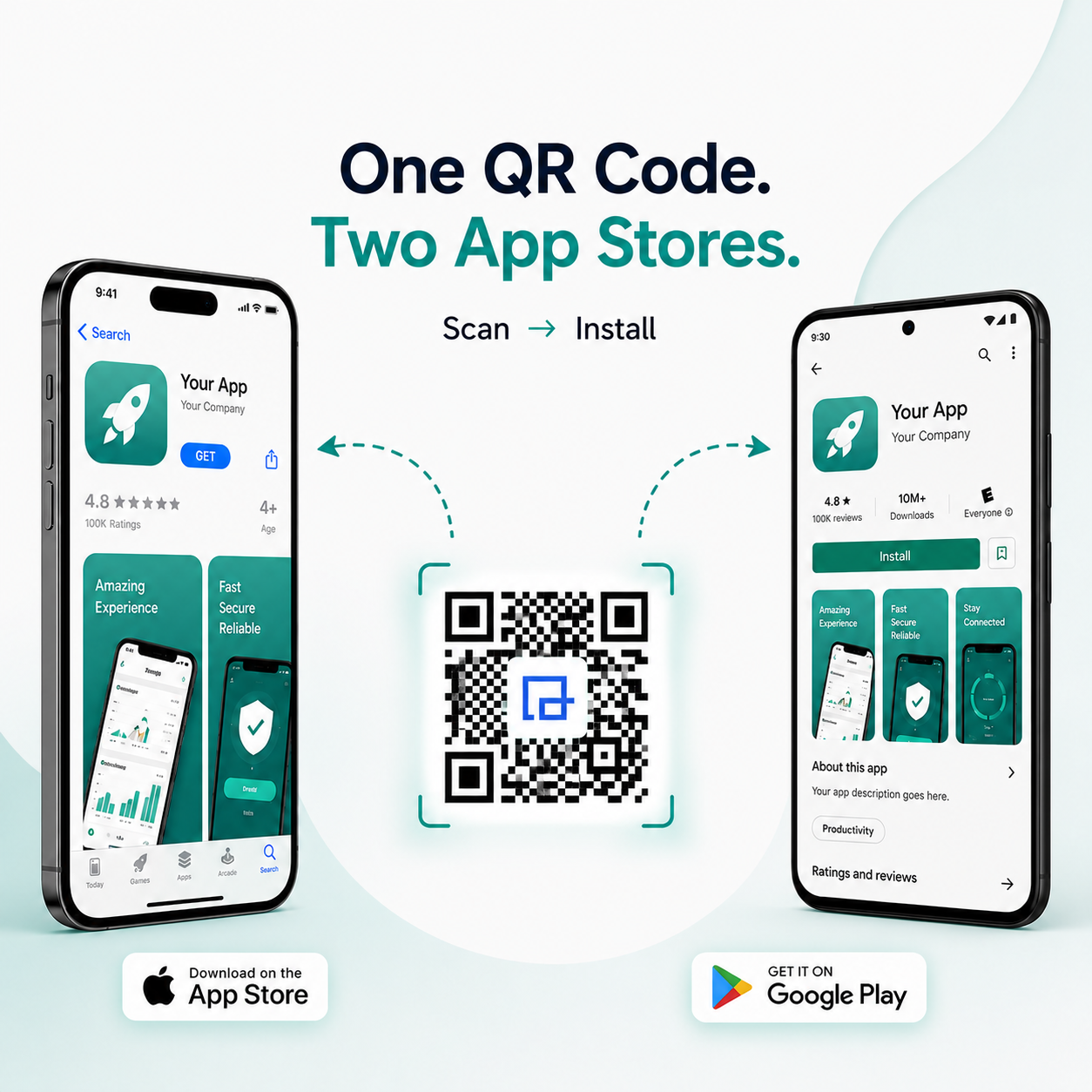
One QR Code
Both Stores
How to Create App Download QR Codes
Generate app store QR codes in 3 simple steps
1
Add App Links
Enter your App Store URL (iOS) and Google Play URL (Android). One QR
code works for both platforms with smart device detection.
2
Customize Design
Add your app icon, choose brand colors, and customize the QR code
appearance to match your app branding.
3
Share & Track
Download and share your app QR code. Track scans and downloads to
measure app promotion effectiveness.
Seamless User Journey
Device Detection Flow
One smart QR code automatically routes every user to their native
app store in milliseconds.
1
QR Scan
User scans the unique code
2
Detect Device
Identifies OS instantly
3
Play / App Store
Routes to correct store
4
Install App
Ready for the user
Why Use an App Store QR Code?
The smart way to drive app downloads with minimal friction
Auto Device Detection
Users are automatically sent to Google Play or App Store based on
their device, eliminating confusion.
Faster Downloads
No searching, no typing app names. One scan and users land directly
on your app download page.
Higher Install Rates
Reduce friction and increase app installs. QR codes eliminate
barriers in the user journey.
Update Anytime
Change app links without reprinting QR codes. Perfect for app
updates or new store versions.
Key Features
Professional app store QR codes with smart device detection and
analytics
Smart Device Detection
Automatically detects iOS or Android devices and redirects to the
correct app store (App Store or Google Play).
Dual Platform Support
One QR code works for both iOS and Android. Users are automatically
directed to the correct app store for their device.
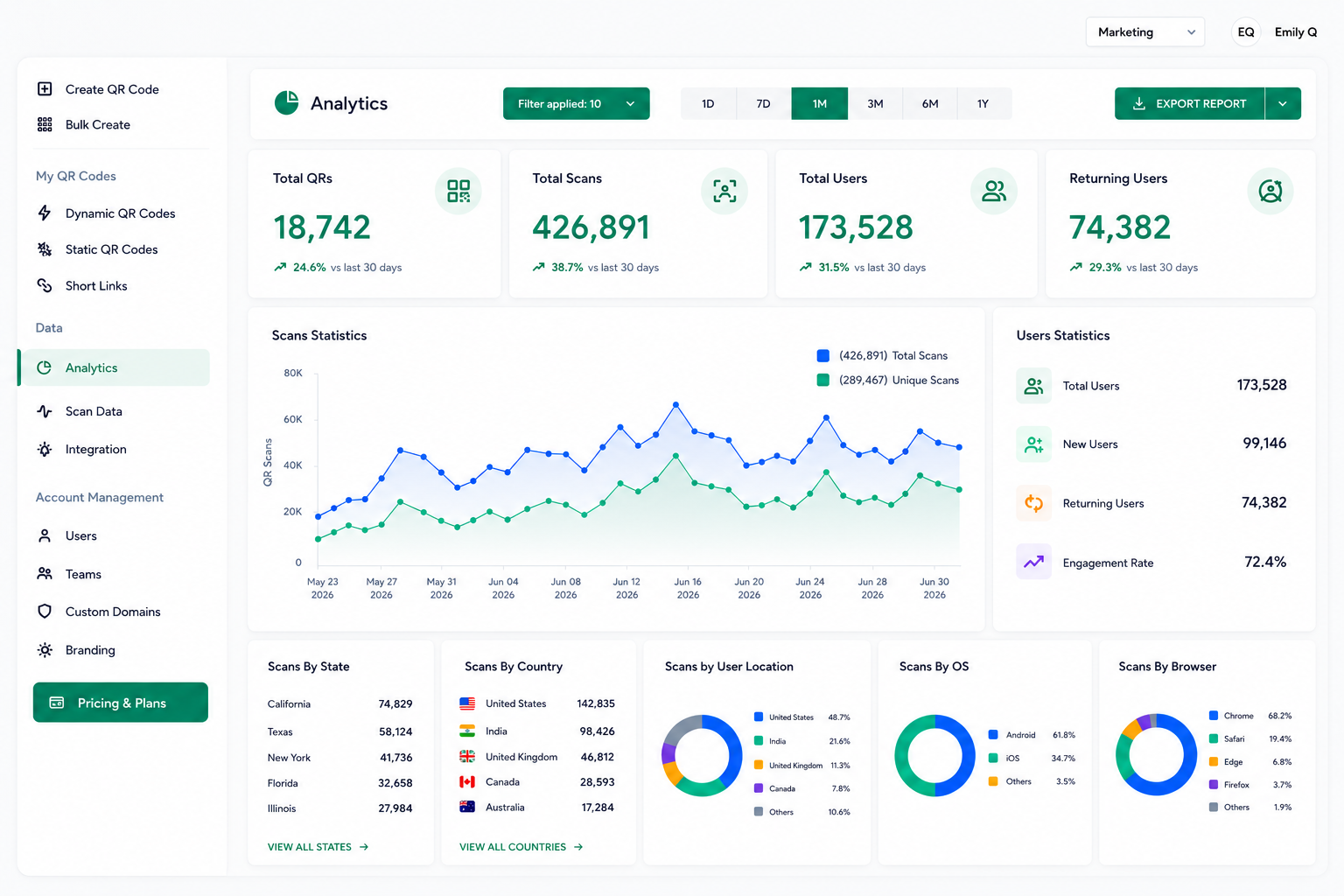
Download Analytics
Track app download QR code scans, device types, and app store
redirects to measure campaign effectiveness.
App Icon Integration
Add your app icon to the QR code design to make it instantly
recognizable and branded.
Easy Updates
Update app store links anytime with dynamic QR codes. No need to
reprint materials when you update your app.
Multiple Formats
Download in PNG, SVG, PDF, or EPS formats for use in print
materials, websites, or digital marketing.
Real-Time App Download Tracking
Monitor your app QR code performance with detailed analytics
TODAY'S PERFORMANCE
Downloads Today
2,847
Android
63%
iPhone
37%
Conversion Rate
92% (+4%)
Track Every Scan and Download
Total Scans
See exactly how many users engage with your app QR code
Device Split
Get a clear breakdown of iOS vs Android users
Geographic Data
Understand where your most active users are located
Conversion Rate
Measure how effectively your QR codes drive actual downloads
Perfect For Any App
Drive mobile app installs across every industry
Mobile App Launch
Drive pre-launch signups and day-one downloads with app store QR codes
SaaS Product
Link to app download from web app or marketing materials
Ecommerce App
Boost mobile shopping with QR codes on packaging and receipts
Restaurant Ordering App
Place app QR codes on menus, tables, and receipts for quick downloads
Fitness & Health App
Share app download QR codes in gyms, studios, and wellness centers
Gaming App
Drive downloads through app store QR codes in ads and gameplay
Use Cases for App Store QR Codes
App Marketing
Promote app downloads in advertisements, flyers, and marketing
materials.
Events
Share app download QR codes at conferences, trade shows, and events.
Product Packaging
Include app store QR codes on product packaging for companion app
downloads.
In-Store Displays
Place app QR codes in retail stores and physical locations.
LIVE
Real-Time Analytics
2.4K
Scans Today
100%
Success Rate
Real-Time Scan & Click Analytics for QR Codes and Links
Elevate your QR code campaigns with QRTRAC’s real-time analytics. Track unique scans, user behavior, and location data with anonymized IP and geo-location insights. Export first-party scan data for a complete view of your campaign's success and make data-driven decisions to optimize performance
First Party Scan Data
Export scan data to learn about your QR code campaign performance
Real Time Analytics
Get instant insights into unique users, scan frequency, and location data to optimize your campaigns.
Frequently Asked Questions
Common questions about app store QR codes and mobile app downloads
How do app store QR codes work?
App store QR codes link to your app's download page. When scanned, they detect the device type (iOS or Android) and automatically redirect to the App Store or Google Play Store, opening your app's download page.
Do I need separate QR codes for iOS and Android?
No! One app store QR code works for both platforms. Our smart device detection automatically redirects iOS users to the App Store and Android users to Google Play Store.
Can I track app downloads from QR codes?
Yes! You can track app QR code scans, device types, and app store redirects. While we can't track actual downloads (that's handled by the app stores), you can see how many people scanned and were redirected to download your app.
What if my app isn't in the app stores yet?
You can create QR codes that link to a landing page with app information, pre-registration, or beta testing signup. Once your app is live, you can update the app download QR code to link directly to the app stores.
Can I update my app store links without reprinting?
Yes! With dynamic QR codes from QRTRAC, you can update app store links anytime. No need to reprint materials when you update your app or change app store destinations.
Which file formats are available for app QR codes?
Download your app store QR code in PNG, SVG, PDF, or EPS formats for use in print materials, websites, digital marketing, or product packaging.