Get rid of fragile paper menus and outdated directory binders. Hotel QR codes let your guests scan to order dinner, join the Wi-Fi, and register instantly. You save thousands on print costs while giving travelers the fast, mobile experience they get at home.
We wrote this guide for hotel general managers, operations directors, F&B leads, and guest relations teams. Whether you run a 15-room boutique inn or a 500-room beach resort, you will find actionable steps to set up secure, custom-branded QR codes that actually get scanned.
Benefits of QR Codes in Hospitality
Your guests run their lives from their phones. They book flights, text friends, and pay for coffee in seconds. When they walk into your lobby, they expect that same speed. Placing QR codes at key spots connects your physical property directly to your digital services. You cut front desk bottlenecks and give guests control over their stay.
A smart QR setup delivers immediate relief to both your guests and your staff. Here is how it changes your daily hotel operations:
Faster Guest Service & Reduced Wait Times
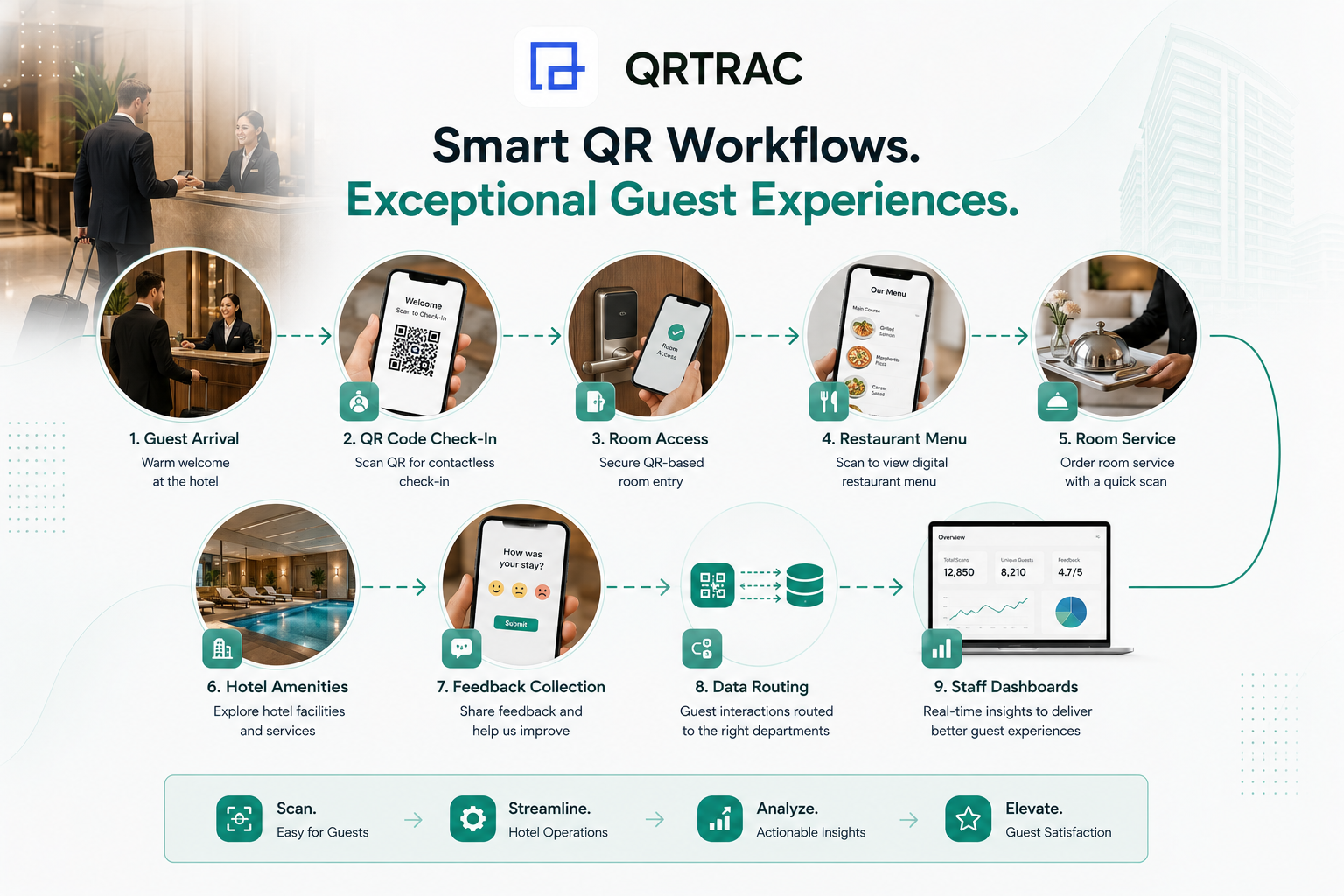
Long lobby lines ruin first impressions. During the 4 PM rush, your desk gets swamped. A simple lobby sign with a QR code lets arriving guests scan to register, upload their ID, authorize a card, and get their room assignment. In the room, a nightstand scan lets them request extra towels or message the desk directly. They bypass the phone queue. Your team gets fewer interruptions.
Contactless Guest Experiences
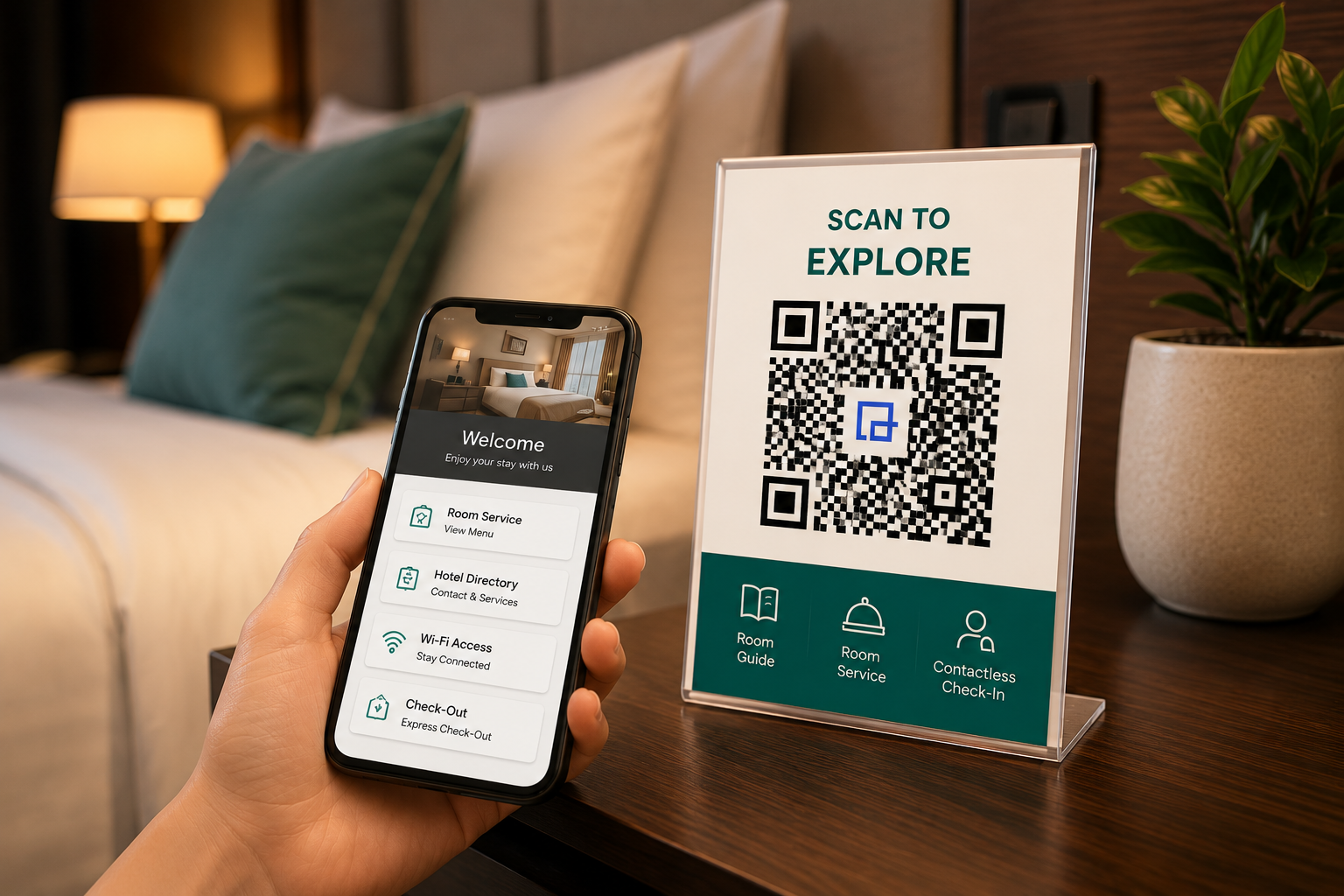
No one likes touching sticky room service menus or dog-eared binders that hundreds of travelers have handled. QR codes give guests a clean, touch-free option. They scan a bedside stand to browse breakfast menus, open local maps, or pull up their digital key on their own screen. It looks sharp, feels hygienic, and saves housekeeping from sanitizing plastic binders during turn-down service.
Digital Menus & Increased F&B Revenue
Paper menus are expensive to print and impossible to update mid-service. If you run out of the ribeye steak at 8 PM, you cannot cross it out on 200 physical menus. A restaurant QR code links guests to your live menu. You can update pricing, remove sold-out dishes, and launch weekend specials in seconds. High-res photos of your local craft beers or wood-fired pizzas drive impulse buys. You can also configure your digital menu to prompt guests with upsells, like adding truffle fries or a premium wine pairing.
Calculate the paper waste in your rooms right now: guest directories, spa pamphlets, channel guides, and local tour booklets. Every time your pool hours change, you must reprint pages and have staff swap them in every single room. Replacing these with one "Digital Guest Directory" QR code drops your printing bill to zero. You can update pool hours, gym rules, or checkout instructions in five seconds from your computer.
Improved Operational Efficiency & Data Collection
QR codes streamline workflows for your staff. Place a code near the thermostat or bathroom vanity. If a guest runs into a broken AC unit or a leaking tap, they scan to report it. This ticket goes straight to your maintenance team instead of getting lost in verbal desk handoffs. You also get clear data on guest interest. If 100 guests scan your spa QR code on Saturday but nobody books, you know your pricing is off or your booking page has a bug.
How to Implement QR Codes in Your Hotel: A Step-by-Step Guide
Do not just scatter generic black-and-white pixel squares around your property. It looks cheap, and guests will ignore them. To build a system that guests trust and scan, use this step-by-step implementation process.
1. Map out guest touchpoints
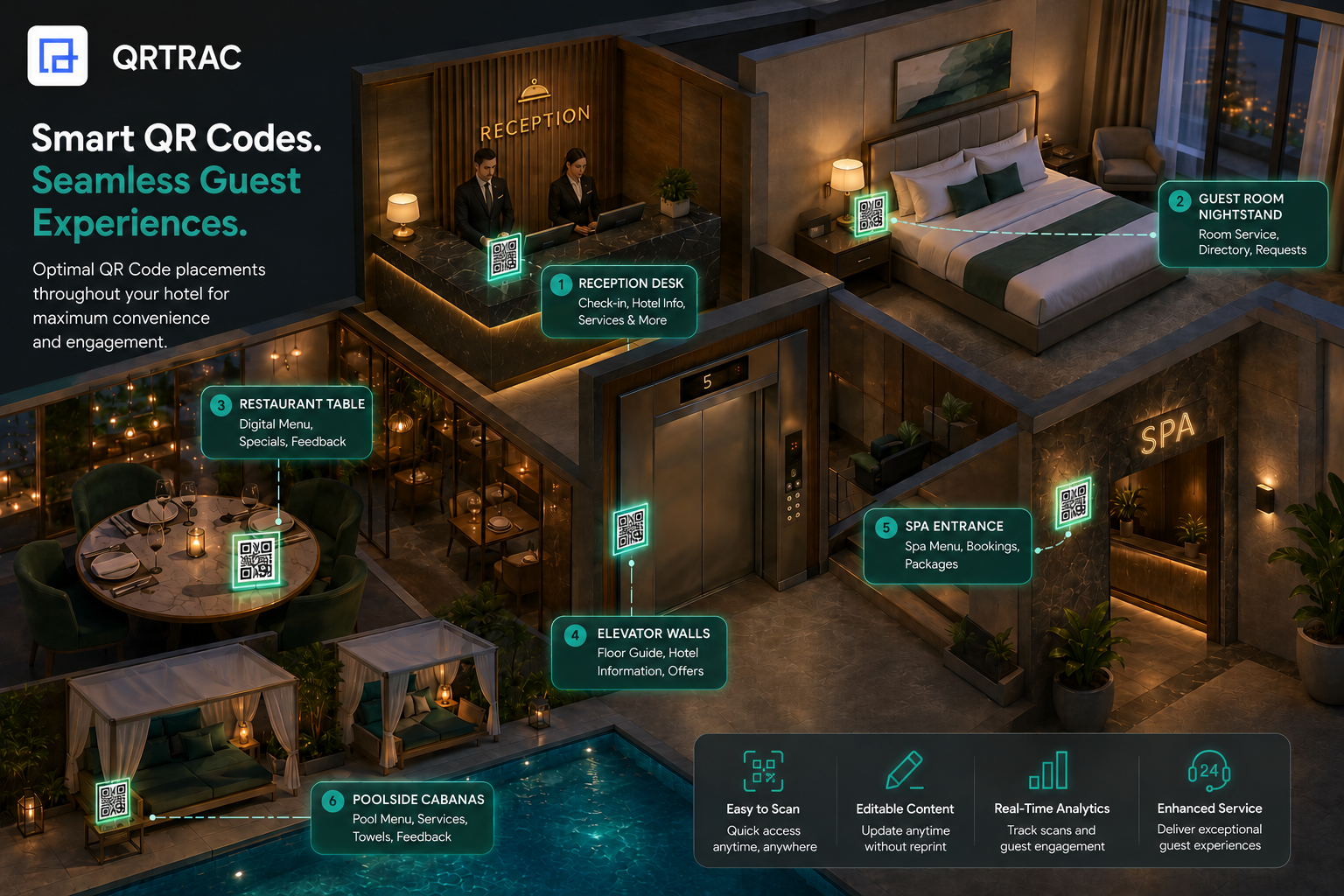
Walk your property as a traveler. Where do people get stuck, look for info, or wait? Focus on reception counters, bedside tables, pool loungers, and elevator lobbies. Every QR code must serve a specific purpose at that exact location. Avoid cluttering walls with random codes.
2. Match the code to the task
Select the right format for the job. If you want to share a room guide, use a Multi-Link QR code to show several options. If you want to show guests how to find your off-site parking, use a Location QR code that opens Google Maps. To collect checkout feedback, use a direct Review QR code.
3. Build mobile-first landing pages
The QR code is just the doorway; the landing page is the destination. If a guest scans a code and has to pinch or zoom on a desktop site, they will leave. Make sure every link goes to a fast, mobile-friendly page with big tap targets and light image files.
4. Brand your codes
Raw black-and-white codes look like utility bills. They clash with a curated interior design. Use QRTRAC to match your brand colors and place your logo in the center. Always use a frame with a clear call-to-action, like "Scan to Join Wi-Fi" or "Scan for Room Service".
5. Test physical prints
Print single samples and scan them under real conditions before ordering 500 costly displays. Test them with older Androids and the latest iPhones. Check the scanning distance and test the codes in your actual evening lighting, like the low, warm light of your restaurant.
6. Buy durable materials
Never tape a home-printed piece of paper to a wall. It ruins your hotel's aesthetic. Use heavy acrylic blocks for tables, thick cardstock for keycard sleeves, and engraved brass plates for lobby signs. For pool decks or spas, use waterproof vinyl.
7. Train your team
Your staff must know what sits behind every QR code on the property. If a guest asks how to book the sauna, your team should point to the card and explain how to scan it. If a guest struggles, staff should immediately offer a physical menu or a tablet.
8. Launch and watch the data
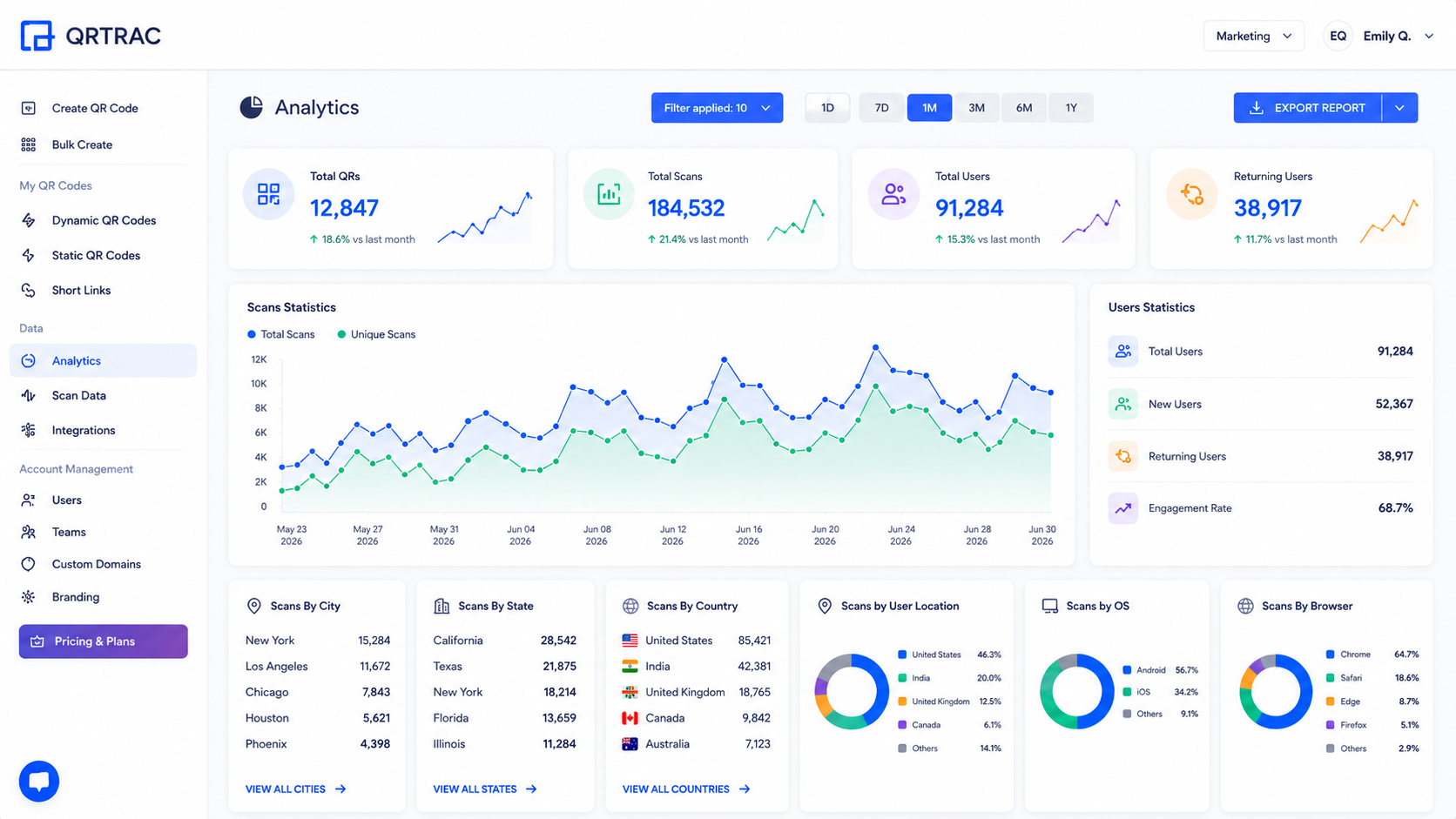
Treat the first two weeks as a pilot. Watch your QRTRAC dashboard. Are guests scanning the breakfast menu? Is the checkout code getting traffic? If a code gets zero scans, find out why. It might catch too much window glare or sit behind a vase.
9. Swap links, not signs
Use dynamic codes so you never have to reprint materials. When you change pool hours for the winter or swap out a signature cocktail, do not replace the cardholders in 200 rooms. Just change the URL in your dashboard. The printed code stays the same.
10. Refine your offerings
Look at your scan data during monthly manager meetings. If you see a major spike in scans on your local guide every Friday afternoon, you could partner with those nearby restaurants for a commission. Let the data drive your on-site marketing.
Deep Dive: Hotel QR Code Use Cases
QR codes connect your physical spaces to your digital guest services. Here is how high-performing properties apply them to solve common guest friction points and speed up tasks:
1. Express Guest Check-In
The Challenge: Arriving guests face long lines at reception during peak check-in hours, making their first impression stressful.
The Solution: A prominent lobby sign with a custom QR code linking to your check-in portal.
Business Advantage: Diverts tech-savvy guests to self-registration, shortening queues so desk staff can assist those who need personal help.
Dynamic Website QR
2. The Digital Room Guide
The Challenge: Paper directories look worn, gather dirt, and require manual reprinting whenever pool hours or channel guides change.
The Solution: A single bedside cardholder with a dynamic QR code leading to your guest portal.
Business Advantage: Housekeeping never has to swap paper pages again. You update spa hours or checkout instructions from any computer in seconds.
Multi-Link QR
3. Room Service & In-Room Dining
The Challenge: Taking dining orders over the phone wastes labor, leads to order errors, and misses upselling opportunities.
The Solution: Room service codes placed on nightstands that open a mobile food ordering portal.
Business Advantage: Increases check sizes with high-quality photos and automated modifiers, like prompting guests to add dessert or a cocktail.
Menu QR Code
4. Frictionless Wi-Fi Access
The Challenge: Guests flood the front desk with phone calls asking for the Wi-Fi password or complaining about hard-to-read login sheets.
The Solution: A Wi-Fi network QR code printed on keycard sleeves, desk signs, and TV screens.
Business Advantage: Connects guests instantly with one scan. Zero typing, zero mistakes, and zero phone calls to reception.
Wi-Fi QR Code
5. Strategic Guest Feedback & Reviews
The Challenge: Unhappy guests post complaints on TripAdvisor without warning you, while happy guests check out without leaving reviews.
The Solution: Feedback QR codes displayed at the checkout desk and on the final digital folio receipt.
Business Advantage: Catches negative feedback privately so you can fix it before checkout, while sending happy guests straight to Google Reviews.
Google Review QR
6. Spa & Amenity Booking
The Challenge: Profitable amenities like cabanas and massage slots go unbooked because guests do not know they exist or how to schedule them.
The Solution: Spa menu QR codes placed in elevators, gym walls, and room guides.
Business Advantage: Drives on-property revenue by letting guests book a massage or reserve a tennis court right from their poolside lounger.
Website QR Code
7. Valet & Vehicle Retrieval
The Challenge: Guests crowd the lobby floor waiting 15 minutes for their car to arrive at the valet stand.
The Solution: A retrieval QR code printed on valet claim tickets.
Business Advantage: Guests request their vehicle from their room while packing. The car is waiting downstairs when they walk out the door.
SMS or Form QR
8. Conference & Event Management
The Challenge: Meeting attendees lose paper agendas and ask your front desk where their breakout room is located.
The Solution: Digital conference signs with dynamic QR codes linking to live schedules and floor maps.
Business Advantage: Eliminates paper flyers. Organizers can change schedules or swap rooms in real-time without reprinting anything.
Dynamic PDF QR
Choosing the Right QR Code Type
Not all QR codes work the same way. Using a generic website link when a specialized format exists wastes potential scans. Here is a direct breakdown of which codes work best for specific hotel operations.
QR Code Type
Best Hotel Use Case
Strategic Advantages
Dynamic Website QR
Room directories, direct bookings, loyalty sign-up pages.
Sends traffic to your custom sites. Tracks scan locations and lets you edit the link anytime.
Dynamic PDF QR
Room service menus, spa brochures, event programs.
Shares existing PDF booklets without forcing you to design a website from scratch.
Digital Menu QR
In-room dining, pool bars, lobby cafes.
Displays food and drinks in a clean, scrollable interface built specifically for quick ordering.
Location / Map QR
Off-site parking directions, local jogging maps.
Opens directions instantly in Google or Apple Maps so guests never get lost.
WhatsApp / SMS QR
Text-a-concierge services, valet dispatch, housekeeping requests.
Initiates a chat with your team immediately, letting you resolve guest requests fast.
Jumps directly to your review page, removing steps so guests actually complete the review.
Multi-Link (Bio) QR
Nightstand stands, digital room guides.
Groups Wi-Fi, dining, and spa links into one hub. Keeps bedside tables completely clean.
Best Places to Use QR Codes in Hotels
Placement dictates scan rates. Guests scan codes when they have an active question or immediate need. A code hidden in a hallway gets ignored. Put your codes right where decisions happen:
Lobby & Public Areas
Reception: Desktop signs driving direct bookings or self-checkout.
Elevator Banks: Posters marketing happy hour or spa openings while guests wait.
Lobby Tables: Small cards with taxi numbers, local maps, or flight statuses.
Valet Stand: Signs prompting keycard returns, tipping, or vehicle retrieval.
Guest Rooms
Nightstand: A clean card replacing the heavy directory binder.
Keycard Sleeves: A small code on the sleeve for immediate Wi-Fi setup.
Bathroom Decals: Glass stickers to request toiletries or report issues.
TV Screen: Displays on your system's home screen for easy streaming setup.
Food & Beverage
Dining Tables: Codes on acrylic blocks for browsing lunch and cocktail menus.
Bar Coasters: Printed coasters highlighting late-night snacks or dessert specials.
Room Service Trays: Small cards on food trays prompting a quick service rating.
Amenities & Leisure
Spa Desk: Easy access to therapy lists, prices, and digital consent forms.
Poolside Loungers: Waterproof cards to order drinks and burgers to your chair.
Gym Walls: Codes on machines linking to video setup guides and workout maps.
The Final Hotel QR Code Deployment Checklist
Do not execute a property-wide rollout without verifying every element. Before publishing your codes, complete this pre-launch checklist:
✓
Scan-tested on both iOS and Android devices
✓
Verified that all destination URLs are active
✓
Confirmed all pages load in under 2 seconds on mobile
✓
Printed clear, bold instructions next to every code
✓
Applied brand colors and logos to the codes
✓
Trained front desk and F&B staff to assist guests
✓
Placed physical fallback menus on standby for offline guests
✓
Tested physical signs in morning, noon, and low evening light
Frequently Asked Questions (FAQs)
Hospitality professionals often have specific operational concerns regarding digital implementation. Here are the most common questions answered:
Can hotels update QR Codes after printing?
Yes, if you use Dynamic QR codes. These let you change the destination link in your dashboard at any time. You won't have to reprint signs or card stands when your dinner menu or room service hours change.
Which QR Code type is best for hotel rooms?
A Multi-Link QR code is your best bet. It acts as a single hub. When a guest scans it, they see a simple menu on their screen with buttons for room service, Wi-Fi, checkout, and local tips. This keeps the room neat and clutter-free.
Can QR Codes fully replace printed hotel directories?
Yes. Top-tier boutique hotels and major resorts are doing this to save thousands on print runs. It keeps rooms cleaner, updates in real time, and saves your staff from manually replacing paper guides in every room.
How can hotels collect guest feedback efficiently using codes?
Place a Feedback QR code on the check-out folio or lobby signs. You can set it up to send critical complaints straight to the manager's email so you can fix issues before checkout, while sending happy guests directly to TripAdvisor or Google.
Do guests need to download a special app to scan the codes?
No. Guests scan your codes using their phone's built-in camera app. The page opens in their regular browser like Safari or Chrome. They do not have to download any slow, heavy hotel apps.
Are hotel QR codes secure?
Yes, when you use a secure generator like QRTRAC. You get features like custom domains, which show guests the URL belongs to your hotel. You can also lock links or deactivate codes instantly if a sign is lost or defaced.
What is the ROI on implementing a QR code system?
You get your money back in three ways: you cut out massive printing bills, you save front desk staff hours on repetitive calls, and you get more in-room dining orders. Most properties cover their software costs in the first month just from what they save on paper. You can read more about how this works on McKinsey's hospitality research insights page.
Real-time analytics dashboard tracking scan locations, devices, and engagement metrics.
Conclusion: The Future of Digital Hospitality
Adding QR codes to your hotel is not about chasing a trend. It is about matching how travelers live. Your guests want control, speed, and clean options. They want to connect to Wi-Fi instantly and order breakfast without picking up a dusty desk phone.
When you place digital access points in rooms and public spaces, you take the heat off your front desk. You cut paper costs, speed up orders, and capture room service sales that usually slip through the cracks. Your staff can focus on hospitality instead of spelling out passwords.
With dynamic codes, you retain complete control. You can edit a lunch menu, update pool hours, or fix a link in seconds without reprinting. It is a direct upgrade that pays for itself in your first month of printing savings.
Give Your Guests a Better Experience Today
Create custom, branded QR codes built for hotel operations. Cut your printing budget, boost room service orders, and track exact scan metrics.
 By Eshwar Deshmukh
· Updated