QR Codes for eCommerce Stores

Put QR codes on your product packaging and inserts to connect customers with assembly guides, troubleshooting videos, and support forms instantly. This guide shows you exactly how to build a better post-purchase experience, cut return rates, and win repeat buyers.
eCommerce QR Codes
Unlimited Scans
Editable After Printing
Real-Time Analytics

Benefits of eCommerce QR Codes

Adding QR codes to your packaging bridges the gap between physical products and digital support. When you swap paper manuals for dynamic links, you save on printing costs and solve customer problems faster.

  • Better Customer Experience: Customers scan to track orders, register warranties, or view setup guides. No one wants to type long URLs on a phone using a mobile browser.
  • Instant Product Specs: Send customers to full ingredient lists, sizing charts, or technical specifications that won't fit on your physical label.
  • Faster Customer Support: Route users to your returns portal, warranty signup forms, or help articles to lower your support ticket volume.
  • Fits Your Existing Tech Stack: QR codes work with the systems you already use, whether your store runs on Shopify, WooCommerce, or a custom build.
  • Lost-Proof Manuals: Provide digital assembly guides and PDF manuals that customers can save directly to their phones.
  • Lower Packaging Costs: Ditch thick paper inserts. A simple card with a list of digital links saves money and lightens your shipping weight.
  • More Customer Reviews: Prompt buyers for feedback right when they open the box and excitement is high.
  • Drive Repeat Sales: Use packing slips to highlight discount codes, email newsletter signups, or your social channels.

Digital Manual ROI Calculator

See how much you save when you swap physical paper inserts for a digital QR code.

Estimated Monthly Savings
$2,000
By switching to digital manuals.

How to Implement QR Codes in an eCommerce Store

To get the highest scan rates, you need a plan. Follow this 10-step checklist to launch your QR codes without friction:

  1. Find your key touchpoints: Map out where customers need help, like the order invoice, shipping box, or product label.
  2. Pick your QR code type: Match your goal to the right format—like a URL for tracking, a PDF for setup guides, or a multi-link list for multiple resources.
  3. Build your mobile landing pages: Create the simple, fast-loading pages or video links your codes will point to.
  4. Add your brand colors: Style the QR code with your brand colors and logo to show customers it is safe to scan.
  5. Test with real phones: Scan the codes using both iOS and Android cameras to ensure they load instantly.
  6. Print on packaging: Position the codes clearly on your shipping boxes, packing slips, or product tags.
  7. Brief your support team: Make sure your team knows where each QR code points so they can help customers quickly.
  8. Ship your first batch: Start sending out orders with your newly printed QR codes.
  9. Watch the data: Track scan volumes, peak times, and device types to see how customers interact with your products.
  10. Update links on the fly: Use dynamic QR codes so you can change the target URL anytime without reprinting your packaging.
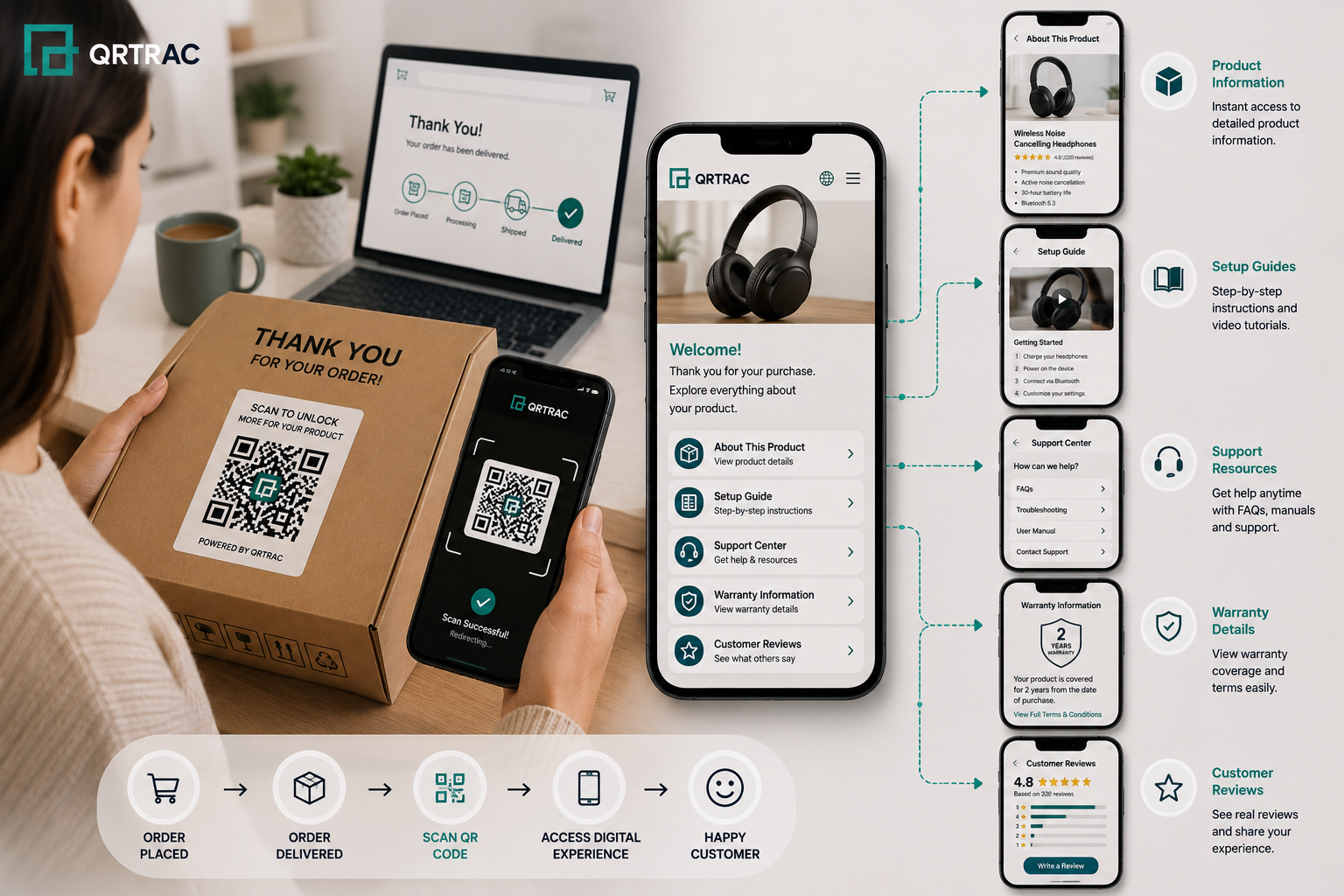
eCommerce QR Code Workflow

eCommerce QR Code Use Cases

QR codes fix specific bottlenecks in your post-purchase flow. Here is how actual brands use them to solve common problems:

Product Information & User Manuals

Business Challenge: Printed booklets cost money to ship, take up box space, and go out of date the moment you update a product.
How QR Codes Solve It: Put a QR code on the packaging that links directly to a digital library of care guides, size charts, or manuals.
Implementation Process: Print a high-resolution code on your product box linking to your hosted PDF documentation.
Benefits: You cut printing costs immediately. Customers always see the latest version of your manual, and you save weight on every shipment.
Recommended QRTRAC Type: PDF QR Code or Website QR Code

Video Tutorials & Setup Guides

Business Challenge: Complex assemblies frustrate buyers, leading to high return rates and angry support emails.
How QR Codes Solve It: Link them straight to a YouTube tutorial showing them exactly how to assemble or use the product.
Implementation Process: Place a 'Start Here' card right on top of the items inside your shipping box.
Benefits: Fewer setup issues mean fewer returns. Customers get to use their purchase faster and with less stress.
Recommended QRTRAC Type: YouTube QR Code or Website QR Code

Customer Support, Order Tracking & Returns Information

Business Challenge: Customers cannot find your contact info quickly, leading to chargebacks or public complaints.
How QR Codes Solve It: Give them a direct path to your chat support, returns portal, or helpdesk.
Implementation Process: Add a support QR code to your invoice or packing slip.
Benefits: You catch issues before they turn into bad reviews. Plus, you deflect basic questions by letting users self-serve.
Recommended QRTRAC Type: WhatsApp QR Code or Email QR Code
📈 Worked Example:

Picture an electronics retailer replacing a 50-page printed manual with a single QR code linking to a digital PDF and a video tutorial. Fewer customers hit a confusing step with no help nearby, so setup-related support tickets drop, and dropping 50 pages of paper from every box cuts printing and shipping weight costs.

Warranty Registration

Business Challenge: Buyers ignore paper registration cards, leaving you with zero data on who actually owns your product.
How QR Codes Solve It: Use a QR code to pre-fill a mobile registration form.
Implementation Process: Include a dedicated warranty card in the box with a clear 'Scan to Register' callout.
Benefits: You collect first-party data easily, grow your email list, and verify purchase dates instantly.
Recommended QRTRAC Type: Form QR Code or Website QR Code

Product Reviews, Loyalty Programs & Newsletter Signups

Business Challenge: Getting customers to leave reviews or buy again after checkout is incredibly hard.
How QR Codes Solve It: Send them directly to your review page or offer a coupon code for their next purchase.
Implementation Process: Add a 'Thank You' card to the box with a QR code offering 15% off their next order in exchange for an honest review.
Benefits: You generate more verified reviews, boost social proof, and drive repeat sales.
Recommended QRTRAC Type: Review QR Code, Multi-Link QR Code, or Coupon QR Code

Choosing the Right QR Code Type

Choose the right code format to make the scanning experience as fast as possible for your customers. Here is how to match your goals to the correct QR type:

QR Code Type Best eCommerce Use Case Advantages Recommended Implementation
Website QR Product pages, Setup videos, Order tracking Highly versatile, trackable, easy to scan Anywhere on packaging or invoices
PDF QR User manuals, Assembly guides, Sizing charts Share docs instantly without hosting costs Product label or instruction insert
Form QR Warranty signup, feedback forms Gathers customer data in seconds Warranty cards and thank-you notes
WhatsApp QR Live support, sales questions Opens a direct chat with your support team Contact section of packing slip
Email QR Support tickets, return approvals Pre-fills your support address and subject line Returns documentation
Multi-Link QR Centralized customer resources Combines manuals, reviews, and store links into one scan Inside the shipping box lid
Google Review QR Collecting seller feedback Takes customers straight to your Google review box Thank-you inserts
Coupon QR Loyalty discounts, repeat orders Auto-applies discounts at checkout Promotional flyers inside the package
Digital Business Card QR Brand contact details Saves your support phone and email to their contacts Included in high-value orders

Best Places to Use QR Codes in an eCommerce Business

Where you print your QR code determines your scan rates. Put your codes in these key areas to get more scans:

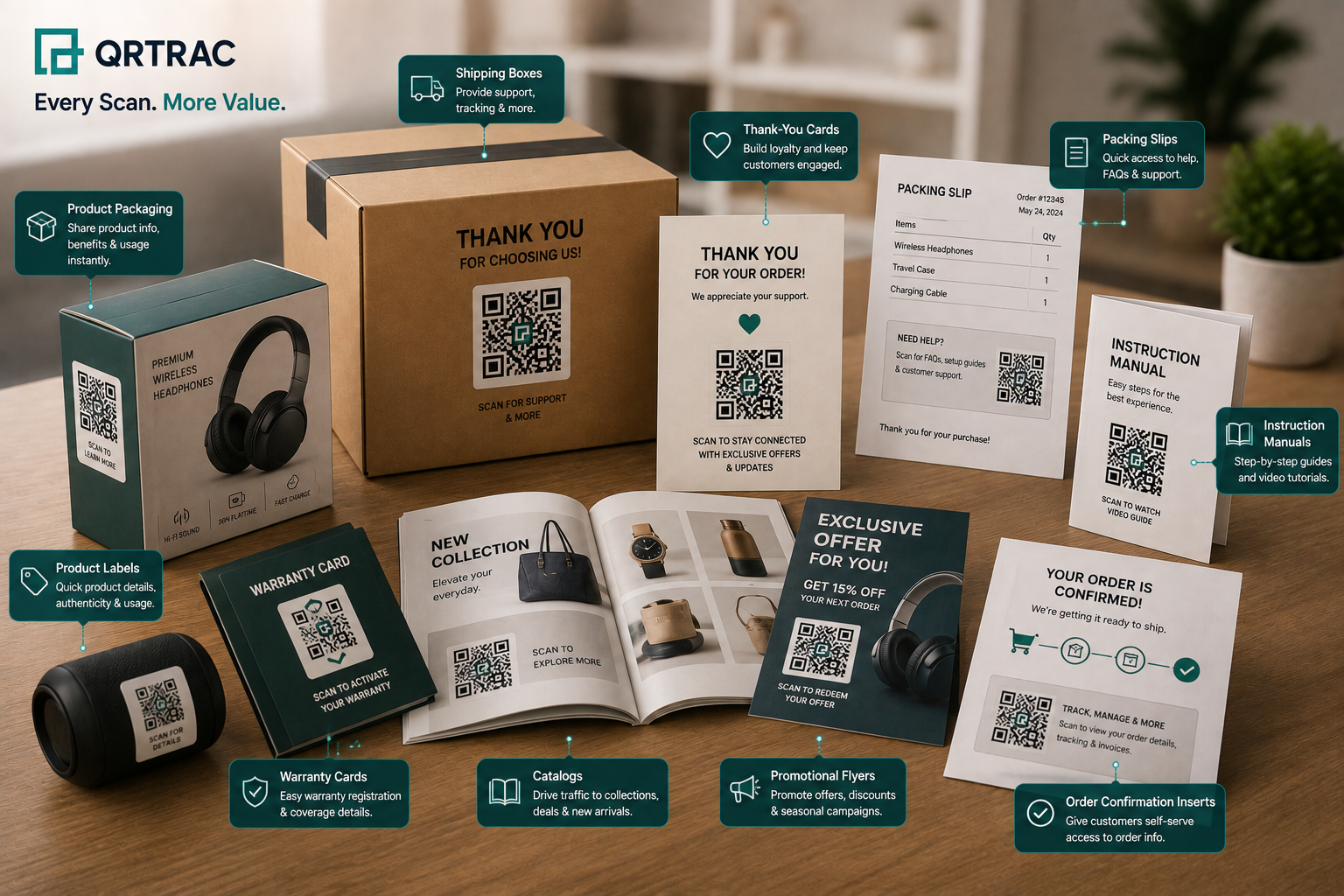
  • Product Packaging Put setup guides or authenticity links right on the retail box.
  • Shipping Boxes Great for unboxing moments. Link to your brand story or social accounts on the inside lid.
  • Packing Slips & Order Invoices Put your returns portal, tracking updates, and support links here because buyers always look at this sheet.
  • Thank-you Cards Perfect for asking for reviews, giving loyalty discounts, or linking to your social profiles.
  • Instruction Manuals Link to visual video tutorials right next to complex steps in the paper guide.
  • Warranty Cards Get rid of long paper forms. Let buyers scan and register their product on their phone with a digital card.
  • Product Labels Great for apparel and food. Link to care instructions, ingredient details, or sourcing stories.
  • Catalogs & Promotional Flyers Link printed marketing materials straight to your online store for instant purchasing.
QR Code Placements in eCommerce

How QR Codes Improve the eCommerce Customer Journey

QR codes connect physical shipping boxes to your digital storefront. Here is how they look in action across a typical buyer journey:

1

Find & Buy

A shopper discovers your product online, reads reviews, and places an order.

2

Delivery

The physical box arrives at their doorstep, beginning the offline brand experience.

3

Unboxing

The customer opens the package and spots a clear QR code with an actionable prompt.

4

Instant Access

They scan the code to watch a quick assembly video or download care guides on their phone.

5

Easy Support

If they have questions, they click the support link to text your customer service team on WhatsApp.

6

Loyalty & Reviews

They register their warranty, leave a positive review, and use a discount code on their next purchase.

Improving the Post-Purchase Experience with QR Codes

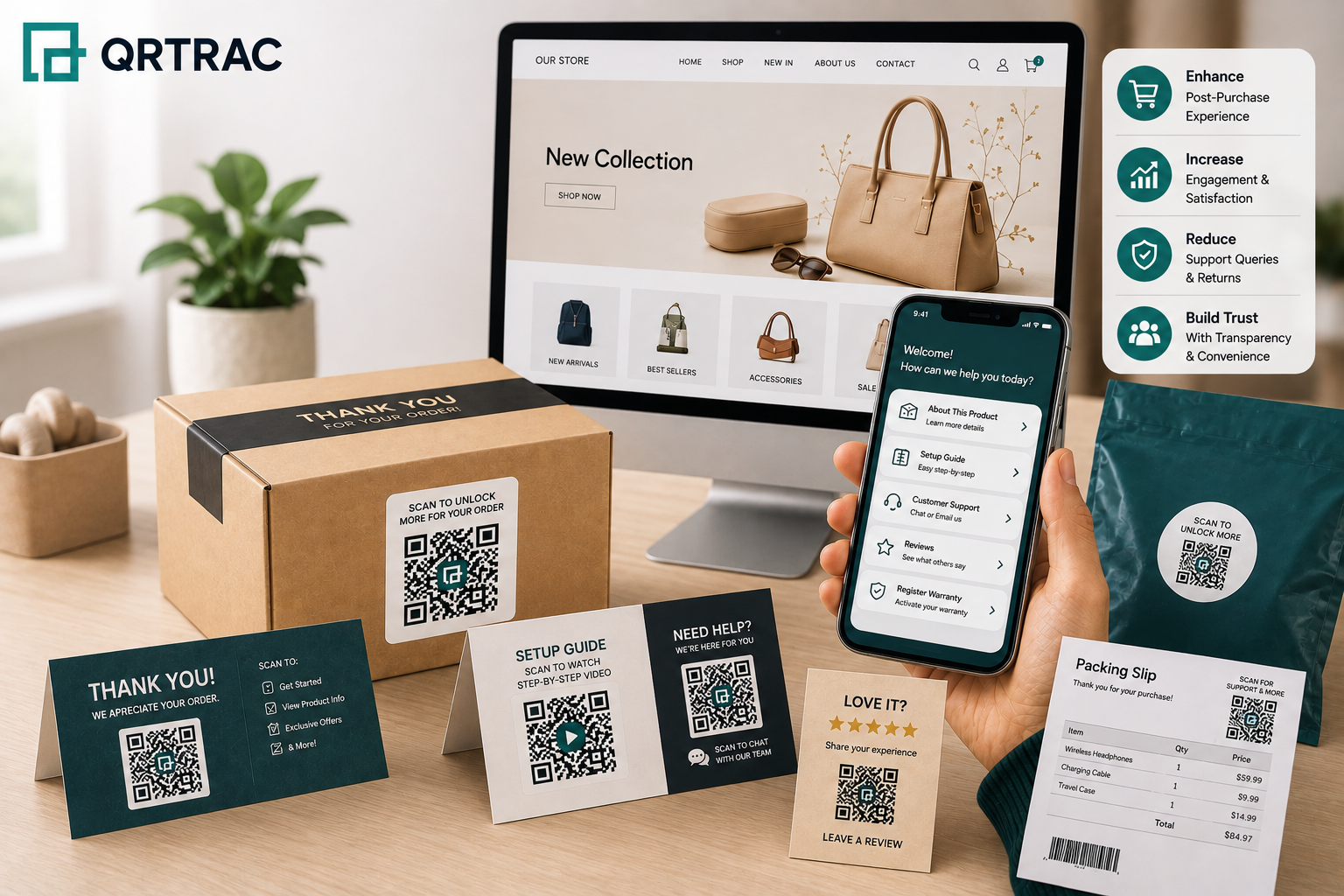
The unboxing moment is your best chance to build trust. When you use QR codes to share information, you stop buyers from getting frustrated. Link directly to:

Product Guides: Digital manuals that customers can save on their phones.
Video Tutorials: Step-by-step visual assembly or usage instructions.
FAQs: Quick answers to the most common post-purchase questions.
Setup Instructions: Immediate guides that keep excitement high.
Care Instructions: Cleaning and maintenance tips for longevity.
Warranty Details: Clear terms and quick registration processes.
Returns Policy: Simple instructions for processing exchanges.
Customer Support Resources: Direct lines to helpdesks and chat systems.

Using QR Codes to Increase Customer Engagement

Use QR codes to turn one-time shoppers into repeat customers. You can use them to drive:

Google Reviews & Product Reviews

Directly link customers to your review platforms while they are actively holding your product, increasing response rates.

Customer Feedback

Route buyers to internal surveys to catch product issues or shipping delays privately before they post a 1-star review online.

Loyalty Programs & Referral Campaigns

Encourage account creation and referral sharing by making the signup process instant with a simple scan.

Social Media & Newsletter Subscriptions

Grow your email list and online community by linking directly to Instagram, TikTok, or email signups featuring exclusive promo codes.

Dynamic vs Static QR Codes

Never print a static QR code on thousands of boxes. If your product link changes, those printed codes are dead forever. Here is how static and dynamic codes compare:

Comparison Factor Dynamic QR Codes (Recommended) Static QR Codes
Editing Change the target URL anytime without reprinting Permanent; cannot be edited once printed
Analytics Full tracking data (scans, device types, locations) Zero tracking analytics
Updating product information Redirect to new manuals or guides instantly Requires reprinting all packaging if links break
Managing support resources Update helpdesk URLs in seconds Creates broken links if you switch support apps
Marketing campaigns Swap seasonal promotions using the same code Tied to a single campaign forever
Scalability Easy to manage across thousands of SKUs Almost impossible to manage at scale
Recommended eCommerce scenarios Product packaging, inserts, catalogs, shipping boxes Temporary flyers (not recommended for eCommerce)

Common eCommerce QR Code Mistakes to Avoid

Avoid these common setup errors that ruin scan rates and frustrate buyers:

  • Using static codes for manuals If your product manual URL changes, every box you've already printed a Static QR Code on becomes obsolete. This causes dead ends for users.
  • Bad printing or sizing Printing codes on heavily curved surfaces, across package seams, or making them too small prevents phone cameras from reading the code.
  • Broken destinations Failing to monitor your links leads to "Page Not Found" errors, which frustrates customers who need help and drives up support volume.
  • No mobile design Sending someone who scanned a code with their phone to a desktop-only page causes them to bounce instantly.
  • No instructions A bare QR code tells customers nothing. Always add text like "Scan for Setup Guide" so they know why they should scan.
  • Skipping analytics If you do not track your scans, you have no idea which packaging inserts or campaigns are actually working.

Best Practices for eCommerce QR Codes

Follow these simple design rules to ensure your codes work every time:

Clear calls-to-action (e.g., "Scan to Register")
Branded designs with your logo
High-contrast, high-resolution printing
Fast-loading, mobile-optimized pages
Dynamic QR codes only
Rigorous testing before printing
Active analytics tracking
Intuitive, clean landing pages
Regular link checks

Measuring eCommerce QR Code Performance

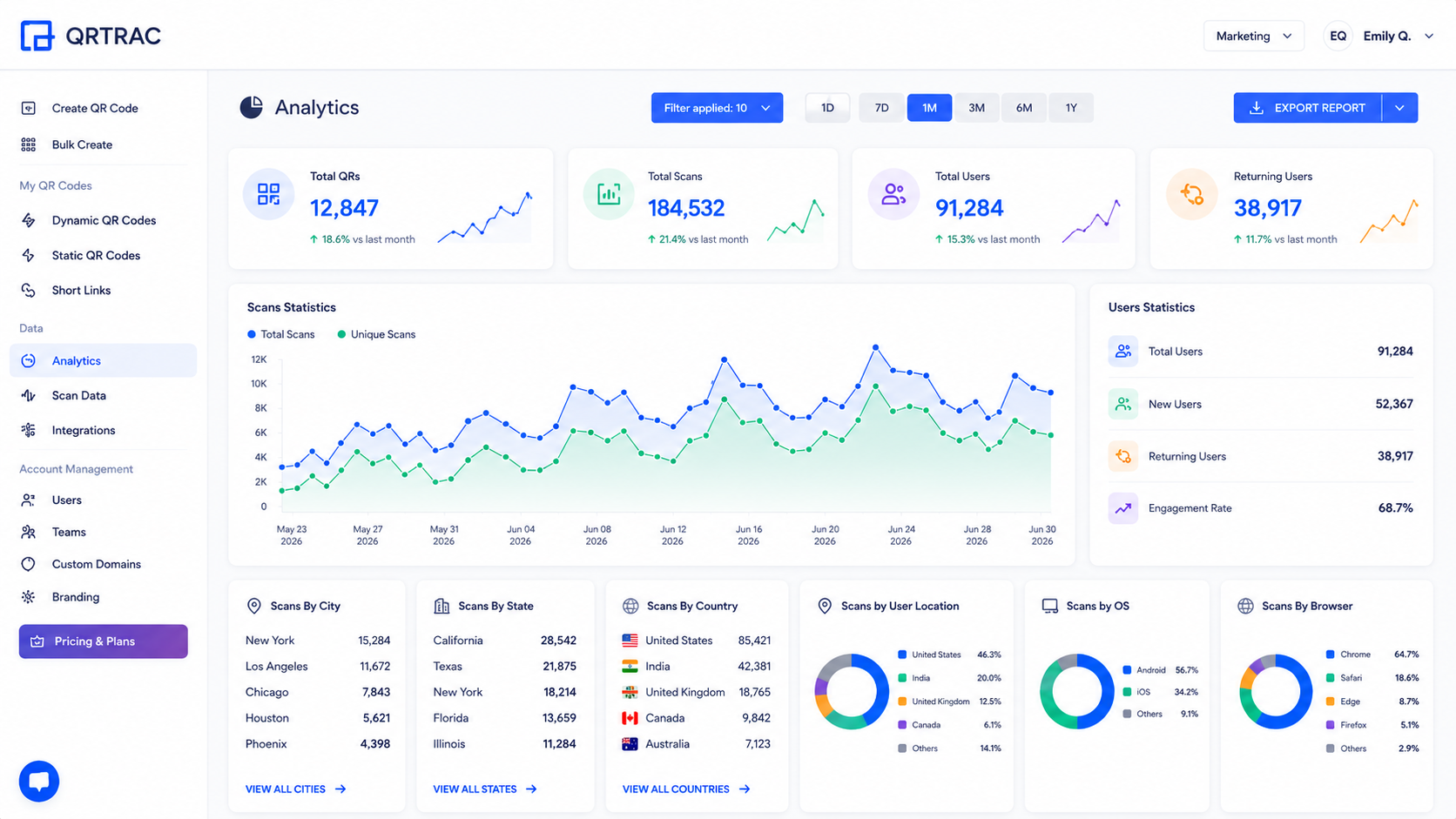
We give you the data to see exactly how your post-purchase setup is performing. Track these metrics in your QRTRAC dashboard:

  • Product page visits: Measure how many offline buyers return to your store.
  • Guide downloads & video views: See which products cause the most confusion based on scan volume.
  • Support tickets avoided: Track if QR codes successfully lower your inbound email volume.
  • Review rates & loyalty signups: Monitor conversions on your review requests and discount codes.
  • Device and location tracking: Learn what phones your customers use and where they scan from.
  • Peak scan hours: Find out exactly when buyers open their packages.
QR Code Analytics Dashboard

eCommerce QR Code Deployment Checklist

Run through this quick check before you send your designs to the printer:

  • ✔ QR Codes tested on multiple devices
  • ✔ Product links and destinations verified
  • ✔ Mobile compatibility confirmed for all pages
  • ✔ Product resources (manuals, videos) updated
  • ✔ Support links connected to active helpdesks
  • ✔ Analytics enabled in your QRTRAC dashboard
  • ✔ Backup URLs ready in case primary domains fail
  • ✔ Customer instructions (CTAs) added near the code
  • ✔ Final physical packaging reviewed for print quality

How to Build Long-Term Customer Trust with QR Codes

Treat your customers' attention with respect. Follow these rules to keep their scanning experience fast and secure:

  • Clearly label every QR Code: Ensure customers know exactly what opens when they scan (e.g., "Scan for User Manual" instead of a blank box).
  • Test QR Codes before products are shipped: A broken link on 10,000 printed boxes is a logistical nightmare. Scan proofs before finalizing prints.
  • Use Dynamic QR Codes for frequently updated product information: URLs for warranty portals or support pages often change. Dynamic codes prevent printed assets from becoming useless.
  • Keep linked pages mobile-friendly: 100% of your QR Code traffic will originate from smartphones. Ensure PDFs and websites are easy to read on small screens.
  • Regularly review analytics: Use the data to improve customer experiences. High scan rates on support codes might indicate poor product instructions.

Sources & References

  • National Retail Federation (NRF) - eCommerce Return Rates and Mitigation Strategies (2025 Report).
  • Shopify Enterprise Insights - The Role of Digital Experiences in Post-Purchase Retention.
  • QRTRAC Internal Data - Average scan rates for packaging QR codes across eCommerce customers.

Conclusion

Adding QR codes to your packaging is the simplest way to connect your physical products with your digital customer experience. When you replace paper booklets with smart links, you cut your print budget, resolve support issues faster, and drive repeat purchases.

Use dynamic codes, keep your landing pages simple, and watch your scan data. You will see fewer returns, happier customers, and higher review rates starting with your next shipment.

Frequently Asked Questions

Can eCommerce businesses update QR Codes after printing?

Yes, if you use Dynamic QR Codes. You can change your destination link in your QRTRAC dashboard anytime without reprinting your boxes or inserts.

Which QR Code type is best for product packaging?

A Website QR Code is the most flexible option because you can link to any landing page, video, or support form. PDF QR Codes are perfect if you just want customers to download a setup manual directly.

Where should QR Codes be placed?

Put support and return codes on your packing slips. Put setup videos and care manuals right on the box, the product label, or a dedicated insert card.

Can QR Codes improve customer support?

Yes. Linking customers directly to troubleshooting videos, help guides, or your WhatsApp chat cuts down on basic support emails. Customers get instant answers, and your team gets fewer tickets.

Can businesses measure QR Code engagement?

Yes. Dynamic QR codes track exactly how many times people scan, where they are, what devices they use (iOS vs. Android), and what times of day they scan.

How can QR Codes improve the post-purchase experience?

They remove the friction of looking for help. Instead of typing web addresses or searching Google for a manual, customers just scan the box to get exactly what they need.

Can QR Codes link to product videos and manuals?

Yes. You can link your QR codes directly to YouTube tutorials, Vimeo links, or hosted PDF care sheets.

Start Using eCommerce QR Codes Today

Build dynamic QR codes with QRTRAC. Track scans in real-time, update your links instantly, and build a better unboxing experience.

No credit card required. 7-day free trial.