Connect physical proposals, business cards, and pitch decks directly to your digital booking pages and private client portals. This guide shows you how to build, track, and secure custom QR codes for your consulting practice.
Adding QR codes to physical touchpoints speeds up how you share sensitive documents, book discovery calls, and collect client feedback. We cover exactly how to set this up securely.
Understanding QR Codes in Professional Services
Think of QR codes as direct bridges. You place them on print materials, and clients scan them to reach digital assets instantly. No more typing long URLs or searching for files. When you use dynamic QR codes, you can swap out destination links at any time without reprinting. You also get deep analytics to see who engages with your pitch decks or reports. With QRTRAC's dynamic QR code solution, consulting firms can create trackable, branded codes that drive measurable results.
Modern QR codes handle up to 4,296 characters and support diverse formats like vCards, PDFs, and deep links. According to industry standards, they remove friction. A client scans a physical brochure and instantly views a secure financial model or books a slot on your calendar.
QR Codes vs. Alternative Technologies
*
*
Technology
Setup Cost
Scanning Requirement
Analytics
Best For
QR Codes
Free-$50/mo
Any smartphone camera
✅ Detailed metrics
Lead capture, proposal links, feedback
NFC Tags
$100-500/mo
NFC-enabled devices only
✅ Detailed metrics
High-end retail, physical cards
Barcodes
$20-100/mo
Special barcode scanner
⚠️ Limited
Internal inventory tracking only
AR (Augmented Reality)
$500-5,000/mo
App download required
✅ Detailed metrics
3D visualization, immersive games
Traditional URLs
Free
Manual typing
✅ Detailed metrics
Simple copy-paste digital links
QR codes offer the best balance of cost, accessibility, analytics, and ease of use for consulting firms.
Enter the destination link or upload your files. Ensure the landing page is mobile-friendly and loads quickly for a smooth client experience, as 95%+ of QR scans happen on mobile devices.
Step 4: Apply your firm's brand design
Add your consulting firm's logo, adjust colors to match your brand identity, and include a clear call-to-action (CTA) frame like "Scan to Book" or "View Proposal".
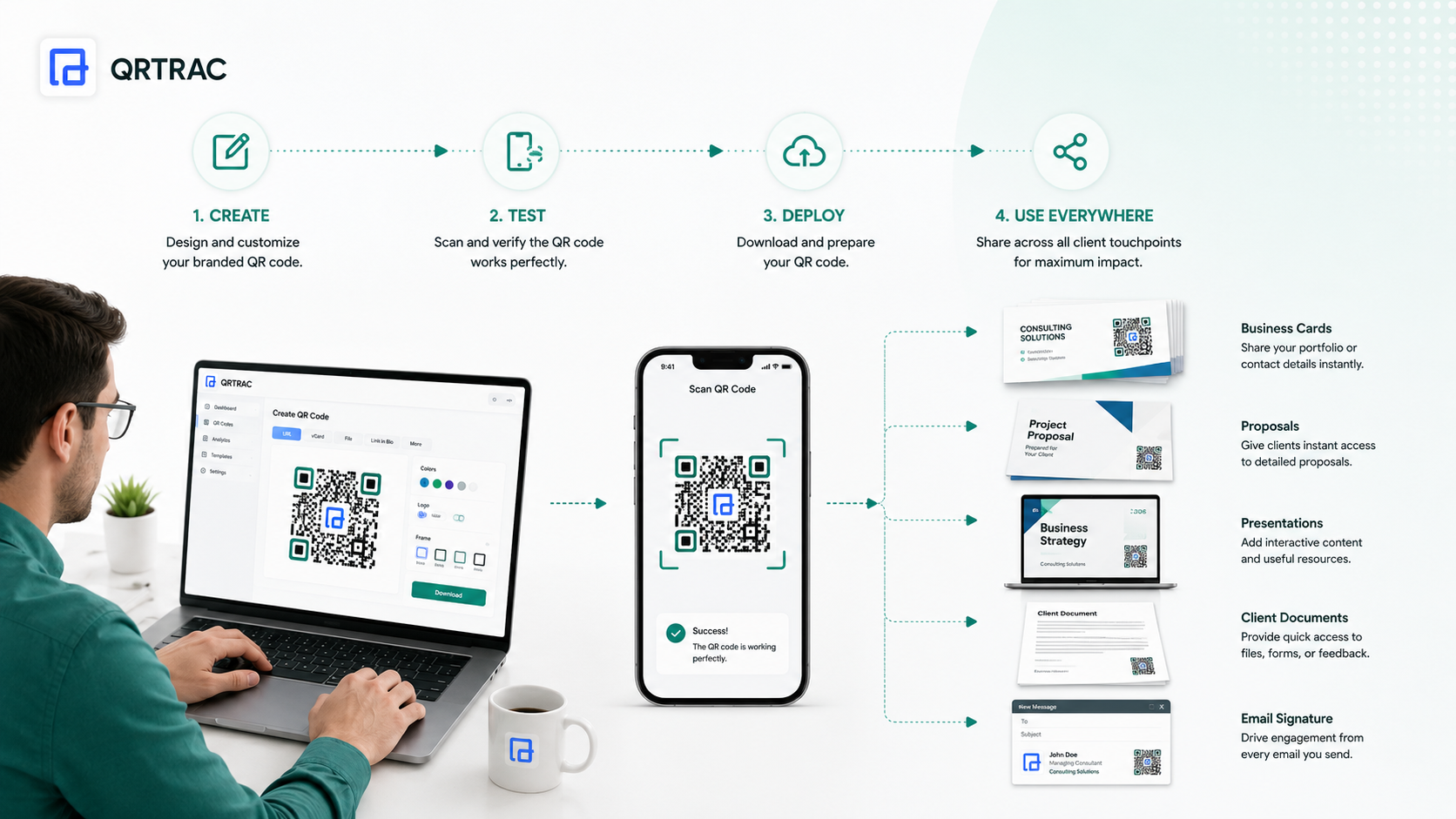
Creating, testing, and deploying branded QR codes for consulting materials.
Step 5: Scan and test on different phones
Before publishing, scan the QR code using different smartphones (iOS and Android) and scanning apps to verify it works perfectly.
Step 6: Add the code to your print assets
Download the QR code in high resolution (SVG or EPS for print, PNG for digital) and place it on your materials.
Step 7: Track scans and user actions
Track scan rates, locations, and user engagement through your QRTRAC dashboard to measure campaign success.
Step 8: Refine based on performance
Use the analytics data to refine your strategy, update destination links if necessary, and improve your calls-to-action.
Key Takeaways
• Always start by defining your campaign goal.
• Customize the code with your firm logo and branding.
• Testing across devices is critical before deployment.
Choosing the Right QR Code Type for Consulting Firms
QR Code Type
Best Use Case
Business Benefit
Ideal Consulting Scenario
Recommended Usage
Digital Business Card QR
Networking and introductions
Instant contact saving
Conferences and initial client meetings
Print on physical business cards
PDF QR
Sharing reports and case studies
Reduces printing costs
Distributing extensive industry reports
Include in executive summaries
Appointment QR
Scheduling consultations
Streamlines booking process
Allowing prospects to book discovery calls
Add to website or email signatures
Website QR
Directing to service pages
Increases website traffic
Showcasing consulting methodologies
Brochures and presentation slides
Google Review QR
Collecting client testimonials
Builds social proof
Following up after project completion
Final project deliverables and invoices
WhatsApp QR
Direct messaging support
Improves client communication
Offering priority support to retainers
Client onboarding documents
Email QR
Initiating inquiries
Simplifies outreach
Requesting quotes for services
Marketing flyers and print ads
Form QR
Collecting feedback/data
Automates data entry
Conducting pre-consultation surveys
Workshop and training materials
Lead Generation QR
Capturing prospect info
Grows email lists
Offering a free whitepaper or audit
Trade show banners and booths
Key Takeaways
• Use PDF QR codes for reports and proposals.
• vCard QR codes are ideal for networking.
• Match the QR type directly to your strategic goal.
Where Should Consulting Firms Place QR Codes?
Smart placement drives scans. Put your QR codes where your clients already look:
Business cards: Swap physical contact details for a vCard QR that saves your phone number and LinkedIn directly to their contact list.
Consulting proposals: Link printed pitches to private video walk-throughs or custom financial worksheets.
Invoices: Add a payment QR code so clients can pay retainer fees instantly via smartphone.
Presentation slides: Put a QR code on your final slide so the audience can download your slide deck instantly.
Reception desks: Let visiting clients scan to join the secure guest Wi-Fi network immediately.
Office signage: Direct visitors to interactive office maps or schedules for specific conference rooms.
Email signatures: Insert a small, clean QR code to let partners book 15-minute syncs on your calendar.
Brochures: Guide readers from physical marketing materials to online case study videos.
Conference booths: Capture high-intent leads instantly by linking to a quick intake form.
Client reports: Link printed executive summaries to interactive dashboards with raw data.
Website: Give desktop users a quick way to scan and shift their browsing experience to mobile.
LinkedIn profile: Feature a code on your header image that takes profile visitors to a scheduler.
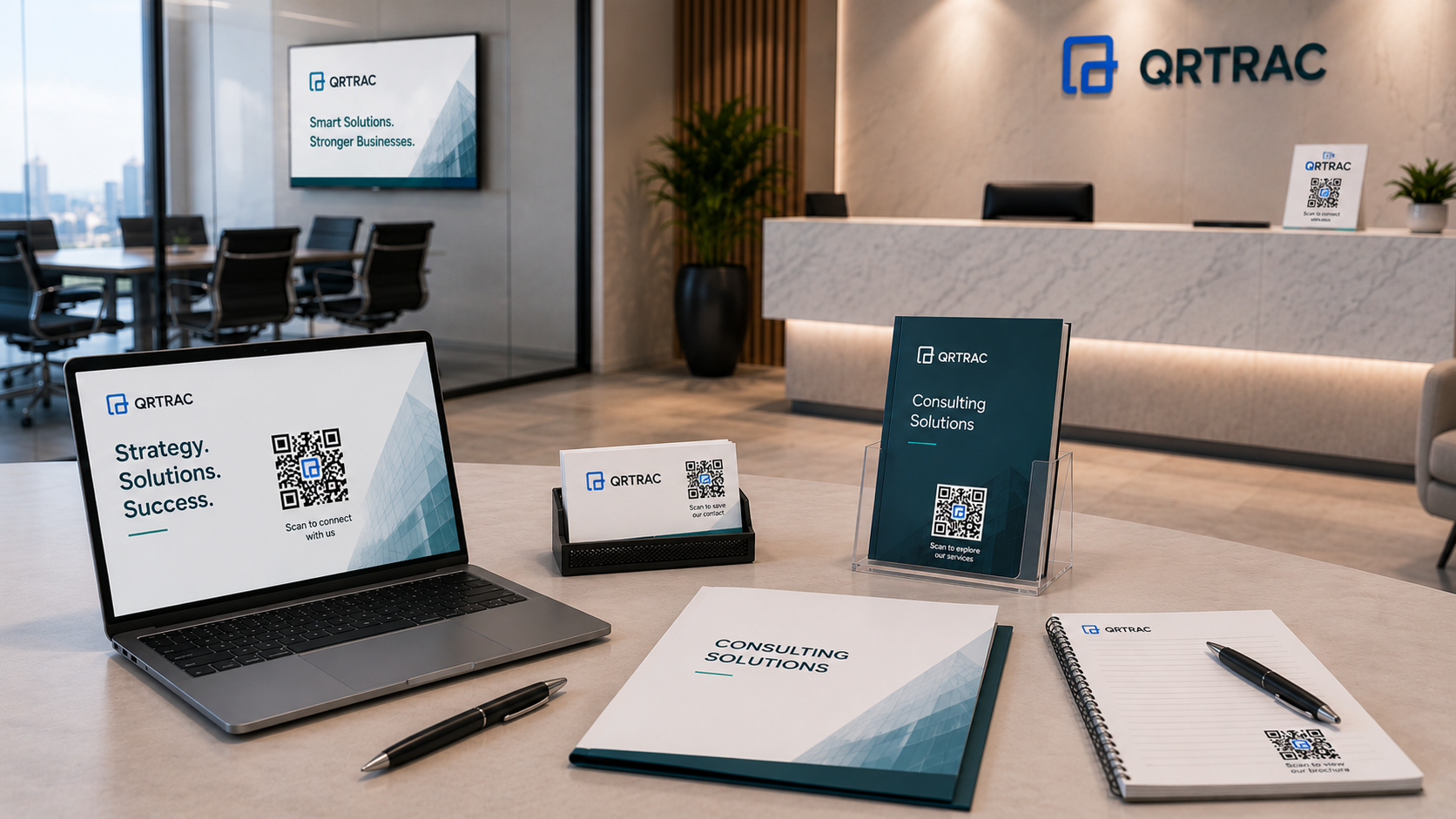
Strategic QR code placements across physical and digital consulting touchpoints.
Key Takeaways
• Business cards and proposals are high-value placements.
• Use QR codes in presentations to distribute slides.
• Reception areas and invoices also offer great opportunities.
Protecting Client Information with QR Codes
Client trust is hard to build and easy to lose. When you share financial plans, restructuring reports, or legal audits via QR codes, safety comes first. Strict privacy frameworks like GDPR demand secure data transmission.
Secure endpoints: Ensure every destination link uses HTTPS and resides on a secure server with modern encryption.
Control your links: Use dynamic QR codes. If a client contract ends or a link leaks, you can deactivate the code or change the landing page instantly.
Correct errors live: If you print a code on a 100-page report and find an error in the appendix, update the destination link on your dashboard without reprinting.
Password protection: Lock sensitive target links behind a password page so only authorized stakeholders can read the file.
Private landing pages: Keep target pages unindexed by search engines. This prevents random web crawlers from indexing your client work.
Anonymize design: Never include private client names or project details in the visual frame or public URL slug.
Deactivate on expiry: Set automatic expiration dates on links containing time-sensitive corporate data.
Routine cleanups: Audit your dashboard monthly and archive codes that link to old, closed accounts.
Key Takeaways
• Always use dynamic codes to manage and revoke access.
• Password protect sensitive client deliverables.
• Do not put private information in the public URL slug.
Common QR Code Mistakes Consulting Firms Should Avoid
Avoid these pitfalls to ensure your QR code campaigns maintain a professional image and deliver results:
Using static codes for client files: Static codes cannot be edited. If a document moves or a link breaks, you must reprint your physical booklets.
Weak or missing call-to-action: A bare QR code gets ignored. Tell users exactly what they get when they scan (e.g., 'Scan to Book Call').
Skipping physical tests: Don't assume it works. Test your printed proofs with both cheap Androids and new iPhones under different light.
Exporting low-resolution files: Blurry codes won't scan. Always download your code in vector format (SVG) for high-quality print.
Poor environmental placement: Avoid placing codes in areas with terrible cell service, like deep hotel basements or windowless conference halls.
Ignoring analytics dashboards: If you don't track your scan metrics, you're flying blind on which proposals actually generate interest.
Linking to non-responsive pages: Desktop-only sites look terrible on phones. Ensure your destination loadout adapts beautifully to vertical viewports.
Ignoring broken links: Check your links often. A dead QR code pointing to a 404 page destroys professional trust instantly.
Best Practices for Successful Consulting QR Codes
✓Brand consistency: Ensure your QR codes feature your firm's logo and color palette to maintain a premium appearance.
✓Clear CTA: Always tell the user exactly what they will get when they scan (e.g., "Scan to view case study").
✓Testing: Implement a mandatory test scan by a colleague on a different device before any public release.
✓Mobile optimization: Verify that the destination page is responsive, easy to read, and fully functional on mobile devices.
✓Landing page speed: Optimize images and code on your destination URL so it loads almost instantly on mobile networks.
✓Regular updates: Periodically check that your dynamic QR codes still point to relevant, active, and up-to-date content.
✓Analytics review: Check scan metrics weekly to understand what materials generate the most interest.
✓Document organization: Use clear naming conventions in your QR code generator dashboard to easily manage codes for different clients and projects.
✓Professional design: Avoid overly cluttered designs; maintain adequate quiet zones around the code for easy scanning.
✓Client experience: Always prioritize the end user—ensure the digital handoff is smooth, secure, and adds tangible value.
Key Takeaways
• Maintain brand consistency with custom colors and logos.
• Prioritize mobile-optimization for all landing pages.
• Regularly review active codes and scan analytics.
How to Measure QR Code Performance
Tracking your metrics turns guesswork into data. Firms that monitor their campaigns make smarter budget and layout choices. Keep an eye on these indicators:
Total scans: Track the overall volume of engagement across your print campaigns.
Unique scans: See how many actual individuals scanned your code versus one client opening it ten times.
Repeat interest: Watch how often a specific client returns to a proposal after your initial pitch meeting.
Scan locations: Map out where your leads scan from—crucial for testing print ads or conference booth positions.
Device analytics: Identify whether your leads run iOS or Android to customize your landing page interfaces.
Campaign battles: Compare print brochures against business cards to see which medium captures more high-value attention.
Form completions: Measure how many scans actually translate into booked calendar slots or downloaded guides.
Attention metrics: Find out which dynamic reports keep clients reading the longest.
By using QRTRAC analytics, you can easily gather these metrics to refine your outreach, improve client engagement, and continuously enhance your consulting campaigns with data-driven decisions.
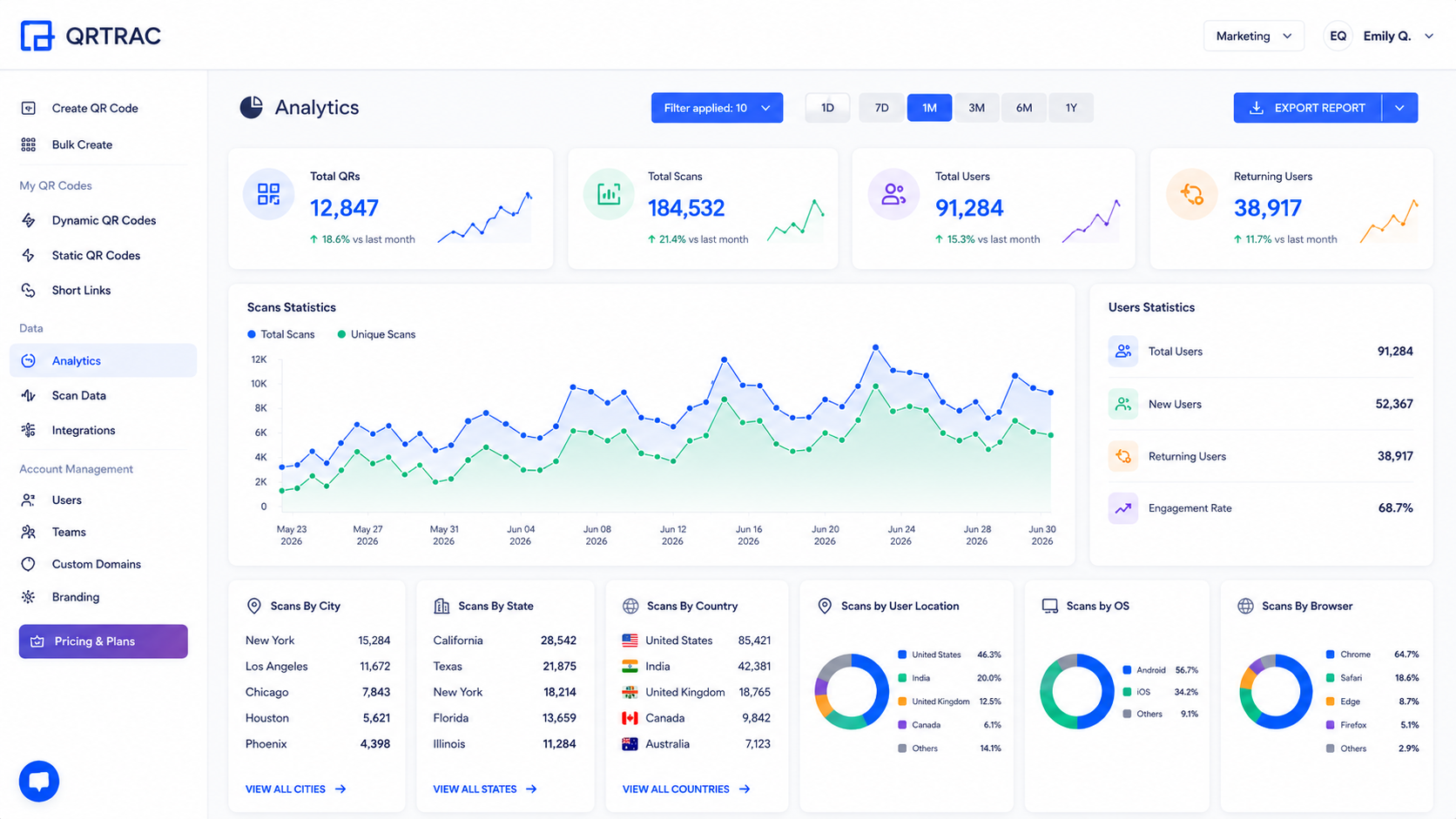
Tracking QR code performance, scan rates, and visitor insights via the analytics dashboard.
Consulting QR Code Launch Checklist
Before making your QR codes live, run through this visual checklist to ensure flawless execution:
✔Destination verified
✔QR tested on iOS & Android
✔Mobile friendly landing page
✔Branding (colors/logo) complete
✔Clear CTA added
✔Analytics enabled
✔Printed sample verified
✔Team approval obtained
✔Backup URL available
Key Takeaways
• Verify all destinations and test on both iOS and Android.
• Ensure branding is complete and a CTA is visible.
• Get final team approval before mass printing.
Implementation Guide
Step 1: Planning and Preparation
Before printing your first code, outline your strategy:
Set a single target goal for each code.
Define your target audience and specific scan scenarios.
Make sure your landing pages look sharp on mobile.
Write down your required target files and links.
Verify that your tracking dashboard is set up properly.
Step 2: QR Code Creation
Generate your codes inside QRTRAC:
Choose dynamic QR codes so you retain editing rights.
Customize the layout with your logo and brand colors.
Set up a custom domain to build client trust.
Configure password access or link expiration dates.
Test your generated patterns on cheap and premium phones.
Step 3: Content and Landing Pages
Build fast, mobile-first pages:
Compress your images and graphics so pages load in under two seconds.
Place your main call-to-action near the top of the phone screen.
Give users immediate value upon scanning.
Verify forms function without bugs on mobile screens.
Verify analytics scripts are active on target pages.
Step 4: Deployment and Distribution
Deploy your QR codes strategically:
Print your codes at a readable size (at least 2x2 cm for handouts).
Provide helpful context and instructions next to the code.
Make sure codes are placed in well-lit areas with solid cell signals.
Train your consulting team on how to help clients who have scan questions.
Check your metrics dashboard after launch to confirm data is arriving.
Technical Setup Best Practices
Pro Tips for Success
• Choose dynamic codes for post-print flexibility.
• Test every print run physically before shipping.
• Use a short, punchy call-to-action frame.
• Review your analytics dashboard weekly.
• Keep target page content current.
• Optimize landing pages for mobile-first views.
Design Best Practices
Maintain high color contrast between your code pattern and the background.
Leave a clear white border (quiet zone) around the code.
Use high error-correction levels to survive scratches and creases on paper.
Test under both bright overhead lights and dim evening environments.
Keep your print files sized for easy, natural scanning distances.
Content Best Practices
Build for thumbs: keep inputs and buttons easy to tap on small screens.
Avoid pop-ups or heavy banners that block the content immediately after a scan.
Use clear headings so readers know they landed on the correct page.
Keep document downloads small and fast.
Swap your target links instantly inside your dashboard when campaign priorities shift.
Measure total scans and look for trends in the days and hours.
Sort results by device operating system and geographic region.
Verify which print layouts convert the most physical readers.
Split-test designs with different framing text to see what works best.
Incorporate scan insights directly into your quarterly marketing budgets.
QR Code Applications Across Consulting Specialties
Different consulting niches use QR codes to solve specific workflow blocks and connect with clients faster:
Key Use Cases
Management Consultants: Put QR codes on slides so clients can open interactive live charts during workshops.
IT & Tech Consultants: Link physical server hardware tags directly to system status dashboards and technical setup wikis.
Financial Advisory: Link printed performance sheets directly to password-protected client portal balances.
HR Consultants: Use codes on training handbooks to point team members directly to policy sign-off forms.
Industry-Specific Benefits
Direct client handoffs that bypass slow email threads.
Better responses to client surveys right after meetings.
Secure tracking for high-value proposals.
A modern, tech-forward brand presentation.
Low print costs across all reports and pitch decks.
Common Challenges and Solutions
Challenge: Low Scan Rates
Solution: Make the code larger. Put it in a contrasting color. Add a clear call-to-action like "Scan for PDF Checklist" instead of just a raw, unlabeled code.
Challenge: Technical Issues
Solution: Always use dynamic QR codes. If a link breaks, you can fix it on your dashboard in five seconds without reprinting anything.
Challenge: User Adoption
Solution: Keep the layout simple. Don't ask for a 15-field signup form immediately. Give them the value first, then ask for an email.
Conclusion
Implementing QR codes in your consulting practice is a proven way to modernize client interactions, streamline operations, and bridge the gap between physical and digital touchpoints. From enhancing networking with digital business cards to securing confidential document sharing, the benefits of strategic QR code usage are substantial.
By adhering to best practices—such as using dynamic codes, optimizing for mobile, and consistently monitoring analytics—you can ensure long-term maintenance and success. Remember to use our launch checklist to verify your codes before every deployment to guarantee a flawless client experience.
Ready to elevate your consulting firm's digital strategy? Create branded, trackable, and secure consulting QR codes today using QRTRAC and get powerful analytics to measure your campaign's success.
Frequently Asked Questions
What is qr code for consulting?
A consulting QR code is a dynamic link built into physical business cards, proposals, reports, or slides. It lets clients access files, book discovery calls, and share contact details instantly on their phones.
How do I start using QR codes in my consulting practice?
Start by setting your goals. Create dynamic QR codes on QRTRAC, direct them to quick-loading mobile pages, and place them on your business cards, slides, or proposals.
What are the costs involved?
QRTRAC plans start at $15/mo. Dynamic QR codes let you track scans and edit links instantly. Custom domains are available on our Startup plans. No surprise fees or per-scan costs.
Can I track performance?
Yes, QRTRAC provides comprehensive analytics including scan counts, geographic data, device types, referrer information, and conversion tracking. All plans include analytics features.
Do I need technical expertise?
No, QRTRAC's platform is designed to be user-friendly. You can create, customize, and manage QR codes without technical knowledge. However, advanced integrations may require some technical setup.
How many QR codes should a consulting firm use?
It depends on your strategy, but typically firms use unique QR codes for different touchpoints—one for business cards, one for proposals, and specific codes for individual marketing campaigns or conferences to accurately track performance.
Can I update my QR code after printing?
Yes, if you use dynamic QR codes. Dynamic codes allow you to change the destination URL at any time without needing to reprint the physical code, making them ideal for consulting deliverables.
Which QR code works best for proposals?
PDF QR codes and Website QR codes are most effective for proposals. They can direct clients to additional interactive materials, detailed pricing sheets, or scheduling pages to take the next step.
Should consultants use dynamic or static QR codes?
Consultants should almost exclusively use dynamic QR codes. They provide essential analytics, allow for destination updates, and ensure long-term usability of printed materials like business cards and brochures.
Can QR codes help generate consulting leads?
Absolutely. By placing a QR code on conference banners or presentation slides that links to a lead capture form or a free downloadable resource (like a whitepaper), you can effectively grow your prospect list.
How do I track client engagement?
Using a platform like QRTRAC, you can monitor total scans, unique visitors, scan locations, and device types. This data helps you understand which resources your clients find most valuable.
What's the difference between QR codes and barcodes?
QR codes hold much more data (over 4,000 characters), scan in any direction, work with standard phone cameras, and track scan metrics. Barcodes only hold short ID numbers and need specific scanning lasers.
How long are QR codes valid for?
Static QR codes last forever. Dynamic QR codes stay active as long as your account is active.
Can QR codes be scanned offline?
A phone camera can read the visual code offline, but the phone must have cell service or Wi-Fi to load the target link or document.
What size should a QR code be to scan reliably?
Aim for at least 2 cm x 2 cm (approx. 0.8 in x 0.8 in) on printed materials. Ensure there is plenty of clean white space around the edges so cameras can focus.
What is the average QR code scan rate for businesses?
It depends on placement. Business cards get around 15-30% scan rates, presentation slides get 20-40%, and custom client proposals get 25-50%.
Do QR codes work in different countries?
Yes, QR codes are universal and work globally. They follow ISO/IEC 18004 international standards and are recognized by all modern smartphones regardless of location. This makes them ideal for global consulting teams and international client communication.
Can I customize QR codes for my brand?
Yes. You can add your firm's logo, match your brand colors, and add custom frames with clear instructions like 'Scan to Book'.
Set Up Your Consulting QR Codes Today
Build custom, trackable QR codes for your proposals, slides, and cards. Track client interest in real time.
 By Eshwar Deshmukh
· Updated