Airport QR Codes: The Complete Implementation Guide

Learn how major transit hubs use QR codes to guide passengers and digitize manual terminal services. Get direct, step-by-step instructions to upgrade your facility's physical touchpoints.

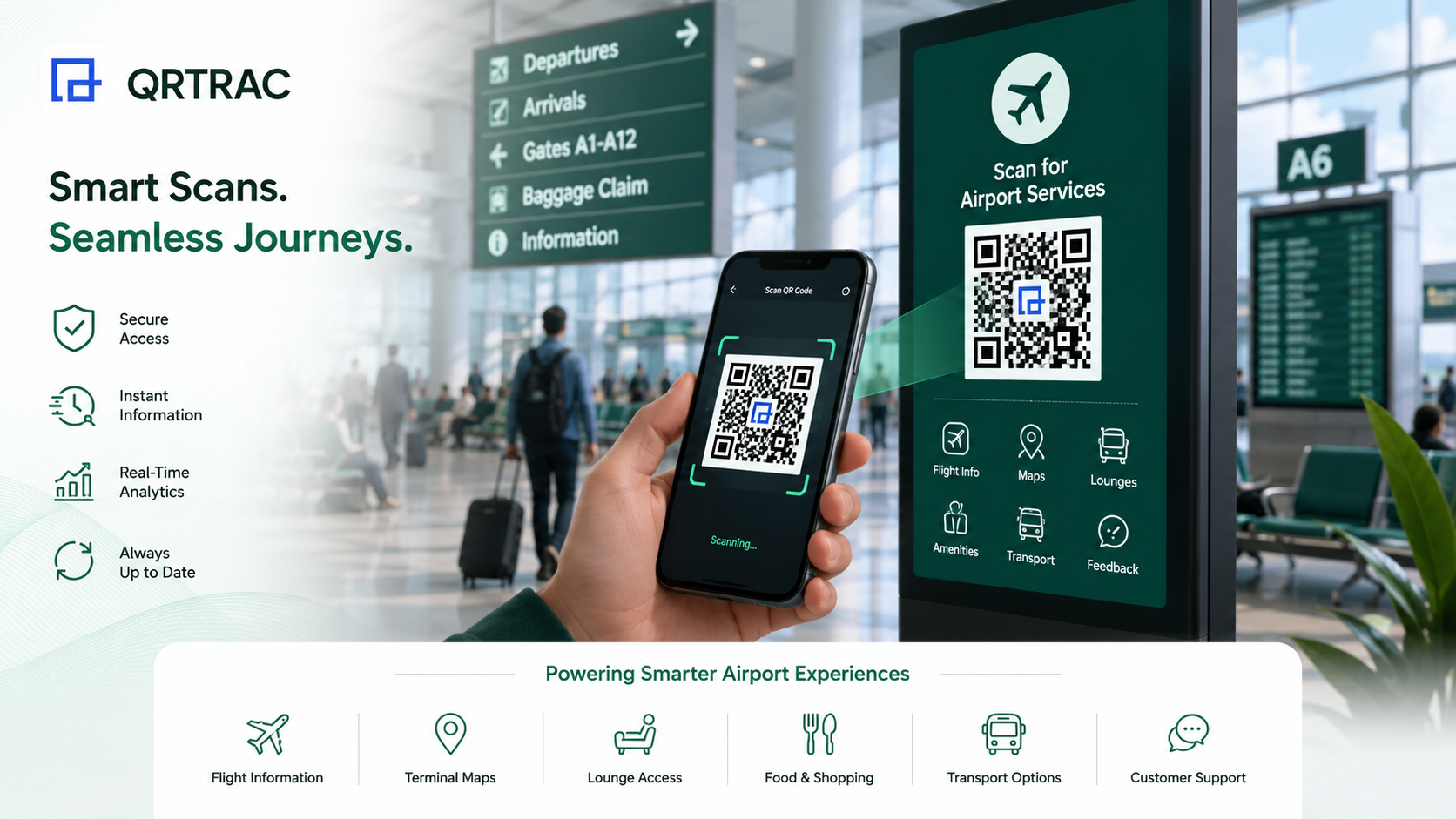
Airport QR Codes Implementation

Benefits of Airport QR Codes

Deploying QR codes across your terminals speeds up passenger flow and saves staff hours.

Quick wayfinding Scanning printed maps opens interactive digital directories instantly. This keeps passengers moving and cuts down long lines at help desks.
Instant access to transit data Direct travelers straight to live flight boards, security guidelines, and bus schedules.
Digital directories Put complex airport directories onto a fast, mobile-friendly page.
Multilingual reach Share updates in five languages simultaneously. International flyers scan and read in their native tongue.
Lower print budgets Ditch paper brochures. Update gate schedules on a digital link to cut printing bills.
Self-serve options Let travelers check baggage status and locate restrooms from their own phones.
Quick facility access Show passengers the fastest route to executive lounges, kid play zones, or quiet rooms.
Fewer basic support tickets Let QR codes handle routine questions about gate locations, freeing your ground crew for complex issues.

How to Implement QR Codes in an Airport

Setting up a QR network takes planning. Follow these ten steps to deploy digital touchpoints across your terminal:

1

Identify passenger touchpoints

Identify where travelers stop. Map the walk from curbside to the gate. Find places where travelers pause—like terminal check-in queues, bag drops, and international arrivals.

2

Choose the correct QR Code type

Match the QR code to the task. Use URL codes for flight boards, Location codes for taxi pickups, or PDF codes for dining menus.

3

Create digital airport resources

Build fast mobile pages. Design lightweight landing pages and web forms. Make sure they load instantly on congested airport Wi-Fi and 5G connections.

4

Customize QR branding

Add your airport logo. Apply your brand colors to the codes. This tells travelers the link is safe and verified.

5

Test the passenger experience

Test the scan in real conditions. Check how the code performs on older Androids and iPhones. Verify people can scan it from ten feet away if it is high on a wall.

6

Place QR Codes throughout the airport

Print and mount your codes. Add QR designs to digital flight boards, static path signs, table tents, and check-in kiosks.

7

Train airport staff

Brief your floor teams. Show info desk staff, security teams, and gate agents how the QR network works so they can guide passengers.

8

Launch passenger services

Go live. Promote the new digital touchpoints on digital display screens and PA systems.

9

Monitor engagement

Check your analytics dashboard. Track which codes get scanned. See if check-in codes peak during morning flights and which maps get the most clicks.

10

Update destinations using Dynamic QR Codes

Swap links without reprinting. Use dynamic codes so you can change a restroom feedback form to a gate-change alert in seconds, using the exact same printed sticker.

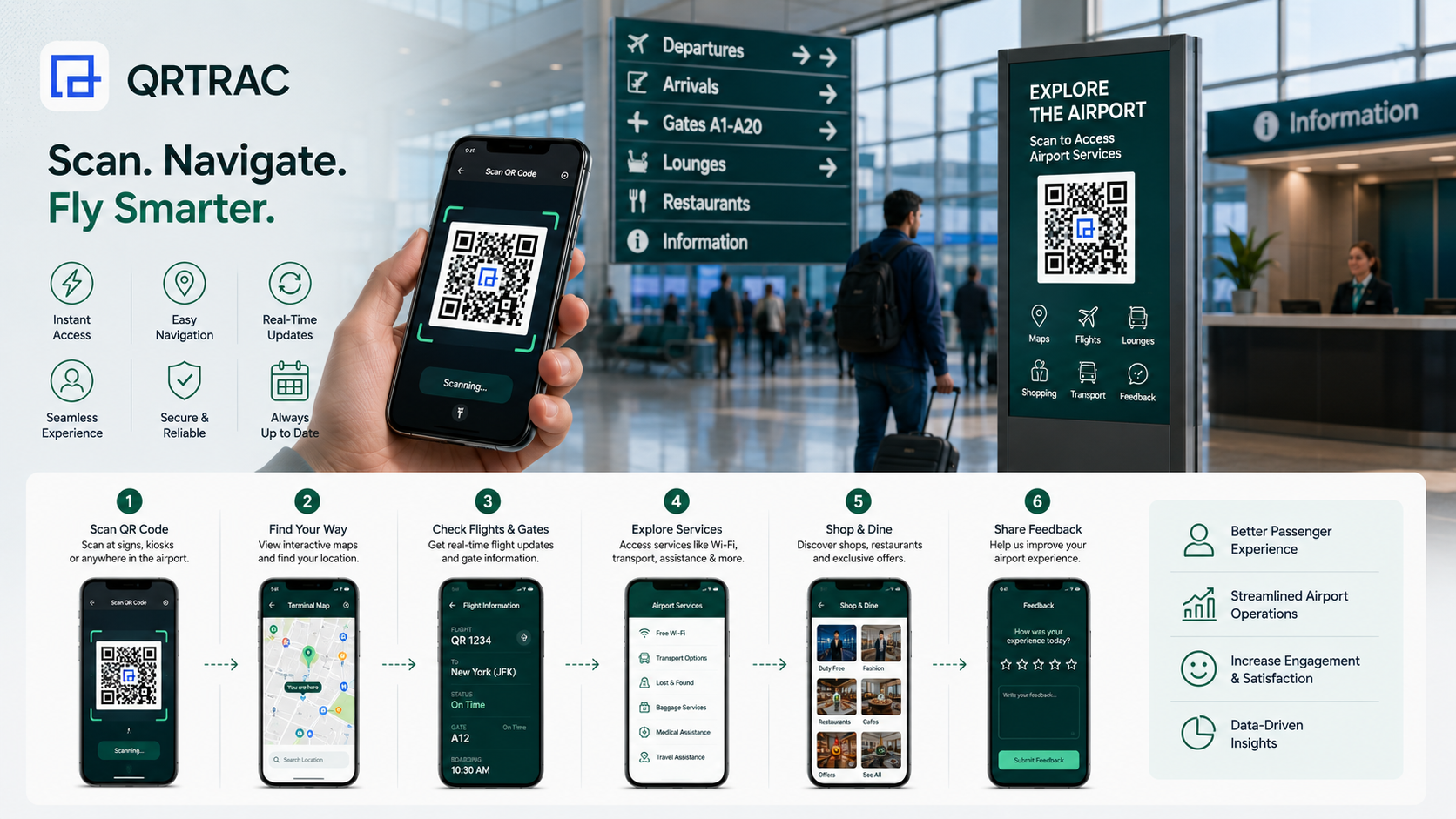
Airport QR Code Workflow

Airport QR Code Use Cases

Here are the most effective ways airport operators use QR Codes to solve daily operational challenges:

A terminal renovation, worked through

Picture a major airport mid-renovation: flight screens are torn down in some concourses, and passengers crowd the few that remain. Dynamic QR codes on nearby pillars let people check live gate updates from wherever they're standing, instead of walking back to a screen. Fewer people hovering near departure boards means less congestion and fewer passengers who miss a gate change.

Interactive Terminal Maps & Gate Wayfinding

Business Challenge: Passengers miss connections because they get lost. This causes delays and crowds info desks.

Solution: Interactive maps that load on any browser.

Implementation: Stick QR codes on static wall directories. The scan opens a step-by-step route map on the user's phone.

Benefits: Reduces stress. Gets travelers moving. Frees desk agents to handle booking problems.

Recommended Type: Website QR Code

Airport Wi-Fi Instructions

Business Challenge: Logins fail when travelers must type long network passwords or hunt for SSIDs.

Solution: Scan-to-connect Wi-Fi QR codes.

Implementation: Print Wi-Fi codes on table tents and window decals in gate waiting areas.

Benefits: One scan connects the user instantly. No typing required.

Recommended Type: Wi-Fi QR Code

Lost & Found Information

Business Challenge: Handling lost wallets, phones, and passports clogs phone lines and stresses out travelers.

Solution: Mobile-friendly claim forms.

Implementation: Put QR codes on the walls near security exits and baggage carousels. Link directly to your intake form.

Benefits: Fills forms faster with accurate data. Passengers report items without queuing.

Recommended Type: Form QR Code

Customer Feedback & Announcements

Business Challenge: You need to know if terminal restrooms are dirty or security lines are backed up before passengers complain online.

Solution: Instant feedback forms.

Implementation: Affix codes inside restroom stalls or next to hand dryers. Link to a quick, one-question rating scale.

Benefits: Get real-time alerts. Dispatch cleaning crews immediately based on scan feedback.

Recommended Type: Google Review / Form QR


Choosing the Right QR Code Type

QR Code Type Best Airport Use Case Advantages
Website QR Flight boards, terminal maps, retail directories Highly versatile. Sends travelers to any live web link.
PDF QR Lounge menus, accessibility guides, detailed policies Perfect for sharing extensive documents without printing
Location QR Ride-share pickup zones, shuttle stops, specific parking lots Opens Google Maps or Apple Maps directly for walking or driving directions
Form QR Passenger surveys, lost & found reports, facility feedback Collects structured data instantly from travelers
WhatsApp / Email QR Customer support, immediate assistance queries Connects passengers directly to a live agent or support inbox
Multi-Link QR General information desks, terminal entrance signs Bundles several critical pages (flight tracker, Wi-Fi login, and parking payment) into a single scan.
Google Review QR Airport lounges, premium dining, VIP services Boosts public reputation by simplifying the review process
Digital Business Card QR B2B interactions, airport management networking Allows sharing of professional contact details without cards

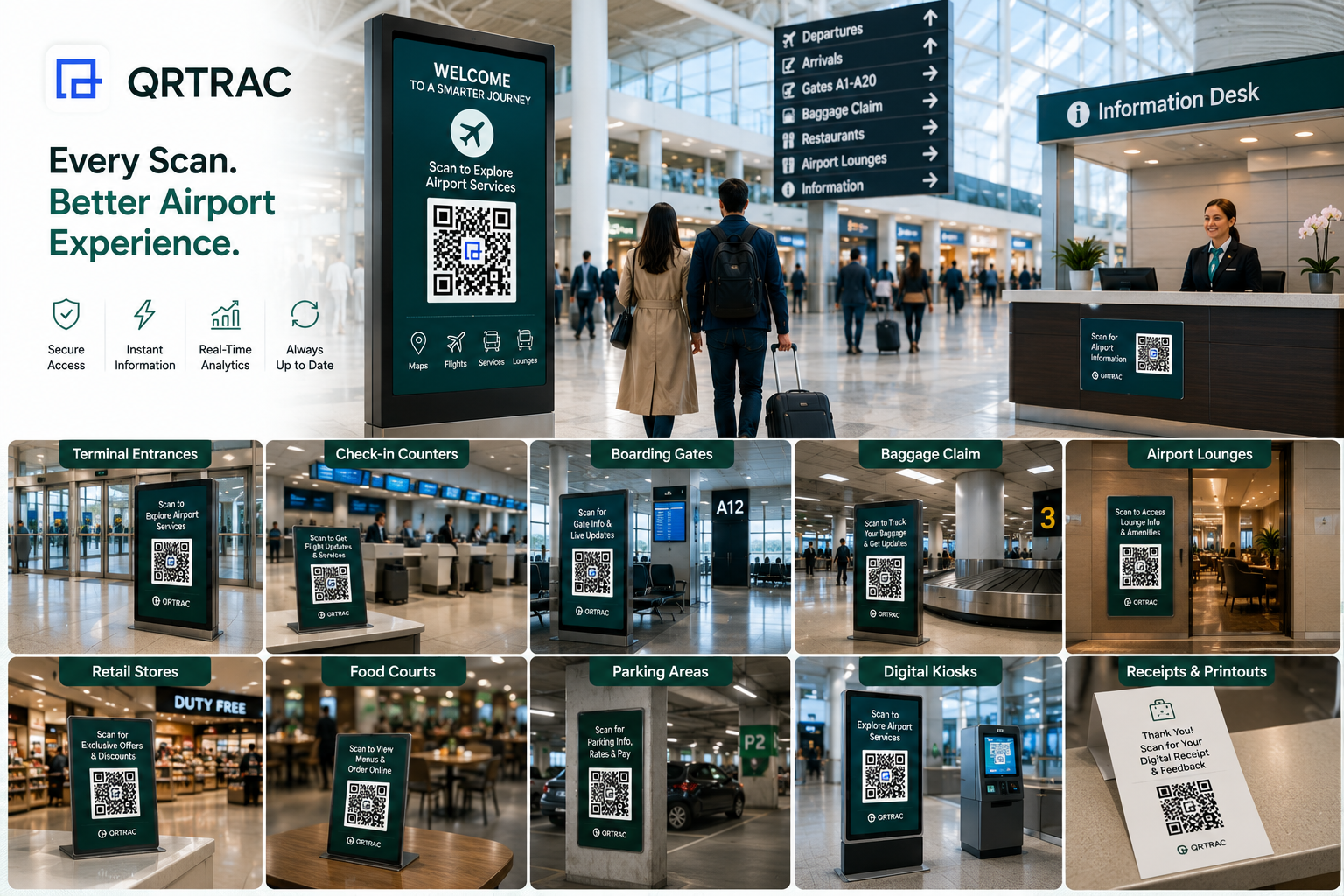
Best Places to Use QR Codes in Airports

Where you put your codes matters. Place QR codes exactly where travelers stall or look for help to drive adoption.

  • 📍
    Terminal entrances: Display multi-link guides to help travelers find their check-in desk the moment they walk in.
  • 📍
    Information desks: Print codes on desk mats so travelers can take maps on their phones.
  • 📍
    Check-in counters: Share links explaining weight limits, prohibited items, and upgrade steps.
  • 📍
    Security entrances: Show liquid limits, laptop rules, and wait estimates to speed up the security line.
  • 📍
    Boarding gates: Link to destination weather, airport shuttle schedules, and flight connections.
  • 📍
    Baggage claim: Share links for lost luggage claims and taxi zones.
  • 📍
    Airport lounges: Show drink menus, spa reservations, and high-speed Wi-Fi details.
  • 📍
    Shops & Dining: Link to digital menus, duty-free coupons, and store location directories.
  • 📍
    Parking decks: Let passengers drop a pin on their parking space, pay exit fees, or track shuttle locations.
  • 📍
    Information kiosks: Add "take it with you" QR codes to screen displays so passengers can carry the maps on their phones.
QR Code Placements in Airports

How QR Codes Improve the Airport Passenger Journey

QR codes link physical terminal spaces to fast digital tools. Here is how they guide a passenger step-by-step:

1. Parking: The passenger scans a pillar code to log their car spot and load a walking map to Terminal 2.

2. Check-in: They scan a sign at the doors to check which aisle handles their airline, avoiding wrong turns.

3. Security: Before queuing, they scan to verify liquid limits and prep their bags to avoid delays.

4. Exploration: Once past security, they scan a directory to find the nearest café or play area.

5. Retail: They scan a duty-free window to grab a 10% coupon.

6. Boarding: They scan a gate sign to see if the walk to Gate B12 takes 5 or 15 minutes.

7. Feedback: They scan a seat-back code to rate the cleanliness of the gate area.

Improving Airport Services

Replace paper signs with digital links. QR codes help deliver critical services in real time:

  • Airport maps and live flight boards: Provide the most sought-after information in the terminal.
  • Wi-Fi setup: Connect passengers instantly without requiring manual password entry.
  • Accessible travel: Guide passengers to sensory rooms, wheelchair hubs, or support staff (aligned with IATA standards).
  • Parking and shuttles: Share real-time bus arrivals and parking space trackers.
  • Lost and found: Create direct web forms so travelers can report missing bags immediately.
  • Support and Lounges: Link to live chat agents or booking forms for private lounge entry.

Enhancing Retail and Dining Experiences

QR codes drive food and retail revenue by connecting shoppers to catalogs and menus:

  • Duty-free coupons: Show current deals and let passengers browse perfume or spirits catalogs while waiting.
  • Mobile food ordering: Let passengers order food to their gate or scan menus to pay from their table.
  • Store locators: Help shoppers find electronics, pharmacies, or local gift shops.
  • Loyalty sign-ups: Promote airport rewards and collect store-level feedback.

Dynamic vs Static QR Codes

Choose the right tech for your terminals. Dynamic QR codes outperform static codes across every operational metric.

Feature Dynamic QR Codes Static QR Codes
Editing / Updating information Yes – Update the link instantly without replacing signs No – Hardcoded permanently, requires reprinting
Analytics Detailed data (scans, device brands, peak hours, location) None available
Campaign management Fast updates for shifting terminal gates or seasonal menus Difficult, requires new physical collateral
Scalability & Branding High – Manage hundreds of terminal signs from one account Low – Hard to track and maintain branding
Recommended use Recommended for permanent signs Use only for single-use paper flyers

Common Airport QR Code Mistakes to Avoid

Avoid these common setup blunders to ensure high scan rates:

  • Bad positioning: Printing codes too high on pillars or in narrow corridors where scanning blocks the walk.
  • Broken links: Directing passengers to dead pages or 404 screens.
  • Using static codes for live data: If a security lane closes or a shop moves, a static code requires a full reprint.
  • Desktop-only pages: Linking to complex desktop websites that require zooming on a mobile screen.
  • Missing instructions: Printing a bare code without a call-to-action like "Scan to track bags".
  • Low print quality: Making codes too small, using low contrast, or placing them behind shiny, reflective glass.
  • Skipping tracking: Missing out on scan counts and user trends by not looking at data.
  • No cell signal checks: Placing codes in basement baggage areas without verifying Wi-Fi or cellular signal.

Best Practices for Airport QR Codes

Use these rules to ensure your QR campaign runs smoothly:

✓Clear CTAs: Write explicit prompts like "Scan for gate map".
✓Custom branding: Apply official brand colors and logos to build trust.
✓Sharp prints: Use high-contrast files sized correctly for the scan distance.
✓Mobile layouts: Build fast, lightweight pages built for phone screens.
✓Dynamic links: Change destination links instantly without replacing signs.
✓Regular audits: Test physical signs monthly to ensure they scan and link correctly.
✓Track metrics: Study scan counts to identify dead zones.
✓Two-click routes: Keep information simple so users find details with two taps.
✓Current files: Keep PDF menus and maps updated to avoid outdated information.
✓Staff training: Ensure help desk teams know how to troubleshoot QR scans.

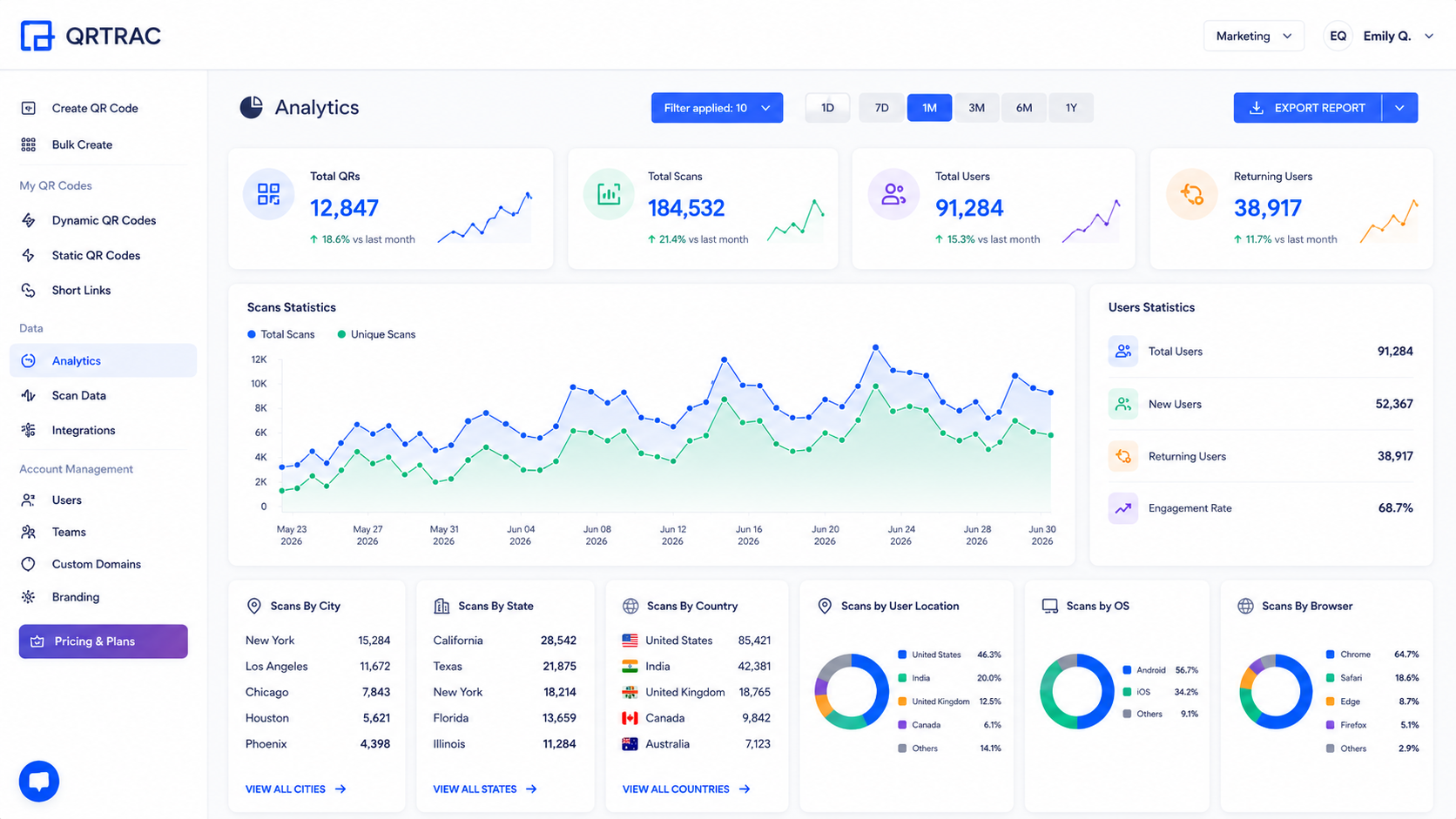
Measuring Airport QR Code Performance

Knowing how travelers interact with your terminal screens helps you fine-tune services. Our analytics dashboard shows you exact engagement metrics:

  • Map views: Find out which gates or wings cause the most confusion based on where people scan for maps.
  • Peak hours: Match scans against flight schedules to forecast high-demand hours.
  • Amenity interest: Monitor visits to baby changing rooms, pet zones, or business lounges.
  • Tenant ROI: Show retail partners exact traffic numbers driven to their shops by your hallway signs.
  • Real-time feedback: Watch restroom rating scores to dispatch cleaning crews.
  • Device data: See if passengers use iOS or Android to customize app prompts.
QRTRAC Analytics Dashboard

Airport QR Code Deployment Checklist

Verify these nine items before printing your terminal signage:

  • ✔ Codes tested on older Android and newer iOS phones
  • ✔ All destination URLs load correctly without errors
  • ✔ Landing pages load under 2 seconds on weak cellular signals
  • ✔ All digital maps, directories, and schedules show current data
  • ✔ Info desk staff and floor teams know how to help travelers scan
  • ✔ Tracking dashboards configured to collect scan logs
  • ✔ Alternative links ready if your primary server goes down
  • ✔ Clear calls-to-action printed alongside every code
  • ✔ No glossy lamination used that causes glare from overhead lights

Helping Passengers Use Airport QR Codes Safely

Keep scanning safe. Tell your travelers how to spot real airport codes:

  • Scan official frames: Tell passengers to scan only codes displayed on official metal stands or digital terminal displays.
  • Double-check domains: Teach users to check the browser bar for your airport's domain before typing email or card info.
  • Look for physical stickers: Advise travelers to report stickers slapped over official signs.
  • Report bad codes: Set up a fast way for travelers to report suspect stickers to security.

Frequently Asked Questions

Can airports update QR Codes after printing?

Yes. With dynamic codes, you swap the backend destination link instantly. Update gate information or link to a new floor plan without reprinting the physical sign.

Which QR Code type is best for airport wayfinding?

Use a Website QR code to link to a responsive, interactive map of your terminal. For taxi pickup spots or bus bays, use Location QR codes that launch Google or Apple Maps directly.

Where should airports place QR Codes?

Place them where travelers stand or wait: check-in lines, security queues, boarding gate seats, baggage claim hubs, and info desks.

Can QR Codes improve airport wayfinding?

Yes. Digitized wayfinding puts a searchable map right on the passenger's phone. This reduces stress, prevents late boardings, and lightens the load on your information desks.

Can airports measure QR Code engagement?

Yes. Our platform provides analytics showing total scans, unique users, scanning hours, and device types. This data shows you exactly which terminal signs perform best.

Can QR Codes replace printed airport maps?

While large wall directories are still necessary, QR codes replace individual paper handout maps. This slashes printing budgets and guarantees passengers see the most current gate locations.

How should passengers verify official airport QR Codes?

Look for branded borders on permanent airport signs. Check that the scanned URL matches your official airport domain before typing in details.

Conclusion

Using QR codes inside your terminal is a practical way to modernize communication, speed up passenger transit, and cut operating costs.

Placing dynamic codes at crucial touchpoints—entrances, check-in desks, security, and gates—gives travelers instant access to digital services. Our analytics dashboard lets you continuously optimize signage based on live scan data.

Success depends on clear rules: high-contrast prints, fast-loading mobile pages, secure domains, and regular testing.

Ready to upgrade your passenger flow? Create your first airport codes today with our dynamic management platform.


Frequently Asked Questions

How do airports use QR codes for baggage tracking?

Airports and airlines place QR codes on baggage tags, allowing passengers to scan and track the real-time status and location of their luggage through a dedicated mobile web page without downloading an app.

Are QR codes safe to scan at the airport?

Yes, official airport QR codes are secure. However, passengers should only scan QR codes displayed on official airport digital signage, verified printed materials, or securely hosted physical displays to avoid tampering.

How do I scan an airport Wi-Fi QR code?

Simply open your smartphone camera, point it at the Wi-Fi QR code, and tap the prompt that appears on your screen. This will instantly connect your device to the network without requiring a password entry.

Do airport QR codes need internet to work?

Scanning the QR code itself does not require the internet. However, if the QR code links to a website (like a flight status page), you will need a cellular or Wi-Fi connection to load the destination content.

What is the difference between a static and dynamic airport QR code?

A static QR code cannot be changed once printed. A dynamic QR code allows airport operators to update the destination URL at any time without changing the physical signage, which is ideal for frequently changing operational information.

Set Up Your Airport QR Codes Today

Create trackable codes with custom domains and analytics.

Trusted Infrastructure Standards

256-bit Encryption GDPR Ready