Bar Crawl Events Made Simple with QR Codes
Streamline your bar crawl events with one coupon QR code that works across all participating bars. Participants scan once, visit multiple bars, and you get automatic analytics for every redemption.
Trusted by Leading Organizations
Join thousands of businesses using QRTRAC for their QR code needs





See It In Action
Real participant experience from scanning to redemption
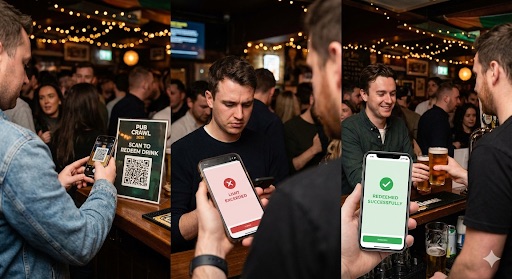
Real participant experience: Scan QR code → Check limit status → Receive drinks upon successful redemption
Try It Yourself
Experience the complete bar crawl QR code flow—from participant scan to bar redemption
Participant Experience
See what participants see when they scan a bar crawl QR code
Click any coupon link below to see the participant experience. When opened, you'll see exactly what participants see when they scan a bar crawl QR code. You can download the coupon image and show it to bar staff for redemption.
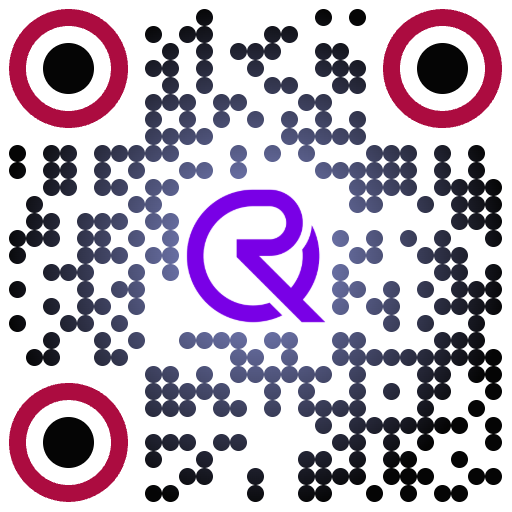
This is what participants scan
Scan this QR code with your phone camera to access the coupon
What you'll see: The coupon page opens instantly with your discount. You can download the coupon image and show it to bar staff for redemption at any participating bar.
Bar Staff Redemption
Experience how simple redemption is
Experience the bar staff redemption flow yourself. Follow the simple steps below to see how easy it is for bar staff to validate and redeem coupons. The entire process takes just seconds and requires no special training or apps.
Step-by-Step Redemption Instructions
- 1 Open any coupon link from the participant section above to see the QR code displayed on the coupon page
- 2 Scan the QR code shown on the coupon page using your phone camera or any QR scanner app
- 3 Enter your bar's unique password (each bar has their own password for tracking)
- 4 Tap "Redeem" to complete the redemption—the coupon is instantly marked as used and tracked in analytics
No App Required
Use any device with a web browser—phone, tablet, or computer. No downloads or installations needed.
Instant Redemption
Scan and redeem in seconds—no training needed. The process is intuitive and works the same way every time.
Automatic Bar Tracking
Every redemption is automatically tracked and attributed to your bar location for instant analytics.
What you'll experience: The redemption process is seamless and fast. Once you scan the QR code and enter your bar's password, the coupon is instantly validated and marked as redeemed. Bar attribution happens automatically in the background.
Complete Admin Control & Management
Configure QR batches, manage bar passwords, set token rules, and track everything from one powerful dashboard. Watch the video below to see how easy it is to set up and manage your bar crawl event.
See Admin Experience in Action
Watch how to configure QR batches, manage bar passwords, and set up your bar crawl event
Click to load video
Admin Responsibilities
As an admin, you have complete control over your bar crawl event. You configure QR batches, manage bar passwords, set token rules, configure expiry dates, and monitor everything through comprehensive dashboards.
Configure QR Batches
Generate unique QRTRAC coupons in bulk with customizable token limits and settings.
Manage Bar Passwords
Assign unique passwords per venue. Upload bars list and automatically assign secure passwords.
Set Token Rules & Limits
Configure redemption limits per user, set token rules, and control event parameters.
Configure Expiry & Dashboards
Set expiration dates and monitor everything through comprehensive redemption dashboards.
Admin Console Features
QR Batch Generator
Generate unique QRTRAC coupons in bulk. Create batches of QR codes for your event with customizable settings for tokens, limits, and expiry.
Bar Password Manager
Assign unique passwords per venue. Upload your bars list and automatically assign secure passwords for each participating location.
Redemption Dashboard
Track scans, redemptions, and fraud in real-time. Get comprehensive analytics with bar-wise performance metrics and participant engagement data.
Event Settings
Configure limits, rules, and expiry settings. Set token redemption limits per user, expiration dates, and customize event parameters.
Quick Setup Example
Here's a quick example of how to set up a bar crawl event. The entire process takes just minutes:
- 1
Create 4-Token QR Batch
Generate a batch of QR codes with a 4-token limit per participant. This allows each participant to redeem at up to 4 different bars.
- 2
Upload Bars List
Upload a CSV or Excel file with all participating bars, including their names, locations, and addresses.
- 3
Assign Passwords
The system automatically assigns unique passwords to each bar, or you can customize them. Each bar receives their password for redemption.
- 4
Enable Expiry
Set an expiration date for the event. After this date, coupons will no longer be redeemable, preventing post-event usage.
- 5
Distribute QR to Attendees
Share the QR code link via email, social media, or print QR codes and place them at event locations. The same QR code works for all participants.
That's it! Once set up, you can monitor all redemptions in real-time through your admin dashboard, see which bars are performing best, and track participant engagement throughout the event.
How Bar Crawl QR Codes Work
One QR code, multiple bars, automatic tracking. Perfect for bar owners, associations, and event agencies.
Simple for Participants
- 1
Scan the QR Code
Participants scan the QR code with their phone camera (no app needed) and instantly receive a unique coupon for the event.
- 2
Visit Participating Bars
Participants visit any participating bar and show their unique coupon to the bar staff.
- 3
Redeem at Multiple Locations
Participants can visit other participating bars and redeem their coupon until they reach their set limit (e.g., one free drink per bar).
Easy Redemption
- 1
Scan Participant's Coupon
Bar staff scan the participant's unique coupon QR code using their phone camera—no app required, just a camera.
- 2
Enter Unique Password
Each bar has a unique password. Staff enter their bar's password to validate and redeem the coupon.
- 3
Automatic Tracking
Redemption is automatically tracked and attributed to your bar location. Analytics are captured instantly in the background.
Everything You Need for Bar Crawl Events
From one QR code for all bars to automatic analytics—QRTRAC centralizes your bar crawl event management.
No App Required
Participants scan with the camera. Bar staff validate with a secure password from any browser. Frictionless for everyone.
One QR Code for All Bars
Create a single coupon QR code that works across all participating bars. No need to create separate codes for each location.
Unique Passwords Per Bar
Each participating bar gets a unique password. When staff enter their password, redemptions are automatically tracked to that specific location.
Scan Limits Per User
Set restrictions on the number of scans per user to manage redemptions effectively. Control how many times participants can redeem across all bars.
Analytics & ROI
Track scans, redemptions, bar locations, participant engagement, and event performance metrics automatically.
Automatic Bar Attribution
Redemptions are automatically linked and attributed to the correct bar location when staff enter their unique password. No manual data entry required—get instant bar-wise analytics and reports.
Bar Details Included
Include store/bar name, location, and address when creating the QR code. All information is automatically tracked in analytics.
Easy Distribution
Distribute via email link or print QR codes and place them in each participating bar. The same QR code works everywhere.
Dynamic QR Codes
Update coupon destinations, discounts, and terms anytime without reprinting. Perfect for events that need flexibility—change the offer behind the same QR code.
Automatic Bar-Wise Redemption Analytics
Get instant insights into which bars are performing best. Every redemption is automatically tracked and attributed to the correct bar location, giving you real-time analytics without any manual work.
Real-Time Bar Performance
See which bars are redeeming the most coupons in real-time
Zero Manual Tracking
Bar attribution happens automatically—no data entry required
Detailed Reports
Export bar-wise redemption reports with all the data you need
See It In Action
Watch how bar-wise analytics work automatically
Click to load video
Multi-Bar Location Redemption
One QR code works across all participating bars. When bar staff enter their unique password, redemptions are automatically linked to the correct bar location—no manual tracking needed. Get real-time bar-wise analytics and reports automatically.
Zero Manual Entry
Bar attribution happens automatically when staff enter their password. No need to manually select or enter bar information during redemption.
Real-Time Bar Analytics
View bar-wise redemption reports instantly. See which locations are performing best and track performance metrics by bar automatically.
Seamless Workflow
The redemption process remains exactly the same for bar staff—simple and quick. Bar attribution happens in the background without disrupting operations.
See It In Action
Watch how multi-bar location redemption works seamlessly
Click to load video
Proven Results
Real success metrics from bar crawl events using QRTRAC coupon QR codes
What Our Customers Say
Real feedback from bar owners and event organizers who transformed their bar crawl events
"QRTRAC made our bar crawl event so much easier. Staff love the simple redemption process—just scan and enter our password. No training needed!"
"The analytics are incredible. We can see exactly which bars are performing best and track participant engagement in real-time. Perfect for planning future events."
"One QR code for all bars is a game-changer. Participants love how easy it is, and we get comprehensive analytics to show our clients. Highly recommend!"
Built for Every Bar Crawl Event
Bar owners, associations, event agencies, and more—launch in minutes and track outcomes in one dashboard.
Bar Owners
Participate in bar crawl events with minimal setup. Just receive your unique password and start redeeming coupons instantly.
Bar Associations
Organize city-wide or district bar crawl events. Manage multiple participating bars with automatic tracking and analytics.
Event Agencies
Run professional bar crawl events for clients. Get comprehensive analytics and reporting to demonstrate event success.
Quick Setup Guide
Get your bar crawl event up and running in minutes
Create Your Coupon QR Code
Define a common QR code of type "coupon code" within QRTrac. Set restrictions on the number of scans per user to manage redemptions for the event.
Add Bar Information
When creating the QR code, include the store/bar name, their locations, address, and assign a unique password for each bar.
Distribute the QR Code
Add the QR code link via email to participants, or print the QR code and place it directly in each participating bar. The same QR code will work across all locations.
Track Analytics
All analytics related to redemptions are automatically captured within QRTrac, providing valuable insights into the event's performance by bar location.
Plans and Pricing
Transparent pricing with no hidden fees. Choose a flexible QR Code plan that scales with your business needs. Start small with our $5 Kickoff plan and upgrade as you grow.
Agency & Enterprise Plans
Scale your organization with white-label solutions, SSO, and custom data residency.
View Advanced Plans
Agency & Enterprise Plans
Scale your organization with white-label solutions, SSO, and custom data residency.
Agency Plan
$250 / month
Everything you need to manage multiple brands or clients with full white-label control.
Enterprise Plus
$5,000+ / year
Global data residency, SSO, and white-glove onboarding for large organizations.
Plans and Feature Comparison
Everything you need to know about our 6 specialized plans.
| Compare Plans | Kickoff Individuals with limited needs | Startup Freelancers & creators going fully branded | Business Plus Most Popular Growing businesses wanting more power | Legendary Businesses with high-volume usage | Agency Agencies managing multiple clients | Enterprise Plus Large organizations with custom needs |
|---|---|---|---|---|---|---|
| | $5 /month
$60 $49 /year
Save 18% vs monthly
| $15 /month
$180 $100 /year
Save 44% vs monthly
| $49 /month
$588 $400 /year
Save 32% vs monthly
| $99 /month
$1188 $899 /year
Save 24% vs monthly
| $250 /month
$3000 $2500 /year
Save 17% vs monthly
| Custom Custom |
| | ||||||
|
?
Total capacity of editable QR codes. This is a total credit limit, not a monthly quota. | Upto 5 | Upto 25 | Upto 250 | Upto 500 | Custom | Custom |
|
?
Static and dynamic QR codes share the same total credit limit — not a monthly quota. | Upto 5 | Upto 25 | Upto 250 | Upto 500 | Custom | Custom |
|
?
Unlimited tracking and scanning for all your QR codes. | Unlimited | Unlimited | Unlimited | Unlimited | Unlimited | Unlimited |
|
?
Unlimited tracking and clicks for all your short links and branded URLs. | Unlimited | Unlimited | Unlimited | Unlimited | Unlimited | Unlimited |
|
?
Use your own brand domain for links and QR codes. | Add-on | Add-on | 1 Included | 1 Included | Custom | Custom |
|
?
Hosted site built outside QRTRAC, using QRTRAC for hosting, CDN, and SSL. Available as an add-on. | Add-on | Add-on | Add-on | Add-on | Add-on | Add-on |
|
?
Individual logins for team members with specific permissions. | 1 | 1 | 3 | Up to 10 | Custom | Custom |
|
?
Isolated environments for multi-client or multi-brand management. | 1 | 1 | 2 | 3 | Custom | Custom |
| | ||||||
|
?
Add extra custom domains to your account anytime. | | | | | | Custom |
|
?
Add extra team members to your workspace anytime. | | | | | | Custom |
|
?
Hosted site built outside QRTRAC, using QRTRAC for hosting, CDN, and SSL. Available as an add-on. | | | | | | Custom |
|
?
Add extra team workspaces to manage multiple brands or clients. | | | | | | Custom |
|
?
Add extra dynamic QR code credits to your plan beyond the included quota. | | | | | | Custom |
|
?
One-time fee per QR code to migrate printed codes from other providers to QRTRAC. Requires your existing codes use a custom domain short URL. $3 one-time per QR code (min 100 QR codes) for Business Plus & Legendary. Included free on Agency and above. | | | $3 one-time/QR · Min 100 QR codes | $3 one-time/QR · Min 100 QR codes | Included free | Included free |
| | ||||||
|
?
Create hundreds or thousands of QR codes at once using CSV or Excel file uploads. | | | Up to 50 | Up to 500 | Custom | Custom |
|
?
Set start and end dates for your QR codes to automatically activate or expire content. | | | | | | |
|
?
Download in print-ready formats including SVG, EPS, PDF, PNG, and JPG. | | | | | | |
|
?
Use AI to generate artistic, brand-aligned QR code designs. | | | | | | |
|
?
Codes optimized for readability from any angle (360-degree). | | | | | | |
|
?
Optimized server-side redirects for zero-latency user experience. | | | | | | |
|
?
Global edge network ensures your links load instantly anywhere in the world. | | | | | | |
| | ||||||
|
?
Remove 'Powered by QRTRAC' from landing pages and short links for a cleaner look. | | | | | | |
|
?
Automatic SSL encryption for your custom domains. | Supported | Supported | 1 included | 1 included | Custom | Custom |
|
?
Fully branded short links using your custom domain. | Supported | Supported | | | | |
|
?
Customize the text at the end of your links. | | | | | | |
| | ||||||
|
?
Monitor scan activity as it happens with live updates. | | | | | | |
|
?
Comprehensive data on scans over time, peak hours, and trends. | | | | | | |
|
?
Deep insights into where your audience is located globally. | | | | | | |
|
?
Precise coordinate-level scan data with user consent. | | | | | | |
|
?
Analyze which hardware and software your customers use. | | | | | | |
|
?
Understand the preferred languages of your visitors. | | | | | | |
|
?
Easy generation of UTM-parameters for marketing attribution. | | | | | | |
|
?
Native sync to push scan events into your GA4 properties. | | | | | | |
|
?
Share results with stakeholders via protected or public links. | | | | | | |
|
?
Summary views of performance by group or campaign. | | | | | | |
|
?
Filter analytics by specific timeframes and comparison periods. | | | | | | |
|
?
View data in the time zone that matches your business operations. | | | | | | |
|
?
Export raw data for offline analysis and custom reporting. | | | | | | |
|
?
Organize links with custom tags for better filtering and reporting. | | | | | Custom | Custom |
|
?
Dedicated exports for granular traffic and referral sources. | | | | | Custom | Custom |
|
?
Add your brand logo to exported PDF and dashboard reports. | | | | | Custom | Custom |
| | ||||||
|
?
Role-based permissions (Viewer, Editor, Admin) for team members. | | | | | | |
|
?
Centralized dashboard for team-wide collaboration. | | | | | | |
|
?
Securely move QR codes and campaigns between users or accounts. | | | | | | |
| | ||||||
|
?
Create a customizable mobile landing page to host multiple links, social icons, and more. | | | | | | |
|
?
Add contact forms to your QR landing pages to capture user information. | | | | | | |
|
?
Stream videos directly from a branded landing page after a scan. | | | | | | |
|
?
Track which specific QR code or campaign generated each lead form fill. | | | | | | |
|
?
Split traffic between different URLs to test which version performs better. | | | | | | |
|
?
Gate sensitive content with a birthdate verification screen before access. | | | | | | |
|
?
Display content automatically based on the user's browser language or location redirection. | | | | | | |
| | ||||||
|
?
We adhere strictly to global data protection and privacy standards. | | | | | | |
|
?
Securely log in using your company credentials (SAML/Okta). | | | | | | |
|
?
Choose where your data is stored (US, EU, etc.) to meet regulatory needs. | | | | | | |
|
?
Priority access to our technical support team and founders. | Standard | Standard | Priority | Priority | Priority | Dedicated |
Ready to Streamline Your Bar Crawl Events?
Join thousands of bar owners, associations, and event agencies who are managing successful bar crawl events with QRTRAC coupon QR codes.
Frequently Asked Questions
Everything you need to know about using QR codes for bar crawl events
How do coupon QR codes work for bar crawl events?
Create one coupon QR code that works at all participating bars. Participants scan the QR code to receive a unique coupon (e.g., for a free drink). Bar staff scan the participant's coupon and enter their unique password to redeem. The same QR code works across all locations.
Do participants need an app to use bar crawl QR codes?
No app required. Participants scan the QR code with their phone camera and instantly receive their coupon. Bar staff can scan and redeem using any device with a camera—no app needed.
How do I manage multiple bars in a bar crawl event?
When creating the QR code, include each bar's name, location, address, and assign a unique password. The same QR code works at all locations, but each bar uses their unique password for redemption tracking.
Can I limit how many times a participant can redeem?
Yes, set restrictions on the number of scans per user to manage redemptions. Participants can visit multiple bars until they reach their set limit.
How do I track which bars are performing best?
All redemption analytics are automatically captured. When bar staff enter their unique password, redemptions are automatically attributed to that location. View store-wise analytics to see which bars have the most redemptions.
How do I distribute the QR code for a bar crawl event?
You can distribute the QR code by adding its link via email to participants, or print the QR code and place it directly in each participating bar. The same QR code works across all locations.
What information should I include when creating the QR code?
Include the store/bar name, their locations, address, and a unique password for each bar. This information helps with tracking and analytics.
Can bar staff redeem coupons without a dedicated app?
Yes, bar owners can scan the user's unique coupon and enter their unique password using just a camera—no app is needed. Any device with a web browser works.